
njllaabmdlbgcgfibgkifnboijlpfban
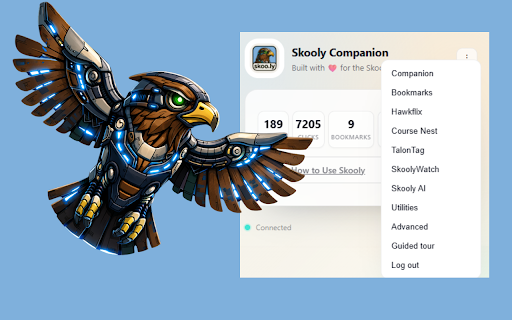
# Skooly Companion Chrome Extension Shorten links, save bookmarks, build courses, and track member progress inside Skool! Seamlessly connect your skoo.ly account to create, copy, and manage bookmarks and short links — plus Hawkflix GIFs, Course Nest course generation, and Hawkeye analytics across your Skool communities. - One‑click short links from the popup, context menu, or Skool pages. - Save links as bookmarks to your skoo.ly account with pinned favorites. - Works when logged out: stores pending bookmarks and syncs after login. - Clean inline UI on Skool posts with lightweight styles. - Automatically keeps your skoo.ly web session in sync. - Hawkflix GIF library: save, tag, and reuse GIFs (public or private) from a Skool picker. - Course Nest: generate Skool-ready courses and organize classroom sorting. - TalonTag: capture member lists and save reusable tags for outreach. - Perch Guard: hide posts, comments, or both from selected members in your feed. - SkoolyWatch: run member profile scans and export watchlists. - Privacy controls: mask tiers, prices, and analytics on demand. - Hawkeye analytics: captures per‑member course completion with 24h/7d deltas. - Member view: see each member’s average completion and drill into course‑level progress. - Course view: see courses, module counts, popularity (active members), and average completion. - Accurate progress: computes completion as `user_completed / num_modules` when available. - Click the extension to shorten the current tab, save a bookmark, or use inline buttons on Skool. - Sign in once to skoo.ly in the popup to enable bookmarks, Hawkflix, Course Nest, and other VIP tools. - Any links saved as a guest are synced to your account after login. - Right‑click GIFs on Skool to send them to Hawkflix, or use the studio to upload and stylize. - Open Course Nest to generate a course draft or re-order classroom lessons. - Use TalonTag to capture member lists and reuse them across outreach or moderation. - Set up Perch Guard to suppress posts/comments from selected members. - Run SkoolyWatch scans from the Watch panel to review profiles and export results. - Visit your Skool community’s Members or Classroom pages; the extension fetches per‑member course progression and sends snapshots to your skoo.ly dashboard. - Open Tools → Hawkeye in skoo.ly to review Member or Course views and refresh rollups. - Stores only necessary data locally (auth, preferences, pending items, and saved lists). - Communicates with skoo.ly solely to create links, sync bookmarks/GIFs, and record Hawkeye snapshots. - Captures course progress only for communities you view, using your existing session. - No ads and no third‑party data sharing.

Skool Invite Tracker
Track top inviters in your Skool community. Tired of manually tracking who’s bringing in new members to your Skool community? This extension does it for you! It automatically ranks members based on how many people they’ve invited, shows you when they joined, and keeps everything organized—so you can see exactly who your top referrers are and reward them accordingly. No more guesswork, just a simple way to keep your community growing. 🚀

Skool Post Scheduler & Automation - StickyHive
Schedule Skool posts, plan content, track engagement, and automate DMs, workflows, and community management with StickyHive. StickyHive is a Chrome extension and community operating system built for Skool community owners. Use StickyHive to schedule posts, plan better content, monitor member activity, catch issues faster, and automate repeat workflows from one dashboard. If you run a Skool community, StickyHive helps you stay consistent without living in the feed all day. Instead of manually posting, checking every comment, tracking members in spreadsheets, and remembering every follow-up, StickyHive gives you one system for managing the operational side of your community. What StickyHive Helps You Do Plan and schedule posts in advance so your community stays active even when you are busy. ✅ Schedule posts ahead of time ✅ Build a weekly content calendar ✅ Plan recurring community prompts ✅ Prepare announcements and launches in advance ✅ Keep your community active when you are offline ✅ Reduce copy/paste, reminders, and manual posting StickyHive helps you turn member questions, community discussions, and recurring themes into better content ideas. ✅ Create post ideas from real community conversations ✅ Turn member questions into future posts ✅ Save content ideas before they get lost in the feed ✅ Plan weekly discussion prompts ✅ Build a more consistent posting rhythm 📊 Understand What Is Happening in Your Community StickyHive helps you see patterns across community activity so you can make better decisions. ✅ Spot engagement gaps ✅ Find unanswered questions ✅ Identify at-risk members ✅ Track member activity ✅ Find testimonials and member wins ✅ Surface members who may need follow-up StickyHive helps you monitor posts and comments for issues that may need attention. Review flagged content faster and spend less time manually scanning every post and comment. StickyHive workflows and DM sequences can help with: ✅ New member onboarding ✅ Welcome messages ✅ Member re-engagement ✅ Trial and customer journeys ✅ Member milestones ✅ Churn signals ✅ Internal team notifications ✅ Member segmentation 🤖 MCP and API for developers Tell your AI to manage your content calendar. It can create posts, find open slots, schedule your week, and publish, all from a simple conversation. ✅ "Schedule my 5 drafts evenly this week" ✅ "What's open on my calendar next Monday?" ✅ "Write a welcome post and schedule it for 9am" ✅ "Publish that draft I wrote yesterday" ✅ Works with Claude, Cursor & other AI tools Who StickyHive Is Built For StickyHive is built for: StickyHive also supports Circle and Mighty Networks for community owners managing communities across multiple platforms. 1. Install the StickyHive Chrome extension 2. Create or log in to your StickyHive account 3. Connect your community 4. Let StickyHive sync relevant community activity 5. Schedule posts, plan content, monitor issues, and run workflows from your StickyHive dashboard Why the Chrome Extension Is Needed The StickyHive Chrome extension connects your community to your StickyHive workspace. It allows StickyHive to help with post scheduling, community activity analysis, moderation alerts, content planning, workflows, and member insights. The extension is required so StickyHive can securely work with supported community platforms like Skool, Circle, and Mighty Networks. Privacy and Security StickyHive only uses permissions needed to support the communities you choose to connect. We do not sell your data. Your community data stays yours. Permissions are used to connect with your selected community platforms, enable post scheduling, read relevant community activity, and power features like moderation alerts, content planning, workflows, and member insights.

Ether-Spell
Warning: Turning Spellchecking on can deteriorate your performance (especially on older computers and with more active participants.) As a very dyslexic person that is highly dependent on spellcheckers, and considers them as assistive devices. I'm increasingly frustrated that Etherpad does not provide a spellcheck solution. Again and again I found myself going for Google Docs instead of Etherpad or at least typing in another program with better spellcheck support. Which totally goes against the collaborative aspect of Etherpad… This stops now! … at least for me. And maybe it is also useful for you :) This plugin is still a work in progress, so if you find an Etherpad installation that does not function with this plugin, please reach out to me.

Decster
Decster - AI-powered learning assistant for skool.com The learning assistant tool for Skool to guide members, improve engagement, and make learning more actionable. We built Decster because we kept seeing the same problem. Skool communities had great content, but members were getting lost in lessons, losing momentum, and missing the next best step. With Decster, you get: ✅ An AI-powered chat in sidebar inside Skool for contextual help while members learn ✅ Personalized roadmaps and daily focus to guide you step by step ✅ Quizzes with feedback and recommended lessons to reinforce learning ✅ Track your progress and see your quiz history as you improve ✅ Faster navigation across courses, modules, and lessons ✅ Guided onboarding to help you get started the right way What users get: - More clarity on what to do next - Better engagement and follow-through - Faster answers without leaving Skool - A more gamified and personalized learning experience Start using Decster today and turn your learning into a more guided, interactive, and motivating experience.
