
njldfihhodcogkoemmipoajlhnjbjjop
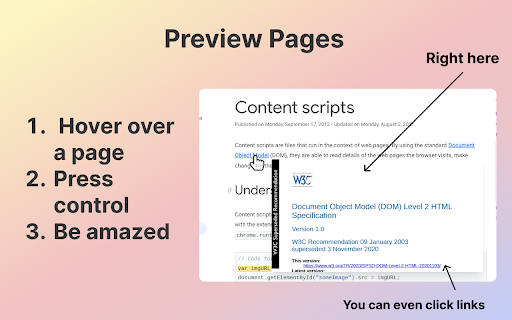
Press control and hover over a page Hover over a page to open a small preview of it that you can interact with! - Simply move your mouse away from the link to get rid of this window - Note: Press Control/Command while hovering over the link to get the window, otherwise you won't see anything different.

Search & Link Preview
See previews of links and instantly performs searches on the same page using this previewer instead of opening new tabs This extension enables you to browse faster online in two ways: preview search results on same page and secondly preview any link from the search result page. How it works: * To perform a search in preview mode, simply select the text and the click on the "search" tooltip button that appears. * To preview a URL, hover over the URL and click on the "preview" tooltip that appears. Features: * !NEW! Automatic hover to preview any URL; choose the hover delay. * !NEW! Works on links that usually break previews including stackoverflow.com * It supports multiple search engines including Google, Bing, Yahoo, Yandex and Baidu * The preview window is resizable and the default size (width and height) of the preview window can be set in the settings pages. * Easily go from preview mode to a new tab page by clicking on the "Open in New Tab" control icon. * Ability to minimize the window or drag it to ensure it does not block important content. * Disable it for specific sites by right-clicking on the browser icon and selecting the "Disable" option while that page is active. The preview may not work on certain pages like Chrome Webstore pages, browser pages (e.g. New Tab), and certain websites managed by enterprise-policy. Report any issues or feature requests at the support hub here - https://chromewebstore.google.com/detail/mmmfofondapflhgbdidadejnechhjocm/support

Auto side preview
preview search result in the right side panel automatically Adds instant preview to search engine results page AutoSidePreview shows you a site without opening it in a tab In search results move mouse to a link and you get an instant preview of the site, when you move to another search results link the preview automatic switch to the new site. more options: - delay setting - side bar width - close outside side bar close it - using mobile user agent preview web page If you want us support more search engine, please leave it in the comment or send a email to searchaipreview@gmail.com

Preview Link
Preview links without leaving the page—live previews, fewer tabs, and hover or key-triggered opening. Preview Link lets you inspect links before committing to full navigation. Open a live preview directly on the page you are already reading, compare links without losing context, and avoid filling your browser with extra tabs. What Preview Link helps with: • Open live link previews on the current page • Choose how previews open: on hover or on hover + trigger key • Keep several previews open with configurable limits • Reload a preview, close it, or open the page in a new tab • Use reader mode suggestions for article-like pages when a cleaner reading view is useful • Fall back to simpler actions when a site blocks embedded preview Useful for documentation, search results, references, dashboards, admin tools, issue trackers, and other link-heavy workflows. Important: some sites do not allow embedded previews. Preview Link does not bypass those restrictions and shows a fallback instead.

Web View - Link Previewer
Web View – Link Previewer lets you instantly preview any webpage linked on a site—without clicking or losing your place. Simply hover over any hyperlink or linked image, and a small preview bubble appears beside it. Click the bubble to open a floating preview window showing the actual content of the linked page—right where you are. Designed for speed, safety, and clarity, the preview window is fully rendered. You can safely inspect links without distractions or risk. Advanced controls let you resize the preview for better readability, take a quick screenshot, split the page into 2 views, or manually close it. Once you move your cursor to any other link on original page (and if not splitted), the preview disappears seamlessly. 🫧 Preview Bubble – On hover, a subtle preview bubble appears beside the link instead of launching the preview directly. 🖱️ Click to Preview – Click the bubble to launch a floating, real-time preview window. 🔍 Enlarge the preview window for better readability 🖥️ Split view mode is available — compare side by side for better clarity 🔗 Open external link in split view for side-by-side access 📸 Capture a screenshot of the preview ❌ Manually close the preview 🔗 Hover over any link or image to activate preview bubble 🪟 Real-time, preview on demand 🧭 Works across most websites automatically 🧊 Minimalist design for smooth, distraction-free use 📚 Great for researchers, readers, and multitaskers Web View – Link Previewer is ideal for anyone who needs to check links efficiently without disrupting their browsing flow.
