
njalndcfgcolndhkmdkjihclbcnmomjl
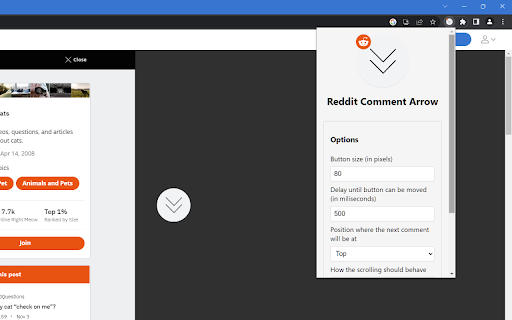
The loved arrow in the reddit comment section to skip to the next top level comment Brings the skip-to-next-top-level-comment-button from the mobile apps to the desktop version of reddit. The button will be positioned on the middle left side of the screen by default. Instructions: - Open a reddit post page - Wait until top comments have loaded - Click on the button to jump to the next comment - Hold and drag (default 500 milliseconds) to reposition the button - You can alter several options in the action menu of the extension. Just click on the icon in the extension popover. If the button should mislocate by any reason, its' position can be reset from the action menu via "Reset button position".

Ultimate Reddit Browser
Effortlessly browse Reddit! Auto-load comments & navigate posts with your keyboard. Enhance your experience, no new tabs needed! Introducing the ultimate Reddit browsing experience: a Chrome extension designed to maximize your time on Reddit while providing an enhanced, smooth, and efficient browsing experience. This alpha release is perfect for early adopters who want to try it out and provide valuable feedback to help shape its future development. Currently, our extension works exclusively with the old Reddit design on old.reddit.com, but we have plans to expand compatibility to the new Reddit design in the future. Auto-load comments: The extension automatically loads the comments of posts, so you don't have to click through to another page to read the discussion. This saves you time and makes it easier to participate in conversations or simply enjoy the content. In-line comment viewing: Easily display comments without having to open a new tab. This means you can quickly read through the top comments on a post, join the conversation, or move on to the next post without losing your place. Keyboard navigation: Effortlessly browse posts and the comment section with our intuitive keyboard shortcuts. Whether you're an experienced Reddit user or new to the platform, you'll quickly become a pro at navigating your favorite subreddits with ease. Navigate through posts using Ctrl (or Cmd) + arrow keys, and navigate through comments using Shift + arrow keys. Customizable settings: In the future, you'll be able to tailor your Reddit experience to your preferences with our customizable settings. Choose how many comments to load, set your preferred shortcuts, and more. Compatibility with the new Reddit design: We're actively working on implementing our extension's features for the new Reddit design, bringing the same seamless browsing experience to an even broader audience. Why should you install this extension? Improved Efficiency: Our extension was designed with the goal of making Reddit browsing as seamless and efficient as possible. You'll be able to navigate more quickly and easily, allowing you to make the most of your time on the platform. Enhanced Experience: The in-line comment viewing and keyboard navigation features make your browsing experience more enjoyable and immersive, enabling you to engage with the Reddit community in a whole new way. Simplified Interface: By eliminating the need to constantly open new tabs, our extension simplifies your Reddit browsing experience. You'll be able to enjoy a cleaner, more organized interface that keeps you focused on the content. Be a part of the development process: As an early adopter, you have the unique opportunity to provide feedback on the alpha release of our extension. Your input will help shape the future development and ensure that our extension continues to meet the needs of Reddit users like you. In conclusion, our Chrome extension is an exciting new solution for anyone looking to enhance their Reddit browsing experience. While still in its alpha release, this extension is perfect for early adopters who want to try it out and provide feedback for future improvements. Download our Chrome extension today and revolutionize the way you browse Reddit!

Reddit Publish Date
This extension adds the original publication date to articles posted on Reddit. Supports all versions of Reddit. With Reddit Publish Date, you can instantly see when an article was originally published—right from your Reddit feed. Improve your Reddit experience and stay informed. This extension automatically adds the publication date of linked articles to each Reddit post, helping you quickly understand the freshness and context of the content being shared. Perfect for users who want to make informed decisions about the relevance and timeliness of news and articles. • Instant date display: See the publication date of articles linked in Reddit posts without needing to click through. • Customizable: Configure exactly how you'd like publication dates to be formatted. Dates can even be color-coded so you can easily tell whether a post is outdated or fresh at a glance. • Works on all versions of Reddit: The design of the publish date label is automatically set to fit with the rest layout on both new and old Reddit. • The extension checks the link in each Reddit post, attempts to retrieve the original publication date of the article, and displays it next to the post if one is found. • Works on articles from news sites, blogs, research papers, and more. Privacy Note: This extension does not collect any personal data about you or your Reddit account. Although it only runs when you're on Reddit, it connects to external websites linked from Reddit to search for publication dates.

Subreddit Search
Makes Reddit search within the current subreddit, instead of all of Reddit. A little while back, Reddit changed how search works. It used to show you posts from the subreddit you're currently viewing when you did a search. Now it shows results from all of Reddit first, and you have to click again to restrict the results to the current subreddit. And if you prefer the search results to be sorted differently, you have to click again. I finally got sick of having to go through 2 extra pages every time I searched on Reddit, so I made this Chrome extension. Whatever subreddit you are viewing, when you search, it'll search that subreddit by default. This extension also has an option that lets you choose the default sort order for search results. This extension does not work on the "old" Reddit.

Apiary - Web Highlighter & Annotator
Highlight and take notes directly on what you read online and instantly share them with friends and colleagues. Easily highlight and take notes on what you read online and then easily save them for later and share them with friends and colleagues in one click. Apiary is a free to try chrome extension based product that allows you to easily highlight and take notes on what you read online. After you have annotated something online it will be saved to your Apiary account where you can then organize in any way you like with our folder system. You can than easily share directly from the website where you took the notes or from your Apiary account later on with anyone you want. Just highlight and get a shareable link you can send to anyone with one click. When using Apiary on a website or email online you have two options. You can choose to just highlight some text or you can highlight and add a comment to that highlight. Allowing you to save and share you favorite parts and current thoughts while reading it with others. You can view your annotations live by clicking the chrome extension and having the Apiary sidebar appear showing all the highlights and notes you have made on that page. Or you can view them later in your Apiary account where we save all the contents of what you were reading and the highlights and notes you took. Allowing you to get the full context of whatever you were taking notes on. Annotate, save, and share what you read online instantly today. ----------------------------------------- Key Features: Web and Email Highlighting Take Notes On What You Read Online Apiary Account Access With Organization Systems Quick and Easy Shareable Notes Private Notes That Only You Can See Automatically Saving Notes ------------------------------------------- How To Use: In order to use the Apiary Chrome Extension you will need an account with Apiary. Please visit www.myapiary.io to create an account today. 1) Create An Account On Apiary (www.myapiary.io) 2) Download Chrome Extension 3) Sign Into Chrome Extension w/ Your Apiary Account 4) Select Text (Left Click & Drag) You Wish To Annotate 5) Click On Apiary Popup To Either Highlight Or Take Note On Selected Text 6) Delete An Annotation By Clicking On A Highlight And clicking Delete Icon 7) Share Your Notes For A Page By Clicking The Apiary Share Button On Bottom Left Corner Of Window 8) View A Note By Either Visiting Your Apiary Account Or By Clicking View On A Currently Annotated Web Page ------------------------------------ Pro Tips: 1) Make Sure You Are Logged Into Apiary Chrome Extension If You Are Having Issues Annotating 2) Organize Your Notes Into Folders On Apiary To Easily Find Notes Later 3) Share Your Notes With Friends By Clicking Share Button And Sending Link To Friends. --------------------------- Got Feedback? Please reach out to us at support@myapiary.io If you find bugs please let us know at https://forms.gle/rHvoLZwaXfVcbAMJ7. If you have a feature request please let us know at https://forms.gle/vguFD2Rxi2FCsSQi8. By installing the extension, you agree to Apiary's Terms of Service, Privacy Policy, and Community Guidelines (which can be found here: https://www.myapiary.io/term-services and https://www.myapiary.io/privacy-policy)
