
nigdbicmeinmmhflhbhcnpidibbiojbf
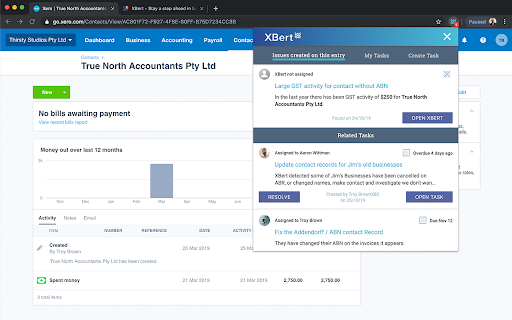
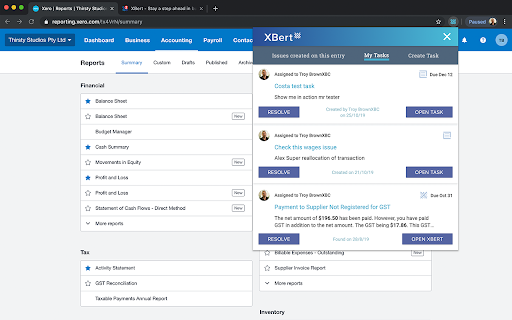

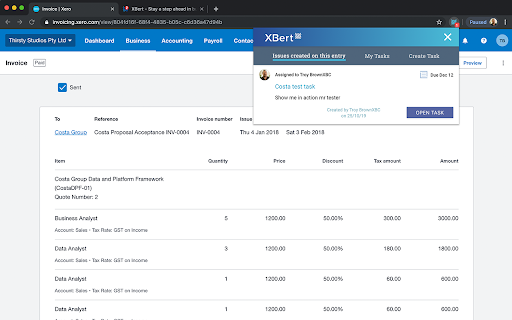
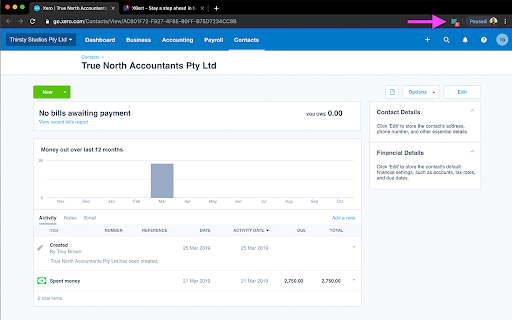
See your XBert alerts plus create and link tasks from anywhere. XBert alerts you to risks before you know the risks exist! The latest advancements in data science and machine learning automatically detect patterns, anomalies and errors in your accounting data, saving you time and money and providing smarter, real-time insights. XBert is a unique and easy-to-use Xero cloud accounting add-on that analyses your accounting data hourly. XBert helps business owners, bookkeepers and accountants stay a step ahead, and provides up-to-date and accurate snapshots of the business’ financial status. The innovative Chrome browser extension, believed to be the first of its kind for Xero add-ons, notifies you in real time of any issues or tasks associated with that Xero entry while you work! Streamlining your workflow just became easier. • The notification count at the top means you won’t miss a thing. • View and switch between existing tasks or be taken to the Xero entry to fix the issue and resolve the risk. • Create and assign XBert tasks that will link directly to the current Xero entry. • View all your assigned tasks and manage them in Xero. The browser extension allows XBert and Xero to work together seamlessly to help you resolve risk, save time, and save money. Stay organised with XBert’s collaborative task management tools and features. You’ll spend less time on wasteful jobs, manual checks and auditing, or searching for errors. Instead, you can focus on the bigger picture - growing your business or creating meaningful value for clients. XBert does all the hard work for you, ensures accuracy and tax compliance, and safeguards the books and business.

Double
Double is one app to run your bookkeeping business. We allow bookkeepers to run their entire month-end close in one tab. Double's chrome extension helps accountants and bookkeepers sync to their accounting ledger. Accountants and bookkeepers can now make changes to transactions within Double and that will sync back to their accounting ledger.

Xenett
Seamless Xenett experience within QuickBooks Online and Xero Xenett is an intelligent Clean-up and Close tool that standardizes, automates, and expedites your review and close process. It connects with your QuickBooks and Xero file and auto-detect the errors within seconds and lets you fix them on the go. It keeps your client books error-free at all time. During the review and close process, if you come across any questions, you can also submit to your clients easily and clients can respond them in real-time using the Client Portal. This extension embeds Xenett inside your QuickBooks and Xero. You no longer need to switch between the apps. You can just install and get started with it. It makes accountant's life easy and efficient.

ClickUp: Tasks, Screenshots, Email, Time
ClickUp is a productivity platform that makes your personal and work lives more productive, saving you time. ClickUp's revolutionary Chrome Extension replaces five separate apps, virtually allowing you to do anything! 1. Create Tasks & Save Websites as Tasks 2. Time Tracking: Easily attach time to ClickUp tasks 3. Screenshots: Capture, mark up, and edit screenshots 4. Email: Create tasks and attach emails to tasks 5. Notepad ClickUp is free forever for up to 100MB of files storage. Installing the Chrome Extension 1. Click ADD TO CHROME 2. Click Add extension in the next popup 3. Click the ClickUp extension icon at the top of your browser window. 4. Log in to your ClickUp Account 5. Select the Workspace(s) that should have access Creating a new task 1. Select the "New Task" tab 2. Write a title for your task 3. Add assignees and a due date 4. Write a description for your task. (Pro tip: Use Markdown Shortcuts in your description fast rich text editing) 5. Click Create New Task Bookmark a site as a task 1. Click on the Bookmark tab 2. This automatically sets the page title & URL as the task title 3. You can also add a description here 4. Then you'll also be given the option to attach a screenshot of the website to the task by clicking Include screenshot Set a Default List Save a default destination for tasks making this the fastest way to add new tasks! Simply locate a task in the extension and select it to begin tracking time. From the Time Spent window, you are able to view time logged on recent tasks and even remove time that was accidentally logged. Back in the ClickUp task, the time has been logged, and we can even start the extension's timer from within the task. Screenshots: capture, mark up, and edit screenshots Capture Capture your entire browser tab or select a certain area to add to a task or download to your computer Attach Attach the file to an existing task or create a new one Mark Up The extension grants you extremely detailed mark up functionality: Paintbrush - draw what you want on top of the screenshot - set a color and brush size Arrow, line, circle, square - quickly add shapes to highlight areas of the screenshot - set a color and brush size Text - add notes right onto a screenshot - set a color, size, and substrate (background) Blur - select an area of the screen you would like to remain hidden. Numbers - drop increasing numbered markers on your screenshot - dragging and dropping allows you to create a box with the number - perfect for sharing steps with a team member Pointer - select things you've already added to the screenshot and make adjustments Undo / Redo Attach to comments 1. Take a screenshot with the Chrome Extension 2. With the screenshot still in the extension, open a task in ClickUp 3. Open the comment editor 4. Click the "Chrome attachment" button Email: Create tasks and attach emails to tasks Capture an email Click the Add to ClickUp button in your email to generate a full HTML record of the email. Attach emails to tasks and create tasks from emails ClickUp will attach the email to a task or create a brand new one with the email attachment included so you can quickly view, jump back, or download the email! For more info, check out our doc on attaching emails to ClickUp! You can also access your ClickUp notes from any page. Open the extension to the Notepad tab, and all of your notes are available from ClickUp. Your notes will sync across all your devices. Use Markdown Shortcuts and Rich Text in any note. When hovering over a note, you will be able to rename the note, archive, delete, and convert the note to a task. While inside a note, at the bottom are the options to see earlier versions of the note, open the fullscreen editor, as well as the option to convert the note to a task. The ClickUp button gives you quick access to the Notepad, Bookmarks, Screenshots, Time Tracking, and creating a task from any webpage. To move the button, click and drag it to any spot on the page. To hide the button, hover over the x icon. You can choose to hide the button for the current session, always for the current website you're on, or turn them off all together.

SuiteFiles
The SuiteFiles Chrome Extension optimises your SuiteFiles experience. This Suite extension helps you get even more from your SuiteFiles subscription. With an easy to use interface, our Chrome Browser extensions seamlessly links Xero Practice Manager (XPM) and Karbon to SuiteFiles, allowing you easily maintain data integrity across XPM/Karbon and SuiteFiles. New in Version 2.0.0 Updated extension to support new XPM layouts Added Karbon integration SuitePrint functionality moved to dedicated extension. New in Version 1.6.11 Fix for SuitePrint folder navigation New in Version 1.6.10 Fix XPM/WFM Job and Quote folder link and document tab for group structured client New in Version 1.6.9 Fix Job and Quote folder link. New in Version 1.6.8 Fixing matching folder link in WFM. Fixing XPM Document tab to looking for the right matched folder. New in Version 1.6.7 Improved the matching logic between clients in XPM and SuiteFiles to now use a unique ID. Now if a client name is updated in XPM, the connection in SuiteFiles doesn't break New in Version 1.6.6 Update Xero cache and DB as soon as updates are made for new XPM migration New in Version 1.6.1 Fix search and save function in SuitePrint New in version 1.5.0 Fixed some display issues for quote/job pages in both XPM and WFM Jobs in WFM will now link to a folder in SuiteFiles Editing or revising WFM jobs and quotes will now prompt to update the folders in SuiteFiles Fixed an issue to improve the workflow for the archive/unarchive of WFM clients New in version 1.4.8 Fixed bug for renaming prompts in WorkFlowMax New in version 1.4.7 Fixed bug for quote links not working in WorkFlowMax Update feature description text in the extension option page Our new Suite Brand has been added to the extension! You can now drag and drop upload to the Documents tab in XPM. Bug fixes to increase stability for jobs and quotes integration with XPM. Bug fix for the Export PDF to SuiteFiles process in Xero Reports. You'll find a new interface when accessing the Documents tab in Xero Practice Manager (XPM), with the links now mapping directly to your files in SuiteFiles, the ability to create folders (with templates) and upload a document. You can now create new folders (with templates) when downloading reports or when using SuitePrint The "Client already exists" message when creating a new client in XPM no longer appears when the field is empty Bug fixes for downloading reports from XPM and exporting Workpapers You can switch back to the default XPM Documents interface by toggling the Documents Tab Replacement button following the steps here. Did you know that installing our Chrome extension also improves your experience when using the Office Web Apps? We've made a few changes to make editing in the browser a better experience.
