
nifijmhijjcmcjcodgbijcgpodeodphb
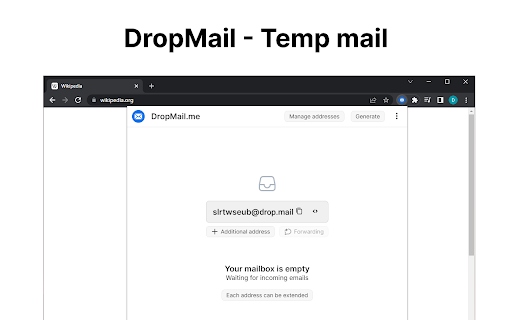
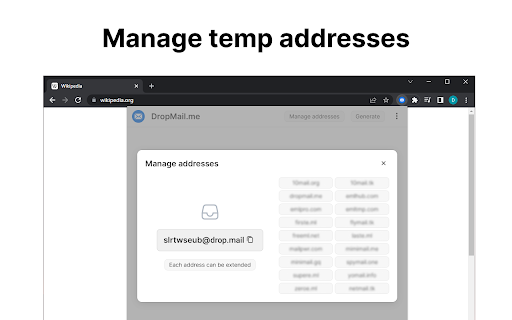
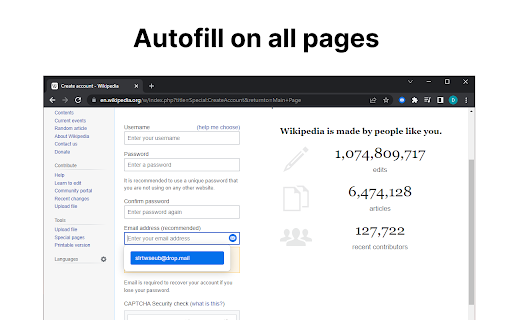
Temporary email. Email for 10 minutes or more. Our service offers disposable email for registrations. Create a temporary email. For 10 minutes or more. Anonymous email service allows you to receive emails for a safe registration on sites and services. Unlimited mailbox lifetime. No registration. Unlimited mailbox size. Attachments allowed.

PDF SmartBox: Merge, Convert, Append
Effortlessly Manage PDFs: Merge, Convert, Append, and Download with Ease 🌟 Introducing PDF SmartBox: Your Ultimate Document Management Solution! 📎✨ Attention busy professionals, students, and anyone working with digital documents — streamline your workflow with PDF SmartBox! 🎯✨ No more switching between multiple tools. This powerful browser extension helps you handle all your document tasks with ease. 🚀💼 📄✨ Merge Files with Ease: Combine multiple files into one organized document effortlessly. Forget manual merging and outdated software! 📑🔄 Convert to Universal Format: Easily convert Word files, spreadsheets, and more into high-quality PDFs in just a few clicks. Create professional-looking documents ready for sharing or archiving. 🌅📄 Add Images Seamlessly: Need to include a visual? Append any image directly to your document, enhancing both style and clarity. ⬇️💾 Download Embedded Files: Quickly download embedded PDFs from web pages with a single click—no digging through complex layouts. Experience the smart way to manage digital documents with PDF SmartBox. Simplify, streamline, and stay organized like never before. 🔗✨ 📢 Take control of your documents today. Download PDF SmartBox and boost your productivity with this all-in-one browser extension! 🚀📎💼

Paint Tool by Painty
Paint tool to draw shapes, add text on web pages in real-time, make a screenshot, and download or share the screenshot with friends. Paint Tool is the perfect tool for anyone looking to express their creativity. Draw on any web page quickly and easily and add a new level of expression to your browsing experience. With Painty tools, you can turn any web page into your canvas. Take your creativity to the next level with our tool. This powerful paint tool allows you to draw on any web page with a variety of tools and colors. Plus, it's lightweight and easy to use, adding a new level of creativity and expression to your browsing experience. With Painty, you can quickly and easily create beautiful illustrations, take notes, and have fun. Simple, easy, and fun to use the Painty app, you can enjoy and learn drawing on this Chrome extension. Our extension has a simple and easy-to-use design. It is not confusing and easily recognizable tool icons (pencil, highlighter, arrows, paint bucket, eraser, and other tools) are used in the app which makes it easy for everyone to use. The best multitool for paint online includes: 🖍️ Pencil - draw a custom line with the selected line width and color. 🖌️ Highlighter - the easiest way to highlight text on any webpage. 🎨 Color Picker - pick a color from the web page or your drawings and use it for drawing. ➖ Line - paint a straight line with the selected line width, transparency, and color. ➡️ Arrow - paint a straight line with an arrow on the end of the selected line width, transparency, and color. 🔗 Polyline - the best way to paint an arbitrary figure. 🔳 Rectangle - draw a rectangle with the selected line width, transparency, and color. 🟡 Circle - draw a circle or an ellipse with the selected line width, transparency, and color. 🔺 Polygon - paint a polygon with the selected line width, transparency, and color. 🔤 Text - add text to the web page with the selected color and transparency. 😀 Emoji - add fun emoji to the web page. 👁️🗨️ Blur - blur sensitive or personal information on screenshots or images. 🧽 Eraser - erase part of your drawings. 🎨 Paint Bucket - fill an area with selected color and transparency. and more! But that's not all - with the Painty New Tab, you can enable additional features such as adding/removing bookmarks and storing saved screenshots. Screenshots aren’t just handy, they’re also revolutionary to getting more work done, faster, they can be extremely helpful when you need to demonstrate something that would otherwise be difficult to explain in words. A screenshot can help you get more work done. 1. Share Does your coworker want your input on a new webpage they’ve put together? Or do they need you to look over a brochure they’re having printed? Instead of writing a lengthy email with edits, take a screenshot and wow your coworker with excellent, efficient feedback. 2. Demonstrate Don’t just tell. Show. Demonstrate exactly what you’re talking about with a screenshot. By using a screenshot that shows exactly what you mean, there’s less chance that you’ll be misunderstood. And that means less confusion, less time explaining, and more time back in your day. For example, explain to a new employee how to log in. Instead of telling them, you can quickly send them a screenshot that they can reference again and again without having to repeatedly ask you. A screenshot with numbered steps is quick to make and easy to understand 3. Show If you’ve ever contacted your IT or Web Support Team to report a bug, you’ve likely been asked to provide a screenshot. That’s because not everyone’s computer is the same. Depending on your machine, the operating system it’s running, and the browser version you’re on, the way something appears for you could be completely different for others. Providing a visual example of what you’re looking at helps others see exactly what’s going on and identify what might be going wrong. Whether you're a student, a professional, or just someone who loves browsing the web, Painty is a must-have extension. You'll have access to an array of advanced annotation tools, including a pencil, highlighter, color picker, arrow, polygon, text, emoji, and more. With Painty, you can easily create informative content by drawing online arrows and shapes that focus on the most significant parts of a text or website. Plus, you can edit the content on the web page or screenshot with the blur, eraser, or paint bucket tools. In short, Painty is an all-in-one tool for anyone who wants to take their web browsing experience to the next level. Try it out today and see for yourself how easy it is to annotate and customize any webpage! We value your feedback! Our team is dedicated to offering you the best Chrome experience possible. If you find our extension helpful, please consider giving it a 5-star rating.

Temp mail Temporary Email mtempmail.com
Temporary disposable fake email address! Get your temporary inbox generated at once. No limits. Get instant access to a temporary email inbox with this convenient Chrome extension. Perfect for quick sign-ups, verifications, or avoiding spam, this extension provides you with a disposable email address that you can use on-the-go. Instant Access: No need to register or sign in. Simply install the extension and start using your temporary email inbox right away. Disposable Email Address: Protect your privacy and avoid spam by using a temporary email address for online activities that require email verification. Seamless Integration: The extension seamlessly integrates into your Chrome browser, making it easily accessible whenever you need it. Automatic Refresh: Stay up-to-date with incoming emails with automatic refresh functionality, ensuring you never miss an important message. User-Friendly Interface: Enjoy a clean and intuitive interface that makes managing your temporary email inbox a breeze. How It Works: Your Ultimate Solution for Temporary Email Addresses Temp Mail provides you with instant, disposable email addresses to protect your privacy and keep your inbox clutter-free. Whether you need an email for quick registrations, temporary subscriptions, or avoiding spam, we've got you covered. Why Choose Temp Mail? Instant Setup: Get your temporary email address in seconds. Privacy Protection: Keep your personal email private and avoid spam. Automatic Disposal: Emails are deleted after 24 hours to ensure security. - User-Friendly Interface: Easy to use and navigate for everyone. How It Works 1. Generate: Click the button to create a temporary email address. 2. Use: Copy and use the email address for your needs. 3. Receive: Check incoming emails directly on our site. 4. Dispose: Emails are automatically deleted after 24 hours . mtempmaill is a free tool that generates temporary email accounts for Benefits of Using Temp Mail - Stay Anonymous: No personal information required. - Avoid Spam: Use temporary emails for untrusted sites. - Save Time: No need to manage multiple email accounts. - Secure: Your data and privacy are our top priorities. About mTempmail and Our Mission mTempmail is a temporary email service designed to protect your real inbox from spam, promotional emails, hacking attempts, and unwanted automated messages. Our platform offers a secure, anonymous, and free disposable email address for anyone who values privacy and simplicity. Whether you need a quick email for signing up on a website or a secure way to avoid spam, mTempmail ensures your personal inbox stays clean, safe, and free from unnecessary clutter. With mTempmail, you can enjoy a trusted and reliable temp mail provider. Our service guarantees privacy and convenience, letting you avoid spam while maintaining security. Creating a temporary email address with mTempmail is free, fast, and completely anonymous, allowing you to safeguard your personal information effortlessly. What is Disposable Temporary Email? Disposable email is a free service that allows users to receive emails at a temporary address, which automatically expires after a specific period. Known by different names such as temp mail, 10-minute mail, throwaway email, or fake email, disposable email addresses are designed to protect users from spam, promotional emails, and potential security threats. This concept has gained popularity as a solution to reduce spam and the risks of identity theft. Whether signing up for online services, forums, or downloading files, mTempmail provides a secure, fast, and anonymous way to use temporary email addresses, keeping your primary inbox safe and clutter-free. Benefits of Using Disposable Email Protects against spam and unwanted emails. Preserves your privacy and anonymity. Quick and easy to create and use. Self-destructs after a set time, ensuring emails don’t linger. The Technology Behind Temporary Email Addresses In today’s digital world, email addresses are required for nearly everything—from professional communication to accessing social media, signing up for services, or making online purchases. Unfortunately, this also exposes users to spam, phishing attempts, and unsolicited marketing emails. Disposable email services like mTempmail have emerged as a practical solution to these challenges. Why Are Disposable Emails Important? With nearly every online service requiring email registration, disposable email addresses provide a smart way to minimize your exposure to spam and security risks. For example, you can use a disposable email address for: Online trials or loyalty programs to avoid promotional emails once the trial ends. Signing up for untrustworthy websites or services without risking your primary email address. Protecting your real email from being compromised in data breaches. Disposable email addresses help ensure your privacy by preventing unnecessary emails from reaching your main inbox and protecting you from potential scams or leaks. How Disposable Email Addresses Safeguard Your Identity Using a disposable email address adds an extra layer of security and anonymity to your online activities. These temporary addresses allow you to sign up for services without sharing your real identity, reducing the likelihood of your data being exposed, sold, or misused. mTempmail empowers you to protect your identity and personal information, whether you’re testing apps, signing up for low-trust services, or creating multiple accounts on a single platform. With mTempmail, you can stay in control of your privacy without compromising convenience. Install the extension from the Chrome Web Store. Click on the extension icon to access your temporary email inbox. Use the provided email address for sign-ups, verifications, or any other online activity. Incoming emails are automatically refreshed, allowing you to stay updated in real-time. Dispose of the temporary email address whenever you're done with it. Why Use Temporary Email Inbox Extension? Privacy Protection: Safeguard your personal email address and keep your inbox clutter-free. Convenience: Avoid the hassle of creating new email accounts for temporary purposes. Security: Reduce the risk of identity theft and online scams by using a disposable email address. Time-Saving: Save time on email verification processes and focus on what matters most. Install now and experience the convenience of a temporary email inbox directly in your Chrome browser!

Inboxes: Create Disposable Temp Mail Addresses
Inboxes lets you quickly create & delete temp mail addresses. Stay private and stop spam with this disposable email generator Let's face it, we've all been there - whether its to access a recipe, or try out a "free" demo. Websites always demand your email address - and it sucks - because you know they'll spam you. So we made Inboxes App, a super easy to use browser extension which creates long lasting temporary email addresses for you. You can create new email addresses and delete them from within the extension, saving your real email from unwanted marketing messages 🎉 There's no sign up required, and Inboxes App has already saved our users from receiving over 12.7 million unwanted messages through the use of disposable email accounts. By using a long lasting temp mail generator instead of a regular temp email website, you keep access to the address for as long as you want, allowing you to control who you want to be able to contact you. While sites like 10 minute mail, Guerrilla Mail, mailinator and Temp Mail recycle short term emails, Inboxes lets you keep your address indefinitely offering you even more more privacy than a traditional temp mail.
