
nhkpemikinijmhnogncmnnkdbolobhjk
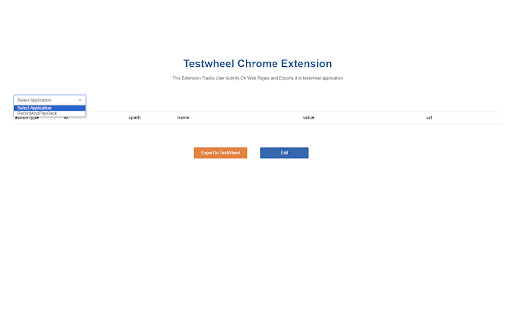
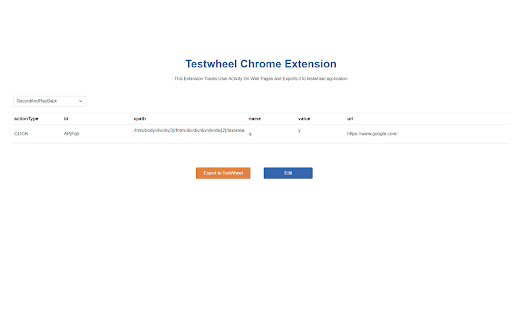
Capture Application Workflow to obtain the TestWheel Application Data Inputs for Test Automation Effortlessly record the end-to-end interactions of your web application and export the data to run tests for the actions you have done. TestWheel recorder is the easy-to-use Chrome extension that allows developers and testers to seamlessly record every interaction on any web application and transform them into robust test cases. Intuitive Recording: Navigate through the web applications as you normally do. TestWheel's intelligent recording feature captures and records user actions such as clicks, keystrokes, form submissions, login page actions, and more, and displays them in list of test data. Visual Representation: Our user-friendly visual representation provides a clear view of test data that anyone can easily understand and use for a test run. Easy Integration: Export the acquired user flow data directly to the TestWheel platform with a single click. Manual scripting and coding knowledge not required. Enhance Efficiency: Leverage TestWheel’s recording extension and enhance the efficiency of your test cases. Save time and resources by automatically generating real time user interactions. Wide Range of Testing: With TestWheel extension, for any web application users are allowed to conduct functional, regression, unit, or integration testing. Customization Option: Users are entitled to customize the test data by adding assertions and modifying variables. Benefits of TestWheel Extension: Reduces the test script creation time effortlessly. Run the test cases anytime and update it when the application evolves. Share recorded test cases with your team for efficient test case management. Reduces the cost and increases the ROI. With TestWheel chrome extension transform and upgrade your automation testing into next generation. Download now. TestWheel is a cloud-based AI augmented automation testing platform that provides invaluable testing solutions for businesses globally. Our script-less automation offers a wide range of testing products such as unit, regression, functional, API, performance/load tastings. The Automation Framework Tool of TestWheel covers the entire test cycle of an enterprise’s web and mobile application. We believe the testing should be simple, smart, and stress-free!

GenQE - AI Assisted Quality Engineering
Use this extension to record video and capture screenshot for your test cases. Unlock the potential of automated quality analysis with GenQE, your AI-powered assistant designed to revolutionize software testing and quality assurance processes. Seamlessly integrated into your workflow, this Chrome extension empowers teams to generate test cases with unparalleled precision and efficiency. Overview GenQE harnesses cutting-edge artificial intelligence to simplify complex QA tasks. From analyzing requirement documents to generating detailed test cases, GenQE makes it effortless for developers, testers, and project managers to streamline their testing processes. By embedding this powerful tool in your Chrome browser, you gain access to: Automated test case generation Business flow modeling Interface design recommendations Comprehensive quality scoring Integration with popular tools like Jira, Figma, and Postman With GenQE, you can shift your focus from manual and repetitive tasks to strategic decision-making, ensuring your software meets the highest standards of quality and performance. Key Features Requirement Analysis and Test Case Generation Analyze requirement documents, videos, and screen recordings to generate accurate test cases. Identify key fields, flows, and variables for comprehensive coverage. Support for various document types, including Word, PDF, Excel, and Figma designs. Business Flow and Interface Modeling Visualize end-to-end business flows and interdependencies. Generate reusable interface components and map variables to test scenarios. Create modular flows for child and parent applications to build scalable systems. Seamless Integrations Jira Integration: Automatically sync generated test cases with Jira tickets. Figma Integration: Extract test scenarios directly from Figma designs. Postman Integration: Import Postman collections to generate API test cases in seconds. AI-Driven Quality Scoring Evaluate the quality of test cases and flows with AI-driven scoring metrics. Gain insights into potential gaps and areas for improvement. Optimize test case coverage using orthogonal combinatorial testing techniques. Customizable Workflows Define workflows tailored to your project’s unique requirements. Enable batch processing to allot test cases dynamically across teams. Generate reports on user engagement, test case execution, and performance trends. End-to-End Test Management Build an end-to-end journey by integrating flows from different modules or applications. Create dependency mappings between variables and test scenarios for complex systems. Support for hierarchical test case organization for better traceability. Data Security and Scalability Leverage Docker secrets for sensitive information in multi-service environments. Ensure compliance with industry standards for secure data handling. Scale seamlessly with cloud providers like AWS, Google Vertex AI, and others. How It Works Install the Extension Add GenQE to your Chrome browser with a single click from the Chrome Web Store. Once installed, the extension appears as an intuitive sidebar in your browser. Upload Your Inputs Upload requirement documents, design files, screen recordings, or API collections. GenQE analyzes these inputs to identify critical elements like interfaces, variables, and test scenarios. Review auto-generated test cases, business flows, and interface designs. Modify and refine outputs using the extension’s user-friendly editor. Save and export outputs to your preferred tools or formats. Integrate and Collaborate Sync outputs with Jira, GitHub, and other tools for seamless team collaboration. Use built-in reporting tools to track progress and share insights. Why Choose GenQE? Efficiency Boost Automating repetitive QA tasks saves countless hours, allowing your team to focus on strategic activities like planning and innovation. Enhanced Accuracy AI-driven analysis ensures comprehensive test coverage and reduces human error in identifying test scenarios. Scalable Solutions Whether you’re a startup or an enterprise, GenQE scales with your needs. Its modular design accommodates projects of any size and complexity. User-Friendly Interface Designed with simplicity in mind, the extension offers a clean and intuitive interface that even non-technical users can navigate with ease. Continuous Improvement Regular updates and new features keep GenQE ahead of the curve, ensuring you always have access to the latest in QA automation technology. Use Cases Software Development Teams Accelerate development cycles by generating test cases and business flows directly from design and requirement documents. Quality Assurance Professionals Streamline the QA process with automated test case generation and detailed quality scoring. Project Managers Gain visibility into project quality metrics and optimize resource allocation with insightful reports. Designers and Developers Use Figma integration to bridge the gap between design and testing, ensuring seamless handoffs. Getting Started Download the Extension Install GenQE from the Chrome Web Store and add it to your browser. Sign In Log in with your GenQE account or create a new one to access all features. Upload Inputs Start by uploading your documents, designs, or recordings for analysis. Generate Export the outputs to align with your project requirements. Support and Feedback Have questions or need assistance? Our support team is here to help. Contact us at genqe@genqe.ai or visit our website https://genqe.ai for more information. We’d love to hear your feedback! Leave a review on the Chrome Web Store and let us know how GenQE is making a difference for you. Install GenQE Today – Redefine Your QA Workflow!

Katalon Recorder (Selenium tests generator)
Selenium IDE alternative to record and export Selenium scripts. With reports & screenshots. Fast & open-source. Katalon Recorder is a free, lightweight web extension that serves as an alternative to Selenium IDE. Designed for automating browser actions and tests, Katalon Recorder is available on Chrome. With Katalon Recorder, you can: Ensure quality by testing your work before passing it on to the QA team. Maintain end-to-end software quality through automated testing. Monitor web application functionality using synthetic testing. Track testing activities with shareable reports, complete with visual dashboards and charts. Save time by automating repetitive browser tasks such as generating reports, filling out forms, and even automating web-based games. Privacy notice: Katalon Recorder is designed with user privacy in mind. Your test artifacts are securely stored on your local machine, ensuring no data is transmitted to our servers. To learn more about Katalon Recorder, visit https://docs.katalon.com/katalon-platform/plugins-and-add-ons/katalon-recorder-extension/get-started/katalon-recorder-overview

Simple Test E2E Recorder
Record E2E interactions with your web applications to the cloud. Record end-to-end interactions with your web applications using SimpleTest, and store the resulting actions as plain English-based tests in the cloud. SimpleTest effortlessly executes these recorded actions as tests across various browser or OS configurations available in the cloud. Easy to Understand: All interactions are saved as plain English statements, making them easy for anyone to understand. Speedy Test Development: Recording and running tests takes only a few minutes. No Setup Cost: Sign up, add the SimpleTest Recorder, and begin testing in no time. It’s that simple! Easy Maintenance: If your UI changes, you can quickly record new interactions, update existing test steps, and continue automation testing without disruptions. == REST API steps are seamlessly supported during recording. == XPath expressions are used to locate dynamic elements with changing attributes, with enhanced strategies to capture more accurate XPaths during recording. == Move or minimize the recorder anywhere on the screen, giving you full control over its placement without forced docking. == Inline element path viewer: Hover over any element in your application, and SimpleTest identifies the element, ensuring stability in repeated executions. == Naming conventions for elements and screens reflect what you see on the UI. == Easily edit or delete any element directly from the recorder.

TestCraft
Introducing TestCraft, a free and open-source browser extension with the power OpenAI LLMs, designed to be a companion to your software testing. AI-Powered Test Idea Generation: Leverage the power of OpenAI to generate comprehensive test ideas based on webpage elements. Automated Test Creation: Generate ready-to-run test scripts for popular automation frameworks, Playwright, Selenium, and Cypress, in your preferred programming language: JavaScript, TypeScript, Python, C#, and Java. TestCraft eases your test creation process and saves time. Accessibility Checks: Empower your web applications to be inclusive for all users. TestCraft identifies accessibility issues and provides actionable insights to improve. Test Idea to Automated Tests: Seamlessly convert your AI-generated test ideas into automated test scripts. Additionally, you can edit the test ideas to improve them before generating automation tests. Unlock the full potential of your testing process with TestCraft. Download it now and experience the future of software testing!
