
nhjkhiaonocfchnbdphjdgoenneiipgo
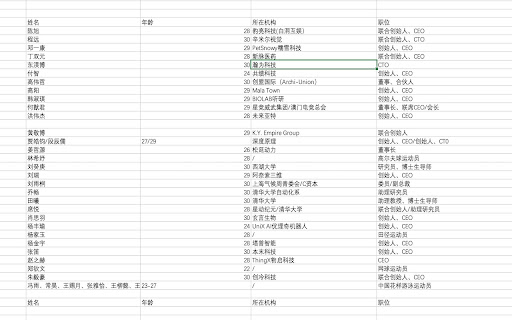


提取并复制网页表格数据 【功能概述】 本插件旨在为用户提供一种便捷的方式,通过右键菜单快速复制网页中的表格数据。用户可以在浏览网页时,轻松提取表格内容,无需手动复制粘贴,从而提高工作效率。 【功能特点】 一键复制: 用户可以通过右键点击表格,选择“复制表格数据”选项,将表格中的数据完整复制到剪贴板。 支持复制表格的标题、行和列,确保数据的完整性和格式化。 兼容性: 插件兼容主流的网页表格格式,包括HTML表格和一些常见的动态表格(如由JavaScript生成的表格)。 支持多种网页编码格式,确保数据的准确提取。 用户友好性: 插件在用户右键点击表格时自动显示“复制表格数据”选项,操作简单直观。 提供清晰的提示信息,告知用户复制操作已完成。 数据隐私与安全: 插件仅在用户主动触发复制操作时工作,不会自动收集或上传任何用户数据。 严格遵守Chrome Web Store的隐私政策,确保用户数据的安全和隐私。 【使用场景】 数据提取: 用户在浏览网页时,可以快速提取表格数据,用于报告、分析或进一步处理。 例如,在金融网站提取股票数据、在学术网站提取研究数据等。 工作效率提升: 通过右键菜单直接复制表格数据,避免了手动选择和复制的繁琐操作,节省时间。 数据共享: 用户可以将复制的表格数据粘贴到其他应用程序(如Excel、Google Sheets)中,方便进行进一步的分析和处理。 【技术实现】 右键菜单扩展: 插件通过监听网页中的表格元素,动态添加右键菜单选项。 当用户右键点击表格时,插件会检测表格的结构,并提供“复制表格数据”选项。 数据处理: 插件会解析表格的HTML结构,提取表格的标题、行和列数据。 数据以纯文本或CSV格式复制到剪贴板,确保兼容性。 用户体验优化: 插件会在复制操作完成后,通过浏览器通知或弹窗提示用户操作成功。 提供简单的设置选项,允许用户根据需要启用或禁用插件功能 【隐私与安全】 插件不会收集或存储用户数据,所有操作仅在本地完成。 插件不会上传任何用户数据到第三方服务器。 插件遵守Chrome Web Store的隐私政策和开发者指南。 【总结】 本插件通过右键菜单提供快速复制网页表格数据的功能,旨在提高用户的工作效率和数据处理能力。它具备良好的兼容性、用户友好性和隐私保护机制,符合Chrome Web Store的审核标准。我们期待为用户提供便捷、高效的数据提取工具

网页表格识别与导出器
自动识别网页表格(支持 Element UI、Ant Design),支持预览、行列多选复制,导出为 Markdown、JSON、CSV、SQL 格式 📊 网页表格识别与导出器 - 让表格数据提取变得简单 ━━━━━━━━━━━━━━━━━━━━━━━━━━━━━━━━━ 🎯 你是否遇到过这些问题? - 想复制网页表格数据,却只能一行行手动选择 - 需要将表格导入 Excel,却不知如何下手 - 后台系统的表格无法直接导出 - 动态加载的表格数据难以获取 ✅ 这款插件就是为你设计的! ━━━━━━━━━━━━━━━━━━━━━━━━━━━━━━━━━ ✨ 核心功能 【智能识别】 自动检测页面中的所有表格,包括动态加载的内容。完美支持 Element UI、Ant Design 等主流前端框架。 【预览 & 多选】 可视化预览表格数据,支持鼠标拖拽选择任意矩形区域。 - Shift+点击:快速选择大范围数据 - Cmd/Ctrl+方向键:一键跳到末尾选择整列 - Cmd/Ctrl+C:复制选中内容 【多格式导出】 - Markdown - 直接粘贴到文档 - JSON - 程序接口对接 - CSV - Excel/表格软件打开 - SQL - 数据库导入 【灵活配置】 - 两种悬浮按钮模式:始终显示 / 鼠标悬停显示 - 智能过滤:自动跳过布局表格,只识别数据表格 - 支持禁用指定网站 ━━━━━━━━━━━━━━━━━━━━━━━━━━━━━━━━━ 🔒 隐私安全 - 无需登录,无需注册 - 不收集任何用户数据 - 不与任何服务器通信 - 所有处理均在本地完成 ━━━━━━━━━━━━━━━━━━━━━━━━━━━━━━━━━ 👥 适用人群 - 数据分析师 - 快速采集网页数据 - 产品经理 - 整理竞品信息 - 开发者 - 提取测试数据 - 运营人员 - 导出后台报表 - 学生/研究者 - 收集研究资料 ━━━━━━━━━━━━━━━━━━━━━━━━━━━━━━━━━ 💡 使用方法 1. 打开任意包含表格的网页 2. 鼠标移到表格上,点击右上角的「📊 提取」按钮 3. 预览数据,选择需要的区域 4. 一键复制或下载 立即安装,告别繁琐的表格复制!

Tabon- One-click Web Data Export, Table Scraper & Download
One-click download of web data and tables to CSV or Excel.E-commerce media scraper and collector Spider table download export Extract web tables in one click Tabon helps you quickly extract tables and structured data from any web page and export them to Excel or CSV. No manual copy-paste No complex setup Download with a click ⚡ Perfect for data collection, research, and business workflows. Key features: 1️⃣ One-click table extraction Automatically detects tables and exports immediately. 2️⃣ Export to Excel or CSV Download clean, structured data ready for spreadsheets or analysis 📊 3️⃣ Smart table detection Works even on sites with complex dynamic content. 5️⃣ AI-powered header recognition 🤖 Automatically identifies and generates the correct column headers. 7️⃣ Fast and lightweight 🚀 Runs directly in your browser with minimal resource usage. Tabon is great for: • Market research • Data collection • Lead generation • Price monitoring • Academic research • Web data scraping • E-commerce analytics Why choose Tabon? Many websites make copying structured data difficult. Tabon streamlines the process so you can focus on data analysis instead of data collection. Privacy-first 🔒 Tabon does not collect your personal browsing data. All operations run locally in your browser unless explicitly required. Get started: Install Tabon Open a web page that contains tables Click the Tabon icon Export the data to Excel or CSV

Spreadsheetor - Spreadsheet in side panel
🔔 Top Features ✪ Create Spreadsheet or excel file in side panel ✪ View and edit local spreadsheet file (xlsx, csv) ✪ Work with local files (no server involved) ✪ Auto copy-paste ✪ Extract table from any websites ✪ Input files: excel, csv,xlsx,json,html, markdown spreadsheet, ✪ Output files:excel, csv,xlsx,json,html, markdown,spreadsheet,sql ✪ Lightweight only 63kb ✪ No permission required ✪ No signup required ✪ no tracking, no Ads ✪ Dark mode ## How to use Spreadsheetor Pin Spreadsheetor after install extension Click on Spreadsheetor or (Alt + S) to open Spreadsheetor side panel Click on plus button at bottom-right corner to open file or folder Table editor dialog opened Select text from any webpages. When you mouse up, selected text auto-pasted in focused cell. When you close dialog, edited file with auto-saved to local disk You can mail us: docrailhelp@gmail.com

Table Capture - Tabular Data to Spreadsheet
Table Capture is a powerful and versatile chrome extension that empowers you to interact with Tabular Data on websites. You can effortlessly select, and export Tabular Data to various formats, including Microsoft Excel, CSV, Google Sheets. Whether you need to analyze data, share it with colleagues, or keep a local backup, this extension provides a seamless and user-friendly experience. Hot To Use: 1.Open our plugin and select the table section on the webpage 2.Export table data to csv, google sheets, Excel Key Features of Table Capture: -Recognize Tabular Data with ease and efficiency -Export Tabular Data content to Google Sheets -Download tables directly as Excel spreadsheets or CSV files -Extract tables from PDF files/Images, both local and from the web By design, your data stays at all times on your Google account, never saved in our database. Your data aren’t shared with anyone, including the add-on owner. We complies with privacy laws (especially GDPR & California Privacy Act) to protect your data.
