
nhefjmaiappfgfcagoimkgmaanbimphd

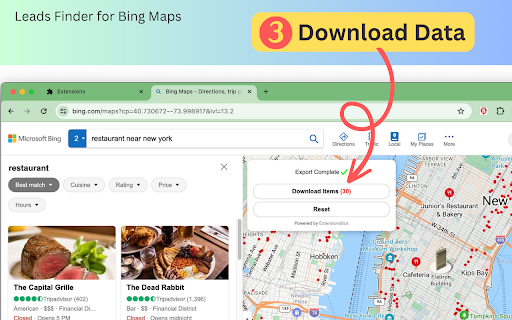

Seamlessly find contact data from Bing Map to CSV/JSON/Excel, enabling efficient lead generation and location-based market research. Maps Scraper & Leads Extractor for Bing Maps is a powerful business lead generation tool that helps you easily find the contact information of prospective customers from Bing Maps. With just one click, you can instantly access a wealth of high-value business leads. We can find target customer data from anywhere across the globe on Bing Maps, including Name, Address, Phone, Website, Geographic Coordinates, Rating, Categories, Business Hours, and more. The extracted data is automatically compiled into an Excel sheet for further analysis and use. Support export in CSV, JSON, and XLSX (Excel) formats. This is the most efficient lead-scraping tool in the industry. It can analyze and gather data from Bing Maps results in seconds. This ultra-fast finding speed provides great support for your business expansion and market development. We can provide you with a huge amount of high-quality business leads, which is tremendously beneficial for B2B sales, marketing campaigns as well as business planning. It's a powerful tool to fuel your business growth. Leads Finder for Bing Maps is an easy-to-use yet powerful business lead generation tool. If you need to quickly and efficiently obtain business leads for sales prospecting and marketing, it will be your best pick. Data Privacy Your data stays on your device and is not stored or transmitted to our servers. We prioritize keeping your information secure and confidential. In-App Purchases Our Extension is a freemium product with a nominal subscription fee. With a paid subscription, you can Extract 100,000 leads per month and receive premium support. The exact cost is displayed in the extension's interface, ensuring transparency and ease of understanding. Disclaimer This extension is an independently developed product by ExtensionsBox and has no association with Bing.com.

Bing Map Scraper Tool – Extract Business Listings & Leads
Bing map scraper tool to extract business listings, phone numbers, addresses, and website data from Bing Maps easily. Bing Map Scraper Tool is a Chrome extension designed to extract publicly available business data from Bing Maps. It helps users collect structured business information such as business name, address, phone number, website URL, and category details from Bing Maps business listings. This tool is built for users who rely on Bing Maps data for lead generation, market research, and business analysis. Instead of manually opening and copying details from each listing, Bing Map Scraper Tool automates the process and delivers organized data in a simple workflow. What the Bing Map Scraper Tool Does • Scrape business listings from Bing Maps • Extract business names and categories • Collect phone numbers and contact details • Capture business addresses and locations • Extract website URLs from map listings • Scrape data based on location and category Location-Based and Category-Based Bing Maps Scraping Users can enter a location and business type to extract relevant Bing Maps data. The tool supports scraping business information across categories such as: • Restaurants and cafes • Hotels and hospitality businesses • Real estate and property services • Retail stores and local shops • Healthcare providers and clinics • Professional and commercial services This makes the extension useful for building location-specific business lead lists. Bing Map Scraper Tool is designed to extract data from multiple Bing Maps listings efficiently. Users can collect large datasets for business intelligence, outreach, or internal research without manual effort. This is especially helpful for agencies and businesses that need structured Bing Maps business data at scale. Built for Business Intelligence and Research The Bing Map Scraper Tool is commonly used for: • Business lead generation • Market and competitor research • Location-based business analysis • Identifying market gaps and opportunities • Sales and marketing data preparation By using Bing Maps as a data source, businesses can gain insights into local markets and customer distribution. Easy to Use and No Technical Knowledge Required The extension is designed with simplicity in mind. • No programming or technical skills required • Works directly inside the browser • Run it on Bing Maps • Start extracting data with a few clicks This allows easy use of the data in CRM systems, spreadsheets, reporting tools, or outreach workflows. Privacy and Responsible Usage • Extracts only publicly available business information • Does not bypass logins or restricted systems • All data is processed locally in the user’s browser • No user data is collected, stored, or shared User privacy and responsible usage are always respected. For any questions or issues related to the Bing Map Scraper Tool extension, contact: info.scrappertool@gmail.com This Chrome extension is not endorsed, affiliated with, authorized, sponsored, or certified by Microsoft Bing or any of its affiliates. It is an independent tool designed to extract publicly available business data from Bing Maps pages opened in the user’s browser.

BingGMaps map scraper & clue extractor
Extract business name, address, photo, coordinates, website, email, social media and more from Bing Maps OpenStreetMap in one click. BingMaps Map Scraper & Lead Extractor, Lead Extractor helps you extract business listings from Bing Maps and OpenStreetMap. Who do you serve and why? Does your business target small businesses: restaurants, bars, grocery stores, garages, barber shops, small clothing stores, art galleries, and more? If so, you've probably spent countless hours browsing the web to build a lead file. Emails, websites, addresses, and phone numbers are scattered all over the place, and if you're not an intern, you'll have to spend valuable time gathering this information before you can start prospecting. It's the equivalent of "pick up the phone book, go to 'A' and start dialing." Features With this software and map data, you can: * Find leads anywhere in the world * Quickly filter and analyze leads in Excel The app isn't magic. It extracts all available data from online maps. Without this software, you can do it manually or hire a virtual assistant to do the job. Features: 📍 Extract listings from Bing Maps 📍 Extract listings from Open Street Maps (OSM) 📊 Download as Excel or CSV with appropriate column types ✨ Generated spreadsheet contains 22 columns including phone number, venue name and address (English and localized versions), website, average rating, and more. PLEASE NOTE: This app is freemium software. You can use the limited version for free or upgrade for unlimited use. Download functionality is limited to the most recent 40 records. USE NOW ON BING MAPS 1. Click on the Puzzle Piece icon on the toolbar. Find Presto's icon and pin it to your toolbar for quick access. 2. Search for content on Bing Maps - http://bing.com/maps/ 3. Watch the number of results grow on the toolbar icon

Maps Extractor by Leads Extractor
Extract data in seconds from Maps in Google Chrome for generating B2B leads, including email, phone numbers and much more. Use this Maps Scraper extension to extract information of companies to save time, boost productivity and prospecting! If you are "I like to find my leads within minutes" type of person, then today is your lucky day. * Find leads for you business in any industry across all countries * Qualify leads faster than ever before * Increase productivity by reducing hours spent looking for leads This is the fastest way to extract valuable leads from businesses (e.g., web designers in London, bicycle shops in Amsterdam, restaurants in New York, etc.) within Bing Maps. How it works? All you have to do is use Bing Maps Scraper like you normally do (similar to a Google Maps Scraper), while the extension finds the business emails and more automatically in the background for you - ready to be downloaded when you open up the extension. You can use the TRIAL version (limited data) to see how the bing maps scraper / google maps scraper tool works and decide to upgrade to our unlimited results plan for a fair monthly subscription - cancel anytime you like, no questions asked! ======= Leads Extractor for Bing Maps Scraper is a powerful extraction tool to boost your company or product for a fair monthly price and unlimited access. If you are having troubles with either PixLeads Extractor, Presto G Map Extractor or even GMaps then this might be an alternative for you as a business explorer. It works like any Google Maps Scraper extraction would, but this extension is for Bing Maps to enrich company data to save time, boost productivity and prospecting! DISCLAIMER: All data collected by the leads extractor google maps scraper extension will not be stored locally on the computer where you install the extension. The extension will NOT attempt to offload, distribute, broadcast, sell or in any way share collected data. We designed Leads Extractor with the privacy of the user's data in mind.

Bing Maps Leads Scraper - MapLeadScraper
A smart scraper for leads, export or save Maps result pages to XLSX/CSV file. Scrape local business data from Bing Maps to csv file with MapLeadScraper, including leads, reviews, phone number, email address and more. Designed to increase productivity and streamline lead acquisition, this is your go-to solution for gathering leads directly from Bing Maps. Just click the "Start Export" button and watch as the extension quickly compiles all the essential data into a convenient Excel or CSV spreadsheet. Whether you're a marketer, sales professional, or business owner, this tool empowers you to effortlessly build a comprehensive database of potential customers. Provide a range of benefits for users, including: ✅ Efficient search and extract business information from Bing Maps: With this tool, users can easily and quickly search for company information using specific keywords on Bing Maps, providing rich and detailed data on companies around the world. ✅ Gather leads including website URLs, email addresses, and social media profiles: The tool provides an easy way to extract contact information from Bing Maps, including website URLs, email addresses, and social media profiles. This can help businesses reach potential customers more effectively. ✅ Export data to Excel or CSV for easy analysis and integration with other tools: Data can be exported to Excel or CSV format for easy analysis and integration with other tools. This ensures that users can access and use the data they collect from the tool. ✅ Streamline lead generation and save valuable time and effort: With this tool, users can automate lead generation and save valuable time and effort. It helps companies improve their outreach and expand their customer base effectively. Designed for a variety of users, including: 1. B2B marketers – For B2B marketers, finding quality email addresses is crucial to expanding their client base. This tool can help them gather such details, leading to more successful marketing campaigns. 2. SaaS Companies – For SaaS companies, using this tool can help their outreach teams be more effective in retaining and expanding their customer base. 3. Sales Teams – Sales teams can use this tool to reach a larger customer base and close more deals, making the sales process more efficient. 4. Growth Hackers – For growth hackers, this tool can be used to achieve accurate and efficient user base growth without dedicating all their time to outreach. While all of these are good old products, compared to our peers, MapLeadScraper has richer and more real-time data than Presto Map lead extractor, and MapLeadScraper exports faster than G Map Extractor. We were also able to find addresses like Github appearing on the website, which no one else is currently doing.
