
nhcgblhkgldoffihfhknehpiclghkjom
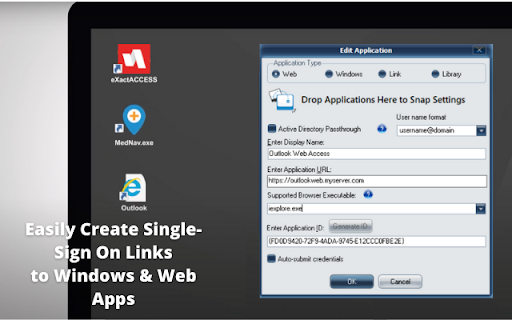
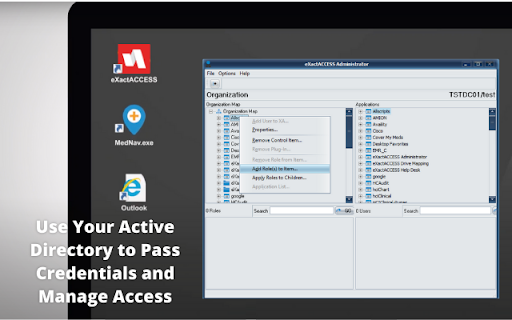


Provides Form-Fill SSO capabilities when used with Identity Automation’s RapidIdentity product Provides web automatic application integration for Identity Automation’s ExactAccess product. Identity Automation’s SnapApp offers capabilities to easily add and manage web-based applications to ExactAccess, Identity Automation’s enterprise Single Sign-On (eSSO) and clinical workflow solution. With SnapApp, you can identify, create, and modify the sign-on functions to many common Web and Windows applications. Simply enable and integrate applications for ExactAccess through the intuitive drag and drop interface— no profiler, wizard, or scripting required. In addition, SnapApp provides the ability to configure web SSO links to launch in specific browsers, add custom input fields, assign access by Active Directory groups, and more. SnapApp supports Microsoft Windows, Windows desktop applications, Internet Explorer, Firefox, Chrome, and any chromium-based web browser.

ARGOS DOM
Xpath extraction extension for ARGOS STU (HTML Action) This extension works in conjunction with the HTML Action operation in ARGOS STU (the automation scenario development software of the ARGOS Low-code platform). It visualizes and facilitates acquisition of Xpath and other various browser related information for development of ARGOS Automation Scenarios.

Anti FeR toolkit
Adds features and extensions for the bushtarion web game (formerly Canola toolkit formerly Antisback's bushtarion toolkit) This adds some functionality to the Canola toolkit, which it is forked from. Fixes the regex for Company name matching (no more oddities with names that include '@', '~', or '^'), adds information about who someone has attacked, includes stealth mobs in the activity chart, and maybe more! 1.2.22 Changes: Defaults for options set to "on" 1.2.21 Changes: Additional options for the military page and supply depot 1.2.18 Changes: Includes an options page, navigate by right-clicking the icon and selecting "Options" 1.2.13 Changes: Displays development information for technologies unlocked for a given dev/construction Shows troop count on a hack Shows a horribly formatted estimate on the flak needed to land on a target given the visible units Display information about what you are 30% and 70% of in the score breakdown overlay Show gov defense in spy report incoming (but doesn't account for when it recalls) 1.2.12 Changes: Fixes seed/income calculation Adds a button to hack from the search page in a new tab Spy report incoming/outgoing is now sorted by ETA Spy report incoming/outgoing displays original mob ETA Adds an input so that dynamic AR calculation can be done from the spy report 1.2.11 Changes: Attacks on an HQ don't show a huge number for ETA Stealth mobs sent now default to ETA 5 sent New "Plant Max" feature calculates how many seeds you are able to plant given how many gards you have home. Updates grass seed bonus in Spring 1.2.10 Changes: Fixes single person mobs not showing up on spy reports Fixes HQ incoming/outgoing not showing HQ outgoing mobs stay in the outgoing screen "until recalled", which I don't know when it is recalled so take the info as an alert more than a reality Alerts if the user does not have enough harvesters to cover the max needed (in total, not at home) 1.2.9 Changes: Reverting mob notes and loving on Alci 1.2.8 Changes: Makes mob notes on alliance incoming screen more interesting for some :) 1.2.7 Changes: Fixes score evaluation for players with public ID's Fixes military mob calculations for "all" Income calculator now reasonably accounts for exponential seed loss and nighttime seed penalty Search results include a "Total" row for acres and score 1.2.6 Changes: Fixed spy report when spying a member of your own alliance Finished searching by Public Name Added full Hack output to console debugger when hacking from Alliance incoming page Added troop cost calculation on Military page 1.2.5 Changes: Fixes score calc for insurance that is "claimable early" Alliance incoming "Defend" and "Retaliate" links are now buttons Added "Hack" button on alliance incoming to make a best guess at route and fill out incoming notes Added "Recall" button on alliance incoming to recall from alliance page 1.2.4 Changes: Add Land Fat percentage to search results Fix Alliance page incomings when AHQ! is targeted Add Unit Stats quick link in side panel Add ID list generation with search results (in console debugger output) Add "Has Attacked" information on news page 1.2.3 Changes: Alerting when the user has uncultivated acres Maintenance page additionally displays the seeds you can grow with troops home Alliance page has quick links to setup defensive or offensive mobs from the incoming screen

BBR Helper
This provides some advanced stats (game score, simple player rating and game box plus-minus) on multiple pages for NBA, WNBA, G-League, international leagues and college basketball. Including: - average stats by season on the player page - average stats by playoff series on the player page - average stats by player on the team_season page - average stats by player on the team_player page - average stats by player on the season_player page - single game/half/quarter stats by player on the game_boxscore page - single game and average stats on the gamelog and split pages - top 5 and top 20 average stats players on the season page - top 20 average stats players on the team_season page - top 20 average stats seasons rankings on the player page - top 50 career stats rankings on the player page - multiple stats rankings on the leader page - player awards column on team season page gBPM = (-0.55 * fga + 1.04 * fg3 + 1.39 * fg - 0.25 * fta + 0.79 *ft + 0.17 * orb + 0.27 * drb + 0.24 * (trb - orb - drb) + 1.34 * stl + 0.43 * ast + 0.64 * blk - 0.34 * pf - 0.95 * tov) / g """ , where orb is treated as 0.3 * trb and drb is treated as 0.7 * trb approximately when stats are not complete in early years.

Apiary - Web Highlighter & Annotator
Highlight and take notes directly on what you read online and instantly share them with friends and colleagues. Easily highlight and take notes on what you read online and then easily save them for later and share them with friends and colleagues in one click. Apiary is a free to try chrome extension based product that allows you to easily highlight and take notes on what you read online. After you have annotated something online it will be saved to your Apiary account where you can then organize in any way you like with our folder system. You can than easily share directly from the website where you took the notes or from your Apiary account later on with anyone you want. Just highlight and get a shareable link you can send to anyone with one click. When using Apiary on a website or email online you have two options. You can choose to just highlight some text or you can highlight and add a comment to that highlight. Allowing you to save and share you favorite parts and current thoughts while reading it with others. You can view your annotations live by clicking the chrome extension and having the Apiary sidebar appear showing all the highlights and notes you have made on that page. Or you can view them later in your Apiary account where we save all the contents of what you were reading and the highlights and notes you took. Allowing you to get the full context of whatever you were taking notes on. Annotate, save, and share what you read online instantly today. ----------------------------------------- Key Features: Web and Email Highlighting Take Notes On What You Read Online Apiary Account Access With Organization Systems Quick and Easy Shareable Notes Private Notes That Only You Can See Automatically Saving Notes ------------------------------------------- How To Use: In order to use the Apiary Chrome Extension you will need an account with Apiary. Please visit www.myapiary.io to create an account today. 1) Create An Account On Apiary (www.myapiary.io) 2) Download Chrome Extension 3) Sign Into Chrome Extension w/ Your Apiary Account 4) Select Text (Left Click & Drag) You Wish To Annotate 5) Click On Apiary Popup To Either Highlight Or Take Note On Selected Text 6) Delete An Annotation By Clicking On A Highlight And clicking Delete Icon 7) Share Your Notes For A Page By Clicking The Apiary Share Button On Bottom Left Corner Of Window 8) View A Note By Either Visiting Your Apiary Account Or By Clicking View On A Currently Annotated Web Page ------------------------------------ Pro Tips: 1) Make Sure You Are Logged Into Apiary Chrome Extension If You Are Having Issues Annotating 2) Organize Your Notes Into Folders On Apiary To Easily Find Notes Later 3) Share Your Notes With Friends By Clicking Share Button And Sending Link To Friends. --------------------------- Got Feedback? Please reach out to us at support@myapiary.io If you find bugs please let us know at https://forms.gle/rHvoLZwaXfVcbAMJ7. If you have a feature request please let us know at https://forms.gle/vguFD2Rxi2FCsSQi8. By installing the extension, you agree to Apiary's Terms of Service, Privacy Policy, and Community Guidelines (which can be found here: https://www.myapiary.io/term-services and https://www.myapiary.io/privacy-policy)
