
nglaklhklhcoonedhgnpgddginnjdadi
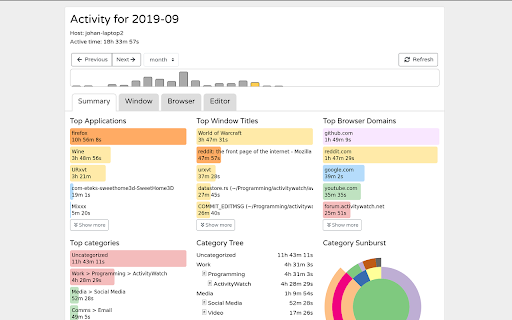
Log the current tab and your browser activity with ActivityWatch. A browser plugin that extends ActivityWatch with the ability to keep track of how much time you spend on the web. NOTE: Requires you to have ActivityWatch installed on your computer!

Watchtime Tracker
Track your activity on Youtube and Twitch Unlock your YouTube and Twitch viewing habits with this Chrome extension! Seamlessly track your watch time, video count, and more, all synced across your devices. For YouTube: - Monitor your actual viewing time. - Keep track of your video count. - Discover your Top 10 channels. - View your average daily watch time. For Twitch: - Track your watch time for each streamer. Keep all your statistics at your fingertips across multiple platforms with a handy sync feature.

Web Activity
Use Web Activity tool as your website time tracker to check your screen time, page views and get web based time tracking. 🌐 Introducing Web Activity - your ultimate web time tracker and productivity enhancer! 🚀 ➤ Elevate your online experience with web time tracker extension, empowering you to take control of your digital life. With tailored features to boost productivity, manage web screen time, and protect privacy, it's the ultimate solution for a healthier relationship with the Internet. 🚀 🧑💻 How to make the most of web activity: 1. Quick Setup: Install extension pressing the button Add to Chrome. 2. Personalization: Customize settings easily to suit your preferences. 3. Monitor: Keep an eye on your web activity and track your progress in real-time. 4. Analyze: Explore the analytics dashboard to gain insights from your data. 5. Improve: Use these insights to optimize your online habits, boost productivity, and overcome web addiction. 💡 Key Features to Transform Your Experience: ✨real-time tracking: Stay informed with instant updates on your web activity, providing valuable insights into your browsing habits. ✨ custom time limit: Manage your screen time effectively with a browser time tracker, setting personalized limits and web timer for browsing sessions, ensuring a balanced digital lifestyle. ✨ website blocking: Eliminate distractions by blocking specific websites during designated periods, promoting deep focus and concentration. ✨ comprehensive analytics: Gain understanding into your browsing behavior with detailed analytics, allowing you to make informed decisions about your digital habits. ✨ privacy protection: Enjoy unparalleled privacy and security with web based time tracking. 🔍 Effortlessly track Your web activity ➤ Web activity is your essential web analytics in the digital world. It quietly records your website visits using a website time tracker, offering valuable insights for professionals and students alike. ➤ Take control of your browser screen time, block distractions, and create a focused digital environment. With this extension, managing your online habits has never been easier. 📈 Manage your screen time like a pro ➤ Struggling to stay focused in a sea of digital distractions? Web Activity empowers you to take charge of your screen time. Set personalized time limits, block distracting websites, and create an environment conducive to deep concentration. ➤ Effortlessly monitor your progress and make adjustments as needed. With screen time tracker, you'll conquer procrastination and maximize your productivity like a true professional. ⏱️ Unlock Insights with web analytics ➤ Explore your browsing habits with web activity advanced web analytics dashboard. Identify trends, track your most visited websites, and gain invaluable insights into your online behavior. ➤ Armed with this knowledge, optimize your digital resources and browsing experience. Make informed decisions to enhance productivity and efficiency in your web usage statistics. 🔒 Privacy and Security First ➤ Rest easy knowing that web activity prioritizes your privacy. Operating locally within your browser, it ensures your personal data remains secure and confidential. ➤ Your browsing activities stay on your device, protected from unauthorized access and outside interference. - Top-rated web activity tracking extension. - Fast and accurate screen time tracker for enhanced productivity. - Effortlessly track website usage and browsing habits. - Enhance your focus with customizable features in a distraction free environment. 💻 Feature Highlights to Elevate Your Experience: 🌟 Privacy Protection: Rest assured knowing that Web Activity prioritizes your privacy, operating locally within your browser to safeguard your personal information. 🌟 Seamless Integration: Enjoy a seamless integration into your browsing experience, effortlessly tracking your online journey without intruding on your workflow. 🌟 Intuitive Customization: Tailor web activity tool to suit your preferences with intuitive customization options, ensuring a personalized and optimized browsing experience. Stay tuned for future updates as we continue to enhance Web Activity with new features and ensure compatibility with the latest advancements in web technology. 💡 This extension tracks your browser usage in real-time, providing insights into the websites you visit and the time you spend online. 💡 Yes, web activity is free to download and use. 💡 To install web time tracker, press the button "Add to Chrome". 📌 Is my data secure with Web Activity? 💡 Yes, it operates locally within your browser, ensuring the privacy and security of your personal information. 📌 Can I track website usage with it? 💡 Yes, this tool provides comprehensive analytics on website usage, allowing you to gain insights into your browsing habits and see total time spent browsing. 📌 Does it work with incognito mode? 💡 Web Activity may not track activity in incognito mode, as it operates within the browser's standard mode 🚀 Take control of your digital life with web activity Ready to take control of your online experience? Download our tool today and experience the difference for yourself. Whether you're aiming to boost productivity, manage browser screen time, or protect your privacy, this comprehensive tool, complete with a web timer, has everything you need to succeed in the digital world.

Freework Time Tracking & Task Management
Extends the Freework Web-App to track your Time and manage your Timesheet from the Browser! Freework is where your digital HQ lives. It's the place to connect everyone in projects so teams can deliver better results, faster. Freework aims to streamline the management of teams and projects for businesses, in order to simplify and speed up the planning and supervision of projects. We enable project based companies to work even more efficiently and easily - with one product.

AppScan Activity Recorder
Record traffic and actions to use in an AppScan Dynamic Analysis scan Use the AppScan Activity Recorder to record traffic and actions for use in an AppScan Dynamic Analysis scan. Capture manual crawl, login, and multi-step data (traffic and actions). Recording Traffic: To record browser activity, 1. Before recording, log out from the site you intend to record and disable auto-sign in/auto-fill from Chrome settings. This enables the extension to record all browser tab activity. 2. From the Chrome Web Store, click Add to Chrome to add the recorder extension to the Chrome browser. 3. Open the website you want to record. 4. On the address bar, click the AppScan Activity Recorder extension icon to start recording the browsing activity. The AppScan extension icon blinks indicating it is recording the activity. Note: The extension icon’s tooltip displays the domain URL being recorded. This is particularly useful when you are accessing different sites in the same Chrome browser instance. 5. Perform the browsing activity, leaving the system tray window open. This extension records browser traffic including request/response and user actions. The scope of recording is only for the tab where the extension is invoked; no activity is recorded for other tabs. 6. To stop recording: • Click the AppScan extension icon to stop recording, or • Click 'Cancel' in the Chrome debugging message dialog box. The extension prompts you to save the recording in *.dast.config file format. Extension Options: The AppScan Activity Recorder extension includes options to view recording activity in a debugger window and to enable encryption. To set AppScan Activity Recorder options: 1. Open the Options page: a. Right-click the extension icon and select 'Options', or b. From the Chrome Extensions management page, select 'Details' > 'Extension options' for the extension. 2. Select options. • Debugger Selection: • Show debugger during recording: Show user activity in a separate window. In normal mode (without the debugger window enabled), the system tray window displays recording information only. • Encryption Selection: • No Encryption: Recorded data will not be encrypted. • Default Encryption: Encrypt the recording to prevent exposure of sensitive recorded information. Uses a common mechanism supported across all environments. Encrypted recorded files with Default Encryption are supported in HCL AppScan Enterprise version 10.4.0 and above, HCL AppScan on Cloud, and any HCL AppScan integrations (HCL AppScan Jenkins and HCL AppScan Azure DevOps Plugins, for example) that integrate with HCL AppScan Enterprise and HCL AppScan on Cloud. • Advanced Encryption: Utilizes an environment-specific encryption mechanism to prevent exposure of sensitive recorded information. This option reveals additional product selection options. Encrypted recorded files with Advanced Encryption are supported in HCL AppScan Enterprise version 10.10.0 and above, HCL Appscan 360° version 2.0.1 and above, HCL AppScan on Cloud, and any HCL AppScan integrations (HCL AppScan Jenkins and HCL AppScan Azure DevOps Plugins, for example) that integrate with HCL AppScan Enterprise, HCL Appscan 360° and HCL AppScan on Cloud. • Product Selection (Visible only if Advanced Encryption is selected): • AppScan on Cloud: Allows selection of the US or EU region for AppScan on Cloud. • AppScan on Premises or Private Cloud: Provides input fields for up to three deployment URLs. At least one URL is mandatory if this option is selected. 3. Click 'Save'. Saves the selected options to Chrome's local storage. If 'Advanced Encryption' is chosen, • Validates that at least one product is chosen and, if "onPrem" is selected, at least one URL is provided. • Fetches and validates encryption keys from the provided URLs or region endpoints. • Access to these URLs or region endpoints is essential for saving the options. The saved options will then be used for subsequent recordings. Notes: • Analysis of recordings from websites using HTTP/2 is not currently supported. • On Chrome Version 84.0.4147.105 (Official Build released on July 28th, 2020) (64-bit) and newer, the info banner lingers after the recording is stopped explicitly via the AppScan Activity Recorder icon. This does not hamper the saved recording or the extension functionality in any way. The Chrome Web Store Dev Support team has confirmed this as an intentional change. Click 'Cancel' to dismiss the banner. • The "runtime_blocked_hosts" extension settings GPO policy to validate the URL to record traffic is not supported from version 2.0.0. Changelog: • 2.1.0 - Support for environment-specific encryption. • 2.0.1 - Bug fixes • 2.0.0 - Migrated from Manifest V2 to Manifest V3 • 1.1.0 - Support to encrypt recorded files. - Bug fixes. • 1.0.10 - Updated AppScan icons. • 1.0.9 - Support for adding browser version and debug option to recorded traffic file. - Bug Fixes related to GPO support. • 1.0.8 - Support for "runtime_blocked_hosts" Extension settings GPO policy to validate the URL to record traffic. Follow instructions in “Set Chrome app and extension policies (Windows)” in this link: https://support.google.com/chrome/a/answer/7532015 to set "runtime_blocked_hosts" Extension settings GPO policy in Chrome Browser. Follow instructions in “Configure Microsoft Edge policy settings on Windows” in this link: https://docs.microsoft.com/en-us/deployedge/configure-microsoft-edge to set "runtime_blocked_hosts" Extension settings GPO policy in Edge Browser. - Capture AppScan Activity Recorder version info in recorded traffic file. • 1.0.7 - Fixed a bug to resolve issues wherein partial headers and HTML response were being captured in recorded traffic files. • 1.0.6 - Support for the new Edge version released on January 15th, 2020 and downloadable from "https://support.microsoft.com/en-in/help/4501095/download-the-new-microsoft-edge-based-on-chromium". Follow instructions in “To add an extension to Microsoft Edge from the Chrome Web Store” in this link: "https://support.microsoft.com/en-us/help/4538971/microsoft-edge-add-or-remove-extensions" to install AppScan Activity Recorder extension in Edge. • 1.0.4 - Support to start recording from a blank URL. • 1.0.3 - Support for log window to record cookies, actions and the requests being hit. • 1.0.0 - First release
