
ngcligbdheofopbokngenlgdpalociaf

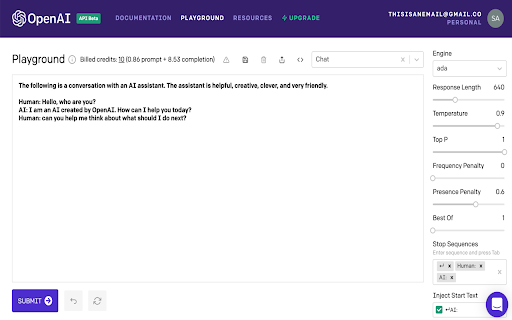
Dynamically count tokens and visualize your spend in OpenAI's Playground. 100% client side and secure. For feedback: saharmor.info OpenAI's playground is where every GPT-3 powered app starts. Token-based pricing was introduced yet it's hard to track and understand how much you're expected to pay at the early stages of building your app within OpenAI's Playground. The code for this extension can be found here https://github.com/Saharhash/TokenAware

PromptSync
Ask ChatGPT, Bard AI, and Bing Chat with one single prompt! Unlock the power of four dynamic chat platforms with a single prompt! Introducing PromptSync, your all-in-one solution for chatting with ChatGPT, Bard AI, and Bing Chat, through a convenient Chrome extension. Multi-Platform Chat Engage in conversations effortlessly with ChatGPT, Bard AI, and Bing Chat from a single prompt. Get diverse perspectives and responses to your queries. Customizable Experience Tailor your chat experience to your liking! Enable or disable individual chat platforms according to your preferences through the settings menu. Efficient Workflow Streamline your workflow by accessing multiple chat services without switching tabs. Save time and stay productive as you harness the combined intelligence of four powerful chat systems.

Codefaster
A power packed productivity tool made with ❤️ by developers for developers. CodeFaster is a fast and simple snippet manager that makes it easy to save code snippets from across the web.! Using CodeFaster extension, you can save your own code snippets from any website, in any format, and even in multiple programming languages. You'll never have to worry about searching for already solved code again! To save the snippet. you can save the snippet from across the web in two ways. One is by clicking on the CodeFaster Blue icon that appears next to the code blocks. Another way is, select the text you want, and then right click, and then click on "Save Code Snippet" option. Snippet sharing. Sharing snippet is super simple in CodeFaster. All you've to do is, just click on the share icon and then copy the link and send it. That's it! Smart Snippet search No more digging through the notepads or word files for searching the code snippet. Using CodeFaster smart search feature, you can easily search all your code snippets in lightning speed. Also, you don't have to enter the exact term for searching snippet, whatever the terms you provide, it'll give the results similar to the query you searched. Save, search and share code snippets faster with CodeFaster! The extension is now available for Chrome, Firefox and Edge. Currently CodeFaster extension supported search engines are: Google, Bing, DuckDuckGo and Ecosia. So what you're waiting for? Download the CodeFaster extension now to make your development process a lot faster and more efficient!

DALL-E prompt helper
Add this extension to your DALL-E prompt to help you find the right prompt. Have you got access to the amazing DALL-E interface but struggling creating high quality renders? Looking for a creative prompt? Stuck? Look no further than Prompt helper! With over 270 carefully picked prompt styles, vibes, moods, inspiration keywords and GPT-3 autocomplete, this extension is perfect for anyone who needs a little help getting started. Plus, dark mode makes it easy on the eyes. Prompt helper FEATURES: ✨ Over 270 keywords for creative prompts ✨ Quality enhancing keywords ✨ Photography related angles, lightning, shot compositions ✨ Digital and 3D keywords ✨ Characters prompt 🤖 Have a GPT-3 API key? Get autocomplete and synonym help on the fly as you construct your prompt! Quality of Life features: 🌟 Dark mode for the DALL-E UI (including automatic dark mode detection) 👩💻 Download a zip of current generations + prompt. 📸 Enable / Remove the Dall-E watermark (it's now allowed in their TOC!) 🔗 Webhook support! Send your results to Zapier (and then Notion, Twitter, anywhere really)

GPT3-slack
GPT-3 for slack web There is an extension for Slack web to check the grammar of your messages. 1.Get your API key from OpenAI's website: https://openai.com/api/ 2.Click on the extension icon. 3.Paste your key and save. 4.Open Slack in your browser. In the input box, the trencher cap icon is for correcting grammar and the light bulb Icon is for text generation. 5. Enjoy! Updated: - We are now utilizing the chatGPT model from OpenAI in order to reduce costs. - There has been an update to the OpenAI policy, and as a result, data cannot be used for model training. For more information on this policy change, please refer to https://platform.openai.com/docs/guides/chat/do-you-store-the-data-that-is-passed-into-the-api.
