
nffagbebpbdnnenokhipflofkfblggho
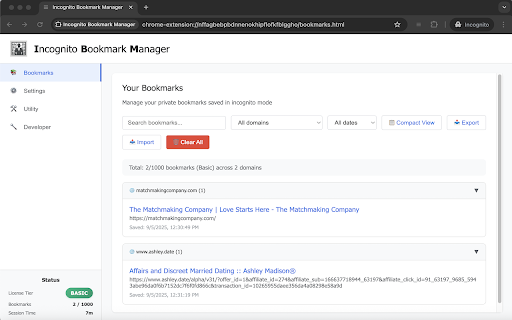

Privacy-focused bookmark manager for incognito browsing with secure temporary storage **Incognito Bookmark Manager - The Ultimate Privacy-First Bookmark Solution** A revolutionary bookmark manager designed exclusively for incognito browsing, ensuring your private bookmarks remain truly private with zero network calls and complete offline operation. **🔒 PRIVACY-FIRST DESIGN:** • Works ONLY in incognito mode - your private browsing stays private • Session-based storage automatically clears when incognito windows close • No tracking, analytics, telemetry, or external data collection • 100% offline operation - never connects to the internet • Optional persistent storage for power users **⚡ CORE FEATURES:** • One-click bookmarking with auto-filled page details • Smart text capture from selected content as bookmark notes • Quick save with keyboard shortcut (Ctrl+Shift+S / Cmd+Shift+S) • Domain-based organization with collapsible folder structure • Advanced real-time search across titles, URLs, tags, and notes • Date-based filtering and comprehensive bookmark statistics • Cross-tab synchronization for seamless multi-window experience • Intelligent duplicate detection prevents saving the same URL twice **💎 FREEMIUM LICENSING TIERS:** • **Free Tier**: 100 bookmarks with JSON export/import • **Basic Tier**: 1,000 bookmarks with enhanced features • **Plus Tier**: Unlimited bookmarks + AES-256-GCM encryption • Revolutionary offline license validation protects your privacy • **Pricing & Licenses**: https://incognitobookmarks.com/pricing **🔐 PREMIUM ENCRYPTION (Plus Tier):** • Password-protected exports with military-grade AES-256-GCM encryption • Secure .ebm file format with custom binary structure • Password strength validation and toggle visibility • Import encrypted bookmarks with secure password dialogs **🛠️ UTILITY FEATURES:** • Merge multiple JSON bookmark files with smart duplicate detection • Intelligent tag and note consolidation for matching URLs • Batch processing with detailed statistics reporting • Professional Chrome-style interface with comprehensive settings **⌨️ PRODUCTIVITY SHORTCUTS:** • Ctrl+Shift+I (Cmd+Shift+I): Open bookmark manager • Ctrl+Shift+S (Cmd+Shift+S): Quick save current page • Chrome notifications confirm successful saves **🎯 PERFECT FOR:** Professional users, researchers, journalists, students, privacy advocates, and anyone who values data sovereignty and wants their private browsing to stay truly private. **✨ LATEST v9.7 FEATURES:** • Enhanced onboarding with step-by-step incognito setup guide • Improved status checking and comprehensive error handling • Direct purchase integration for seamless license upgrades • Resolved all content security policy issues for maximum reliability Your private bookmarks deserve private storage. No cloud, no tracking, no exceptions.

Abookmark - advanced bookmark manager
Advanced bookmark manager and tab organizer to enhance the native bookmarks and tabs - Cooperate with native bookmark system. - Labels/Tags. - Spread view & top bar. - Advanced search. - Recent bookmarks. - Link replacing. - Tab / session managements. - Tabs as bookmarks. - Side panel & vertical tab bar with tab groups. - Workspace. - Data view. Copy bookmark or tab information to the clipboard. - Data text editor. (edit bookmarks in your favorite text editor) - Extract links from web page. - Keyboard shortcuts. - Link hint. (vi-like keyboard) - Bookmark keywords - Add new bookmark at the top. - Export any bookmark folder. - Import selected bookmarks from a file. - Monthly backup. - Auto sync. Abookmark is a professional bookmark viewer and manager. It has a manager page similar to the native bookmark manager and a navigation page similar to the native bookmark bar. And it is also a tab and session manager at the same time. What does a typical tab manager look like? They save tabs in one place, and then close tabs. These saved tabs can be divided into groups, which are called workspaces. You can reopen these tabs later, or open the entire group. They also provides simple data management functions, such as deleting, renaming, and moving between groups. What is the essence of this saved data? It's just a list of web addresses. In fact they are bookmarks. The so-called workspace is in fact a bookmark folder, and the so-called tab manager is a simplified bookmark manager. So, why can't you just use the bookmark manager to manage tabs? This can have a number of benefits: 1. More flexible data structure. Bookmarked folders can be nested, you may call it sub-workspace if you want. 2. More comprehensive data management functions. 3. More secure data storage. 4. Automatic data synchronization. Browsers usually come with a synchronization feature for bookmark data, which can even be used on mobile phones. 5. Cooperation between tabs and bookmarks. Of course, some of the details of tab management are unique, which requires the bookmark manager to add corresponding support. In fact, some users already use the native bookmark management system to manage tabs manually, and there are also tab management plugins that are dedicated to saving tabs as bookmarks. Abookmark goes one step further by abstracting bookmarks and tabs into nodes. Bookmarks are sleeping tabs, while tabs are active bookmarks. Tabs can also be manipulated through the tab nodes, and tab groups are mapped to folders. Using tab nodes on the side panel is similar to the vertical tab bar of Edge, but with the ability to communicate with bookmarks. Abookmark offers a high degree of freedom, which is a double-edged sword. In addition, Abookmark also offers some advanced features. New users should familiarize themselves with the basic logic before gradually exploring more powerful features. All your bookmarks are stored in your browser system. Abookmark does not transfer them to anywhere else.

Bookmark Manager
This is the Chrome extension for BookmarkManager.com, a standalone bookmark manager that uses tags to organize and rediscover links. The extension makes it super easy to add new bookmarks and find existing ones.

SmartTab - Tab Manager & History Search
Tab manager that searches inside tab content. Organize unlimited tabs, restore closed tabs & browse with complete privacy The ultimate tab manager for Chrome. SmartTab revolutionizes tab management with full-text search inside tab content, smart organization, and complete privacy. Revolutionary Tab Search Unlike other tab managers, SmartTab searches INSIDE tab content, not just titles. Lost that React article in 50+ tabs? Find it instantly by searching any text you remember. The only tab manager with true full-text search. Lightning-Fast Tab Manager - Instant popup (0.3s) - manage tabs without leaving current page - Alt+H opens tab manager from anywhere - Real-time search as you type - Zero lag, maximum speed Smart Tab Organization - Tab Folders - Unlimited folders for project-based tab management - Auto-Grouping - Tabs organized by domain automatically - Bulk Operations - Select multiple tabs to manage at once - Time Filters - Find tabs from last hour, day, week, or custom range - Duplicate Finder - Close duplicate tabs in one click Advanced Tab Tools - View all tabs with status indicators (active/audio/pinned) - Restore closed tabs (last 25 saved) - Cross-window tab management - Tab memory warnings - Complete keyboard shortcuts for power users 100% Private Your tabs stay yours. All data stored locally. No servers, no tracking, no accounts required. Optional Chrome Sync for favorites only. Tab Sessions & Backup Export/import tabs and settings. Transfer tab workspaces between devices. Never lose important tab sessions again. SmartTab captures searchable content from every tab, creating your personal knowledge base. Our algorithm prioritizes: - Title matches (highest relevance) - URL/domain matches - Content matches with context - Recent visits - Exact phrases 🎯 Perfect For - Researchers - Find sources by concepts, not titles - Developers - Search error messages across documentation tabs - Students - Organize study tabs by subject - Professionals - Manage work tabs efficiently - Anyone with 20+ tabs open 🚀 Quick Start 1. Install & pin SmartTab 2. Browse normally - auto-saves tabs 3. Press Alt+H to search everything 4. Use "/" for instant search SmartTab - The tab manager that transforms your browser into a searchable workspace. Complete privacy, instant access, intelligent organization. *Your tabs, your privacy, your control.*

iBookmark - Bookmarks, Chrome Bookmark Manager
A high-efficiency tool for quick browsing, searching, and managing Chrome bookmarks A high-efficiency tool for quick browsing, searching, and managing Chrome bookmarks. All bookmarks are displayed in a flat list, which is more efficient and intuitive than the traditional tree menu.
