
nfbclpbgjcnjlpmochahaenmmidleoog

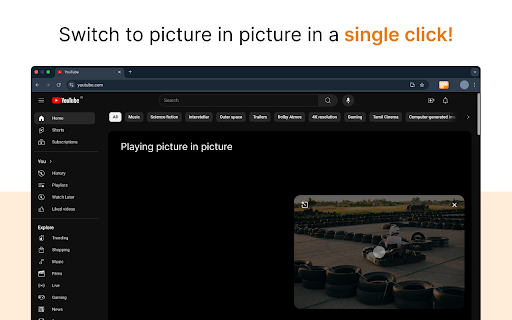

Picture in Picture Extension for Chrome enables you to view videos from a floating popup When activated, the video pops out into a floating player that remains visible as you browse other sites, work in different tabs, or scroll through content. Compatible with YouTube, Netflix, Twitch, and most websites with video. Key Features: 🖵 Seamless Picture in Picture Mode: Watch videos from any platform in a mini, resizable window that stays on top of other apps, allowing you to multitask with ease. 🖵 Works on All Video Sites: Whether you’re streaming from YouTube, Netflix, or your favorite video site, the PiP mode supports them all. Simply click on the extension to pop the video out of its original window. 🖵 Always On Top: The PiP window stays visible no matter what you’re doing, so you can keep watching videos while working, browsing, or even gaming. 🖵 Lightweight & Fast: The extension is lightweight, ensuring it doesn’t slow down your browser or take up unnecessary resources. 🖵 User-Friendly Interface: One-click activation and smooth transitions ensure that PiP mode is easy for anyone to use. Why Install? 🔆 Boost Your Productivity: Multitask like a pro! Watch tutorials, webinars, or live streams while handling emails, browsing the web, or working on documents. 🔆 Watch Anywhere: PiP mode allows you to continue watching videos even when you switch tabs or minimize your browser. 🔆 Convenient for All Users: Whether you're a student, professional, or casual user, Picture in Picture mode improves your video-watching experience without interruptions. How It Works: ⭐ Open any video from any site. ⭐ Click on the "Picture in Picture Extension for Chrome" icon on your Chrome toolbar. ⭐ The video will pop out into a floating, resizable window. ⭐ Continue browsing, working, or gaming while watching your video! Why Picture in Picture? If you’re tired of switching tabs to keep an eye on your favorite videos, this extension is for you. It’s perfect for staying productive while keeping up with the latest content. Whether you’re a multitasking enthusiast or just looking for a more convenient way to watch, our PiP extension brings flexibility to your video experience. No more interruptions – just seamless viewing! Install now and unlock the power of multitasking with Picture in Picture mode!

Dolphin Assistant
A chatbot extension to do on-site search and answer user query. 🐬 Dolphin Assistant – Smart On-Site Search and AI Chat Companion Tired of wasting time searching for information on complex websites? Buried content, hard-to-navigate directories, and outdated on-site search engines can be frustrating… Dolphin makes finding what you need a breeze. Just ask a question, and Dolphin will provide precise answers by deeply understanding the site’s content. Top search results will instantly guide you to the right pages, making your browsing experience smooth and effortless. ✨ What's the key features? - Smart On-Site Search: Powered by advanced LLMs, Dolphin understands your search intent and delivers relevant, high-quality results that lead you directly to the information you need. - AI-Powered Q&A: Ask questions, and Dolphin will instantly provide accurate, context-aware answers based on the website’s full content—no more endless scrolling. - Save Time and Boost Productivity: Dolphin eliminates the hassle of sifting through irrelevant content, allowing you to find information faster and more effectively. - A Pleasant Browsing Experience: Turns a frustrating task into a smooth and intutive experience. - Professionals, Researchers, and Students: Anyone who needs fast, reliable information on complex websites. - Anyone Struggling with Clunky, Outdated On-Site Search: If you've ever been frustrated by poor search results, Dolphin will help you navigate and find the right answers. 1, Click “Add to Chrome” and pin Dolphin for quick access. 2, Log in or create a Dolphin account. 3, Start your 7-day free trial—no payment information required. 4, Browse smarter with Dolphin Assistant!

Content Compass AI
Are you a YouTube creator struggling to understand what your audience really thinks and feels? Generic comments and basic analytics don't tell the whole story. Content Compass AI is your essential Chrome Extension to effortlessly decode audience feedback and supercharge your content strategy. Transform Your Feedback Loop with AI: Content Compass AI uses the power of Artificial Intelligence to go beyond surface-level metrics. Understand viewer sentiment, uncover key discussion topics, identify burning questions, and generate targeted feedback surveys – all within your browser. 🧠 AI Comment Analysis: Dive deep into your comment section! Automatically analyze viewer comments for overall sentiment (Positive, Negative, Neutral), identify key themes and topics being discussed, extract viewer questions, and even get AI-generated content ideas inspired directly by your audience. 🤖 AI-Powered Survey Generation: Need specific feedback? Get unique survey questions tailored to your video content with a single click. Save hours compared to manual survey creation! 📝 Seamless Google Forms Integration: Automatically create professional-looking surveys directly in your Google Forms account. No complex setup required. ✂️ Customizable Questions: Easily edit, add, or remove AI-generated survey questions. Choose from various types like multiple-choice, checkboxes, and paragraph answers. 🔗 Easy Sharing Guidance: Copy your survey link instantly and get tips on sharing it effectively in your YouTube video description, cards, end screens, and community posts. 📊 Simple History Tracking: Keep a record of all generated surveys and analyses for your videos right within the extension. Uncover True Sentiment: Understand the feeling behind the comments, not just the words. Identify Key Topics: Instantly know what resonates most with your viewers. Answer Viewer Questions: Easily find and address questions hidden in the comments. Spark Content Ideas: Let your audience's feedback inspire your next hit video. Save Valuable Time: Automate comment analysis and survey creation. Gain Deeper Insights: Combine qualitative comment analysis with targeted survey feedback. Improve Your Videos: Use specific feedback to enhance content quality, clarity, and engagement. Grow Your Channel: Make data-driven decisions for your content strategy. Get Started for Free! 🎁 Start Your FREE 7-Day Trial Today! Install now and get 10 FREE credits to experience the full power of Content Compass AI. Analyze comments or generate a survey for your next video!

Linkedin Carousel Generator by Makemybrand
Generate LinkedIn Carousel posts from your LinkedIn Home Page. 𝗠𝗮𝗸𝗲𝗠𝘆𝗕𝗿𝗮𝗻𝗱 𝗟𝗶𝗻𝗸𝗲𝗱𝗜𝗻 𝗖𝗮𝗿𝗼𝘂𝘀𝗲𝗹 𝗖𝗿𝗲𝗮𝘁𝗼𝗿 Transform Your LinkedIn Presence with Eye-Catching Carousels MakeMyBrand is the ultimate Chrome extension for professionals looking to elevate their LinkedIn presence. Create stunning carousel posts directly from your LinkedIn Home Page with just a few clicks. Choose from dozens of professionally designed templates and customize them to match your personal brand. 🚀 Why LinkedIn Carousels Matter LinkedIn's algorithm favors engaging, visual content—and data shows 𝗣𝗗𝗙 𝗰𝗮𝗿𝗼𝘂𝘀𝗲𝗹𝘀 𝗿𝗲𝗰𝗲𝗶𝘃𝗲 𝟯𝘅 𝗺𝗼𝗿𝗲 𝗰𝗹𝗶𝗰𝗸𝘀 𝘁𝗵𝗮𝗻 𝘀𝘁𝗮𝗻𝗱𝗮𝗿𝗱 𝘁𝗲𝘅𝘁 𝗽𝗼𝘀𝘁𝘀. Stop publishing content that disappears into the void. With MakeMyBrand.ai, transform your expertise into attention-grabbing carousels that stop the scroll, spark meaningful conversations, and amplify your message. 🔥 Key Features • Professional Templates: Access dozens of expertly designed carousel templates • Seamless Integration: Create directly from your LinkedIn Home Page • Quick Creation: Transform ideas or blog content into polished carousels in just 2 minutes • Ready-to-Post PDFs: Generate publication-ready PDF carousels without design skills 💪 Perfect For • Individuals building their personal brand and thought leadership • Teams looking to enhance their company's LinkedIn content strategy • Marketing Agencies managing multiple client accounts and needing efficient content solutions 📈 The LinkedIn Success Formula LinkedIn's algorithm rewards consistency—posting 20 quality pieces per month significantly increases your reach and engagement. But creating that volume of high-quality content can be overwhelming. MakeMyBrand.ai helps you: • Maintain this ambitious posting schedule without burning out • Transform ideas into polished carousels in minutes • Make daily posting feel effortless and enjoyable rather than exhausting 🏆 Build Your Professional Legacy • Become a Recognized Voice: Break through the noise and establish yourself as a trusted thought leader in your industry • Create a Memorable Brand: Develop a distinct visual identity that makes your content instantly recognizable • Attract Opportunities: Open doors to speaking engagements, podcast interviews, consulting requests, and partnership offers 👑 Stand Out From the Crowd In today's competitive professional landscape, standing out matters more than ever. MakeMyBrand.ai ensures your content isn't just seen—it's remembered. Create carousel posts with relatable content, attractive visuals, and strategic call-to-action elements that drive real engagement. 🔄 From Idea to Impact in Minutes 1. Navigate to LinkedIn 2. Click the MakeMyBrand.ai extension icon 3. Choose your template 4. Input your content or blog URL 5. Download and post your professional carousel Start creating content that builds your professional reputation and attracts career-defining opportunities.

Clickn✘™ – Your Smart 𝕏/Twitter Booster
Achieve 5 million impressions in 3 months? No problem with the right strategy and Clickn✘™. Clickn✘™ makes engaging and growing on 𝕏/Twitter effortless with 1-click replies. Whether you're managing a brand, growing your influence, or simply staying active, Clickn✘™ helps you interact smarter, faster, and with less effort. Easy 1-Click Replies: Choose your response style, pick a tweet, click "Generate Reply", and you're done. Save time while keeping your audience engaged and your 𝕏 growing. Automatic Language Recognition: Seamlessly interact in any language without switching settings—Clickn✘™ recognizes and adapts automatically. Free Credits for Everyone: Enjoy 10 credits per month as an unregistered user, or 50 credits per month when registered—no strings attached. New for PRO Users: Unlock the "VIRAL" response style for higher visibility and more impactful engagement. Effortless Engagement: Automate your replies, manage usage easily, and maintain a consistent presence with minimal effort. Personalized Responses: Tailor your tone with different styles—Friendly, Sarcastic, Thoughtful, or Viral. Scalable Solutions: Perfect for individuals, influencers, and businesses. Clickn✘™ scales with your growth. Start enhancing your 𝕏/Twitter experience today with Clickn✘™ and make every interaction count.
