
nfafjmamdfmgoggddemafpemhebiphid
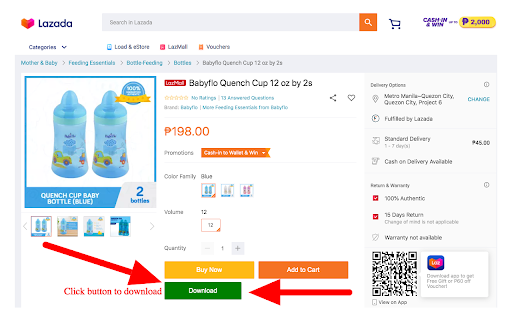
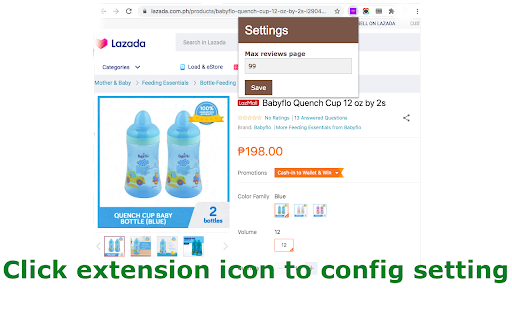

Download all the product images & videos on Lazada With one easy click to download all the product images & videos on websites Lazada. Important: Go to Chrome Settings and turn off "Ask where to save each file before downloading." ---------------------------------------------------------------------------------- By using this add-on, you agree to Terms & Privacy available at https://www.aliimagesdl.com/privacy-and-cookies-policy

Lazada Images Downloader
Effortlessly download high-res Lazada product images in bulk, enriching ecommerce content and digital libraries instantly. The Lazada Images Downloader is a powerful, user-friendly browser extension designed to streamline the process of downloading high-resolution product images from Lazada. This tool is perfect for anyone looking to collect images for design projects, printing, archiving, or simply for those who enjoy browsing vast product selection. Key Features: - One-Click Download: Easily download all images associated with a product with a single click. - Versatile Download Options: Choose to download images individually or in a zip file for bulk downloading convenience. - No Technical Skills Needed: The extension is designed to be simple to use, requiring no coding knowledge. - High-Quality Images: Obtain high-resolution images suitable for a variety of uses. - Privacy-Focused: Your data remains on your local machine; our servers are not involved in the process. How It Works: Here's how you can quickly get all the listing images from a given product: 1. Navigate to a product page on Lazada.com. 2. Click the “download icon” located at the top left of the product listing images. 3. A popup window will appear, displaying all the product listing images. From here, you can download them one by one or opt for a bundled zip file for all images. Whether you're a casual shopper, a power user, or a shop owner, this extension is tailored to meet your needs. It simplifies the process of obtaining product images, saving you time and effort. We prioritize your privacy. The images and data you download are confined to your local machine, ensuring that your information remains private and secure. Get Started: Bring the vibrant array of Lazada images to your desktop with just one click! This extension is not just simple; it's a powerful tool that enhances your image saving experience. Download the extension today and experience the ease of collecting high-quality product photos without any hassle. Disclaimer This extension is an independently developed product by ExtensionsBox and has no association with Lazada.

Lazada Save - Download Product Images & Video
Download Lazada Product Images & Videos. The most popular tool for Lazada! Save Lazada product images in one click! This extension allows you to easily save Lazada images and videos to your computer. You will be able to download product images in one click with the best quality possible! ----- GETTING STARTED ----- 1. Install the extension by clicking the "Add to chrome" button. 2. Open an Lazada product page. 3. Click on the download buttons next to the product images. ----- FEATURES ----- - Download main product images & video - Get the best quality image download ----- ADVANCED ----- - Watermark: Automatically adding watermark on image download. - Image Сompressor: Compress images with the best quality and compression. . . . If you have any questions, or suggestions to improve the app, please let us know at spcpapps@gmail.com!

Shopee Fans - Shopee Seller Assistant
shopeefans.com - An awesome assistant for the Shopee Seller. Shopee Fans:An awesome assistant for the Shopee Seller. 1、Internationalization:support Chinese Simplified, Chinese Traditional, English, etc. 2、Data Collection: simply collect and quick post that supports Shopee, alibaba, Lazada, aliexpress, etc; 3、Shop Followers: auto-following buyers, auto-filter invalid/inactive buyer and sellers; 4、Shop Switcher: easy to manage multiple shops; 5、Shopee Chat Toolkit: translation anything, notification in time; 6、Product Auto-Boost: auto-boost product, increase exposure; 7、Exchange Center: auto-exchange price, the product is controllable. 8、Image search source: You can search 1688 directly through the image, and check the Taobao source price comparison.

Lazada Images Downloader
Save time by easily downloading all product images or zip them together for bulk download. Easily download high-quality images and videos from Lazada with just a few clicks. Our Lazada Images Downloader helps you streamline the process and save time. 👨🏻💻 Features ✓ Download product images and videos without watermarks ✓ Save images to zip ✓ Get the highest quality images ⚙️ Get Started 1. Open the Product details page 2. Open this extension 3. Click the 'Download' button 🔒 Data Privacy Your data privacy is paramount. All data processing occurs on your local machine; it never transits through our servers, ensuring no one else has access to your collected data.
