
nenjmmjmglcjbiabpgjggehahbdejoon


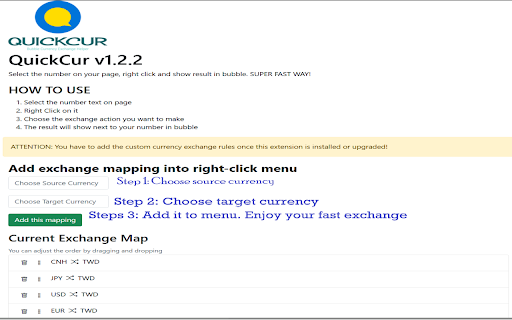

Select the number on your page, right click and show result in bubble. SUPER FAST WAY! Quick Cur - Bubble Currency Converter ----------------------------------------------------------------------------------- Suffer from calculating price when shopping in foreigner website? Try this! Select the number on your page, right click then select the currency mapping. Result will show in bubble. SUPER FAST WAY! [ How To Use ] 1. Select the number on page even include other characters. This tool can read the number 2. Right Click on it 3. Choose the exchange action you want to make ★ In option page, you can create your favorite currency map! * v1.3.0 * Now user can see recent exchange record * v1.2.5 * Rename the package name in Eng. * Add feedback page. * v1.2.4 * Fix the issue that menu is gone when extension upgrades. * v1.2.3 * The issue that new added exchange not working is fixed * v1.2.2 * A better and friendly option page allows user to find the currency. * You can make your owned ordering for currency list * v1.2.1 * Make extractor can read number without comma * Enhance extractor to be able to read number when user select string with both characters and number * Add rate info in popup window v1.2.0 * Fix the issue that functionality failure which deal with number more than million. * Add black text color on pop-up v1.1.1 * Fix the issue that adding currency button not working.

Exchange Rate
Let Exchange Rate instantly convert amounts to your local currency! A live exchange rate extension to see conversions as you hover. Upgrade Your Browsing with Exchange Rate – the essential Chrome extension for real-time conversion. Convert any foreign price instantly by hovering over the amount. Perfect for travelers, online buyers, and anyone managing international transactions, global finance, or just web-shopping. Experience seamless conversions right within your browser, saving you time on every calculation. 🌍 Instant currency calculator conversion for Ultimate Convenience 🌍 Hover to Convert: Instantly see prices in your local money by hovering. 🌍 Live Update: Stay updated with real-time exchange rate today. 🌍 No Switching Tabs: Direct conversions on the page for uninterrupted browsing. Main Features of the Extension: 🌐 Seamless Popup Display: The sleek popup window appears naturally as you hover, our money converter calculator providing conversions that blend right into your browsing experience. 🌐 Real-Time Updates: Perfect for professionals, our live exchange hover extension keeps conversions updated, letting business users track expenses and international rates effortlessly. 🌐 Accurate Data: Our extension pulls information from a trusted currency exchange rates table, ensuring you know the actual costs in foreign money. 🌐 Effortless Price Matching: Instantly view foreign prices in your local value, no need to switch tabs or search for another converter. Who Will Find This Tool Useful? 👤 Online Shoppers: Perfect for euro to dollar conversion, or comparing prices across currencies. 👤 Travelers: Use the international currency conversion rates feature to manage money prices while web-surfing in foreign country. 👤 Business Professionals: Access up-to-date pricing information for global transactions, keeping track of current values across markets. 👤 Anyone Needing Fast Conversions: Whether it’s currency exchange rate usd to krw or currency rate jpy to usd, all conversions are at your fingertips. Top Advantages of This Extension: 💸 Money Exchange Rate: Access multiple currencies, from USD and EUR to KRW and JPY. 💸 Conversion Rate Calculator: Calculate prices with reliable accuracy. 💸 Value Converter: Compare money exchange rates today and see the true cost of items in your home currency. 💸 Effortless Management: Built-in currency exchange rate calculator makes currency management easy. 🔗 Key Features and Customization Options The extension streamlines online currency exchange needs with essential tools: ➤ Automatic Detection: Hover over prices to see the current conversion rate. ➤ Customizable Display: Choose your local value for a personalized browsing experience. ➤ Seamless Integration: Works within any Chrome webpage to create a smooth working or shopping experience. 💹 Advanced Tool for Global Conversions 🧩 Quick Calculation Tool: Access immediate conversion forex across multiple international units. 🧩 Real-Time Price Updates: Always dependable, with refreshes to maintain current rates as you browse. 🧩The useful converter: Essential for accurate price comparisons, offering flexibility for international shopping and budgeting. 🧩 Ideal for Frequent Shoppers: Perfect for comparing prices worldwide, ensuring accurate currency conversion foreign amounts before purchase. Why Choose our Foreign Exchange Rates Currency Converter? ✔️ Ease of Use: Simple hover-to-convert design—no clicks or searches needed. ✔️ Fast & Secure: Built with privacy in mind, perfect for business or personal use. ✔️ Flexibility: Ideal for quick money comparisons and conversion fx on the webpages. ✔️ All-in-One Solution: Our chrome google currency converter extension perfectly integrates seamless conversions into your browsing experience. Getting Started: 1️⃣ Download the ER extension from the Chrome Web Store. 2️⃣ Choose your preferred local value in the side menu. 3️⃣ Hover over any price to view instant money exchange price results. More Reasons to Have This Tool This extension offers unmatched convenience for real-time amounts comparisons: ⭐ Hover-Based Conversions: Convert any price by hovering over it—no need to leave the page. ⭐ Global Money Support: Access major foreign exchange rate updates including USD, EUR, JPY, and more. ⭐ Real-Time Updates: With the extension, you’re always seeing the current exchange rate. ⭐ Customizable Preferences: Pick your local value from the side menu for a tailored exchange rate currency converter calculator experience. 💼 Unlock Maximum Value For anyone handling international purchases, comparing costs across countries, or managing multiple currencies, this money exchange rate converter offers a convenient solution. Easily check prices while shopping online, convert forex totals for accurate budgeting, convert money just for fun or keep track of fluctuating rates on foreign items—all without leaving the page. With its intuitive design, our foreign currency converter is perfect for everyday users as well as business travelers and professionals working with global clients, ensuring you have precise, up-to-date price insights at your fingertips. 🌟 Make Your Browser Work for You No need to search for where to convert currency. Whether you convert BRL to USD, check foreign price comparisons, or simply need an efficient tool to save time, our extension is here to support your browsing. Install Exchange Rate now for instant currency calculation in your local money currency, directly in your browser—perfect for all global conversion needs.

Currency Auto Converter
Automatically convert currencies on web pages to your preferred currency ✨ Key Features Automatic Detection and Conversion - No manual operation required. Automatically identifies currency symbols on webpages and converts them instantly. Supports 11 Major Currencies - Covers the most commonly used currencies worldwide. Flexible Display Options - Choose to show or hide the original amount, adjustable to your personal preference. Completely Free to Use - No ads, no paid features, and no usage limits. 🎯 Use Cases Online Shopping - Instantly see the price of goods in your target currency (e.g., TWD) on international shopping sites like Amazon and eBay. Reading News - Quickly grasp the magnitude of financial figures when browsing news sites like Bloomberg or Reuters. Travel Planning - Automatically convert hotel and flight prices to a familiar currency. Cross-Border Transactions - Quickly convert currencies for efficient international business dealings. 💡 How to Use Install the Extension - Click "Add to Chrome." Set Your Target Currency - Click the extension icon in the toolbar and select your preferred currency (e.g., New Taiwan Dollar). Start Browsing - Visit any website, and the currency will be converted automatically! 🎉 1.1.0 Major Update 1. Japanese Yen "円" Support 🇯🇵 More Japanese Yen formats can now be identified and converted: ¥1000 - Yen symbol precedes the amount. 円1000 - Japanese character "円" precedes the amount. 1000円 - Japanese character "円" follows the amount (common format on Japanese websites). Supports thousands separators and spaces: ¥ 10,000. 2. Smart Hint Function for '$' Symbol 💡 For simple $ symbols (e.g., $50 on a Taiwanese website), the extension will no longer automatically assume USD. Instead: Hovering the mouse over it displays an aesthetically pleasing floating hint window. The window simultaneously shows the conversion results for "Assumed as USD" and "Assumed as TWD". This allows you to judge the actual currency yourself. This function can be toggled on/off in the settings. 3. Issue Reporting Feature 🐛 Added a "Report an Issue or Suggestion" link in the bottom-right corner of the settings interface, allowing you to: Share your usage experience. Fixed memory leaks for more stable long-term use. 5. Bug Fixes 🔧 Fixed redundant conversion issues for HKD (Hong Kong Dollar) and SGD (Singapore Dollar). 🎉 1.2.0 Major Update 1. Multi-Language Support 🌍 Added 5 language interfaces: English, Traditional Chinese, Simplified Chinese, Japanese, and Korean. Users can switch freely: A language selector has been added to the top-left of the settings page. Instant effect: The interface updates immediately after selecting a new language. 2. Multiple Euro Symbol Format Support 💶 €100 - Symbol precedes the amount (common in English-speaking countries). 100€ - Symbol follows the amount (common in European countries) ⭐ New EUR 100 - Currency code precedes the amount ⭐ New 100 EUR - Currency code follows the amount ⭐ New 3. Significant Performance Optimization 🚀 AI Website Smart Skip: Automatically skips AI chat websites like ChatGPT, Claude, and Gemini to prevent lagging. Code Website Skip: Automatically skips websites like GitHub, GitLab, and Stack Overflow. Batch Processing Limit: Limits processing to a maximum of 50 nodes per cycle to prevent overwhelming the browser. Code Block Skip: Automatically skips code tags such as and . 4. Performance Comparison 📊 Before Modification: AI websites would lag or even crash, with CPU usage at 60-80%. After Modification: AI websites are completely smooth, with CPU usage reduced to 15-25%.

多幣種轉換助手
Multi-Currency Converter Extension Features Version: 5.0 The Multi-Currency Converter is a browser extension designed to automatically identify and convert foreign currency prices on web pages, supporting various e-commerce platforms and travel websites. Here are its main features: Automatic Currency Detection: Automatically scans web pages for prices, identifying various currency symbols and formats. Supports multiple currencies, including USD, EUR, GBP, JPY, HKD, and more. Real-Time Exchange Rate Updates: Fetches the latest exchange rates from multiple sources to ensure accurate conversions. Automatically updates exchange rates hourly and daily, notifying users of changes. Price Conversion: Converts identified prices to the user's selected target currency. Supports various price display formats and provides conversion rate information. User Interface: Offers a simple and user-friendly interface for selecting the target currency. Displays conversion status and exchange rate update notifications. Efficient Background Service: Uses background services to automatically manage exchange rate updates and data synchronization. Supports multiple API sources to ensure the reliability of exchange rate data.

汇率转换
此插件为跨境卖家设计,用于显示跨境平台前端页面上商品价格对应的人民币价格。同时也提供手动输入数字转换货币的功能,货币种类共有163个 这是一个为跨境卖家设计的,用于显示平台前端商品价格对应的人民币价值 同时提供163种货币间的自由转换 代码开源托管于Github 更新记录请查看网站 -3.8.1.0 2026年4月20日 修复walmart页面价格转换不正确的问题 -3.8.0.0 2025年9月30日 POP页面支持输入公式计算,例如输入125*36-100,新增POP页面主题:赛博霓虹 - 3.7.3.1. 2025年1月12日 修复TEMU价格转换 - 3.7.3.0. 2024年11月27日 增加Yandex页面价格转换。 - 3.7.2.0 2024年10月14日 修复amazon页面上的价格转换bug -3.7.1.0 2024年8月22日 增加跨境平台walmart的支持,如有问题可以反馈,感谢。 -3.7.0.0. 2024年8月21日 增加100货币量的转换显示,设置中可以关闭 - 3.6.5.0 2024年7月14日 修复ozon页面价格转换不显示的问题 -3.6.4.0 2024年5月31日 增加wildberries和coupang的页面价格转换 -3.6.3.0 2024年5月9日 跨境平台页面价格转换支持选择货币(意为不仅支持人民币,还可以选择其他货币,目前测试站点:美客多) -3.6.2.0 2024年4月23日 修复Temu页面价格造上的问题。POP页面可以设置千分位. - 3.6.0.0 2024年4月2日 增加韩国Kream站点的价格转换支持。POP页面可以记忆,而且可以识别粘贴时的千分位(,或空格) -3.5.5.0 2024年3月23日 增加美客多各站点的价格转换 -3.5.4.0. 2024年3月15日 增加Vinted站点的页面价格转换。 -3.5.3.0 2024年3月11日 增加Ozon站点的价换转换支持.支持切换各种货币.由于站点的特殊性,如果要整个页面翻译成中文,请先等价格显示后再翻译. -3.5.1.1 2024年1月20日,POP页面主题增加以前的"原*经典" -3.5.0.0. 2024年1月11日 POP页面可以设置主题与布局。27种主流货币,按中国银行实时汇率。 - 3.4.5.1. 2023年12月19日 优化汇率请求频率 - 3.4.2.0. 2023年12月11日 汇率请求的频率改为15分钟一次,减轻服务器压力。 - 3.3.1.0 2023年11月21日 重构设置页面,pop汇率转换可以自定义小数位数,跨境平台显示人民币价格可以自定义颜色. - 3.2.0.4 2023年11月07日 主界面优化,整体用wxt改造 - 3.1.1.2 2023年10月18日 增加亚马逊 印度 站的页面价格转换 - 3.1.1.0 2023年9月26日 增加wowmajp 的价格转换支持.同样需要手动授权开启。 -3.1.0.0 2023年5月15日 所有站点的价格转换,需要手动开启.(如后续有更新或问题,请再次手动开启一次)。为了保持最小的请求权限. -3.0.5.0 2023年5月3日 增加TEMU站的支持,需要手动点击开启权限. 取消Aliexpress的支持,因为Aliexpress要登陆才可以看到价格。 3.0.4.0 2023年4月30日 增加韩国Gmarket站的支持,需要手动点击开启权限. 3.0.3.0 2022年11月9日 主界面增加反馈按钮,可以及时反馈异常。POP页面去掉下面的小字1USD=xxx类,使界面更简洁. 3.0.2.2 2022年4月15日 减少不必要的权限,增加安全性。 3.0.2.1 2022年4月15日 插件更新或浏览器更新时,保存之前自由转换的币货种类,不重置 3.0.1.8 2021年12月11日 修复lazada详情页主价格不显示人民币的问题 3.0.1.4 2021年11月26日 增加日本趣天站的支持qoo10 3.0.0.1 2021年8月28日 升级chrome扩展版本到V3,支持离线使用。background切换到Server Worker 2.9.1.0 2021年9月24日 修复chrome94版本下 POP页面不能打开的问题 2.9.0.3 2021年8月17日 修复amazon法国站大金额显示价格错误的问题 2.9.0.1 2021年7月21日 完全重构aliexpress页面价格转换,适应多站点,多语言,多货币 2.8.6.0 2021年7月18日 amazon增法国 加拿大 西班牙 意大利 站点的前面页面价换转换。 2.8.5.0 2021年7月16日 增加shopee巴西,墨西哥,哥伦比亚,智利的支持,增加捐助二维码(:>), 2.8.4.0 2021年3月16日 修复shopee页面规则。改为在线获取,以后页面改变,不必发布新版本,直接后台更新。GoodBOy 2021年3月5日 修复lazada详情页面sku变动后价格不变的问题(redMart页面价格转换未成功,下版修复) ----自由转换界面可以手动拖动排序
