
ndlmonkfnjfeglacjljmmnjbklkmdjpm
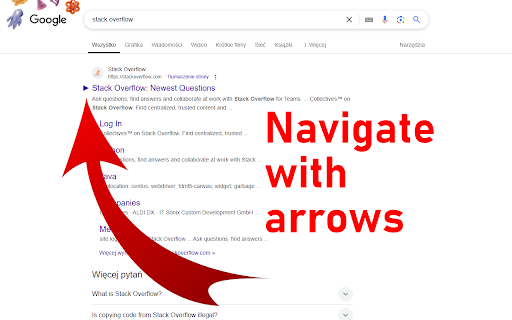
Navigate Google Search results using arrows and keyboard shortcuts. Keyboard Navigator for Google Search™ is a browser extension that lets you to navigate search results with your keyboard. You can open links, and switch between different Google services like Images, Videos, and Maps. FEATURES - Navigate Search Results: Use arrow keys to move through search results. - Open Links Press Enter to open the selected search result. - Switch Google Services: Use shortcuts to switch between Google Search, Images, Videos, and Maps. DEFAULT KEYBINDINGS - Next Result: Arrow Down or J - Previous Result: Arrow Up or K - Next page: Arrow Right or L - Previous page: Arrow Left or H - Open Result: Enter - Switch to All: A or W - Switch to Images: I or G - Switch to Videos: V - Switch to Maps: M Source code on GitHub: https://github.com/KyrietS/keyboard-navigator-for-google-search

Screen Search - Search Screen with Google Lens
Search anything on your screen with Google Lens. Instant visual search, translations, and product info at your fingertips. Visual Search at Your Fingertips Instantly search anything on your screen with the power of Google Lens. Screen Search makes it effortless to identify objects, translate text, find products, and explore the world around you - all with a simple screenshot or area selection. Area Selection: Select any part of your screen to search Full Screen: Capture and search your entire screen Image Search: Upload any image for reverse image search Quick keyboard shortcuts for instant access (customizable) Right-click context menu for images One-click search from the toolbar Auto-detection of text, objects, and products Visual search for shopping and product discovery Choose your preferred search behavior Perfect For: Anyone who wants to learn more about the world around them Why Choose Screen Search? Privacy Focused: No data collection - your searches stay private User-Friendly: Simple interface with powerful results Experience the web in a whole new way. Install Screen Search now and turn your screen into a powerful visual search tool!

Google search results shortcuts
Keyboard shortcuts for google search results J/K(Down/Up): Navigate links H/L(Left/Right): Navigate page /: Focus input field G + [A/I/V/M/N]: [All/Image/Videos/Maps/News] G + shift-V: verbatim search

Keyboard Shortcuts for Google Translate
Provides keyboard shortcuts in the Google Translate™ page. This extension provides keyboard shortcuts in the Google Translate™ page. [key]s are customizable.(at options page) alt (+ shift) + [key]s are bound to each indexed button. shift + enter is bound to the translate button. welcome feedback, comments and suggestion. (twitter) @yamayamayamaji (github) https://github.com/yamayamayamaji/Keyboard-Shortcuts-for-Google-Translate

Search navigator
Navigate search results with shortcuts Search navigator A lightweight productivity tool that complements Chrome by adding shortcut keys it doesn’t provide, bringing vim-like keyboard navigation and quick category switching to your Google Search experience. 🔧 Usage Navigation - j/k or ↓/↑: Move through results - h/l or ←/→: Previous/next page - Enter: Open result (+ Ctrl/Cmd for new tab, Shift for new window) Switch Google Search Tabs a: All i: Images v: Videos n: News s: Shopping Quick Access m: Google Maps y: YouTube Customize shortcuts Click the extension icon. Arrow keys cannot be changed. ⚠️Important Notes - Navigation controls are currently not supported on Shopping pages. - YouTube functionality is currently unstable and in preview version. Navigation features may not work consistently on YouTube Search Result pages. Full YouTube support is planned for future releases. Found an issue or have an idea? Reach out anytime through the Chrome Web Store or our GitHub repository.
