
ndjhebiohmanieefhnhcmlbflfljmhdn

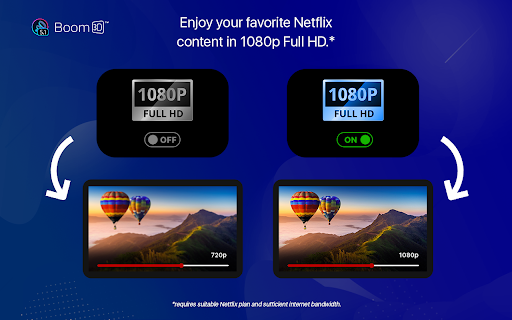

Enables 5.1 Audio Tracks for Netflix Introducing the Boom 3D app for Netflix - the ultimate audio companion for your streaming experience. Our app is designed to provide you with an immersive 5.1 surround sound audio experience, enabling you to fully immerse yourself in the movie or TV show you're watching. With Boom 3D, you can expect crystal clear audio that brings out the depth and richness of each sound in your favorite shows and movies. Our app works seamlessly with Netflix, so all you need to do is download and install the Boom 3D app, and then start streaming your favorite content. The app comes with an easy-to-use interface that lets you customize the audio settings to your liking. You can adjust the bass and treble levels, as well as the volume and the virtual surround sound settings. You can also use the equalizer to fine-tune the audio to your preferences. Boom 3D also includes a host of other features that enhance your listening experience. These include the ability to create and save your own custom audio profiles, so you can switch between different settings depending on what you're watching. In summary, the Boom 3D app for Netflix is the perfect audio companion for anyone who wants to experience the best possible audio quality while streaming their favorite movies and TV shows. With its intuitive interface and powerful audio customization features, you can enjoy an immersive audio experience like never before.

Advanced Audio Equalizer
Enhance your online audio experience with the Advanced Audio Equalizer. Fine-tune your tab audio in real-time Enhance your online audio experience with the Advanced Audio Equalizer, your ultimate sound companion. Join our community of audio enthusiasts and discover a world of personalized sound quality like never before. 🎵 Fine-Tune Your Audio, Effortlessly With the Advanced Audio Equalizer, sculpt your audio to perfection with precision EQ settings and dynamic effects. From crisp highs to deep lows, tailor your sound to suit your preferences with ease. 🌟 Unlock a Universe of Audio Effects Immerse yourself in a world of audio effects with the Advanced Audio Equalizer. Explore reverb, chorus, 3D audio, compressor, and background noise control, each with its own set of presets for instant customization. 🔊 Amplify Your Listening Experience Boost your audio to new heights with volume amplification of up to 800%. Whether you're gaming, streaming, or simply browsing, feel the power of crystal-clear sound with every click. 🔄 Sync Your Settings Across Devices Never lose your perfect audio setup again. With syncable profiles, your personalized settings travel with you across devices effortlessly, ensuring a consistent audio experience wherever you go. Ready to take your audio to the next level? Add the Advanced Audio Equalizer to your browser today and start enjoying a truly personalized sound experience.

Netflix 4K/1080p – Unlock Ultra HD & Full HD Streaming
Watch Netflix in true 1080p and 4K Ultra HD on Chrome — no more blurry 720p streams. Most browsers limit Netflix playback to 720p, even if you’re paying for a higher plan. This extension fixes that by unlocking Netflix in 1080p Full HD and 4K Ultra HD, so you can finally enjoy movies and shows in the quality you deserve. ✅ Force Netflix 1080p & 4K Ultra HD playback instantly ✅ No setup required — just install and start watching ✅ Works on Chrome with seamless background support ✅ Lightweight and safe — optimized for smooth streaming With this extension, you’ll notice sharper details, richer colors, and an overall better Netflix experience whether you’re streaming on a laptop, desktop, or external display. 🎬 Perfect for binge-watchers, movie nights, and anyone tired of Netflix’s 720p limit on Chrome. 👉 Upgrade your streaming quality today — install Netflix 4K/1080p now and start watching in crystal-clear Full HD and Ultra HD.

Folx
Add the downloads directly to Folx app with the right click of a mouse on a file in your browser This Folx add-on allows either automatic capturing of download links or adding new downloads to Folx with the right-click menu in Chrome browser. Compatible with Folx starting with version 5.0. Folx is an app for fast and convenient downloading of files from Internet. This download manager has an easy Mac-style interface and allows prioritizing your downloads, resuming interrupted downloads, and splitting the downloads in threads. Folx allows convenient scheduling of downloading process and can be integrated with iTunes. You can also control the download speed, tag the downloaded files to easily locate them on computer, and more.

Equalizer for Chrome browser
Equalizer for your Browser. Customize your sound by 10 bands, equalizer presets with collection music genres and a bass booster.. The Audio Equalizer allows you to adjust the balance between frequency components with a 10-band audio equalizer, many different sound settings and excellent control for quality sound. Used correctly, it can help you smooth out the sound, making it nicer and cleaner, whether it be adding volume to the low frequencies, removing some of the high frequencies, or adjusting the middle balance between them. This is a handy tool to help you customize the sound for you. Audio equalizer with 21 preset profiles for different music genres and for your taste. You can always edit them to your liking and save your profiles. Audio Equalizer (Eq) can create a surround sound effect, boost bass and increase the maximum volume on your device. You can use it to adjust the level of various frequencies in the audio stream, or to boost both low frequencies (bass) and high frequencies. You can use it as an equalizer for YouTube and other streaming audio, video sites. In addition, we have many other features that may surprise you. Some of our handy Equalizer features: - Preamplifier volume controls; - 10 ranges for sound adjustment; - 21 ready-to-use presets; - Low CPU usage while running; - Boost / Cut frequency in each band is +/- 12 dB; - Absolutely free equalizer extension. Functionality: Promo page usage within the extension. Opening a site page after updating the extension.
