
ndbiekgckmjfcdmekbkdmoioohdjfhmg
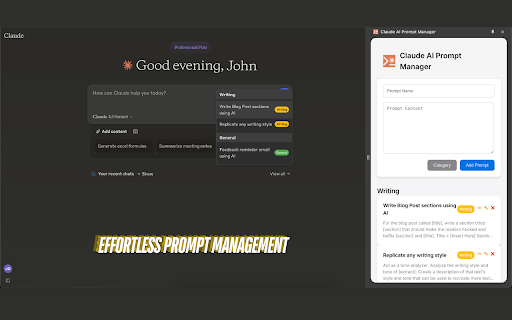
Manage custom prompts for Claude AI Claude AI Prompt Manager allows users to create, organize, and quickly access custom prompts within the Claude AI interface. It supports prompt and category management, a responsive sidepanel, local storage, and cross-browser compatibility, making your Claude AI experience more efficient and organized. - Open the extension by clicking the Claude AI Prompt Manager icon in the Claude AI interface. - Add a new prompt by entering a title, content, and selecting a category. - Save the prompt for quick access later. - Click the blue plus (+) icon/button in the prompt area. - Browse through your saved prompts. - Select a prompt and insert it directly into the Claude AI chat input. Coming Soon: - Personalize the extension with your own categories and color schemes. - Save and run a series of prompts as a prompt chain, executing them one by one with a single click.

Promptly – AI Prompt Enhancer & Manager for ChatGPT, Claude, Gemini
Optimize, save & reuse AI prompts for ChatGPT, Claude, Gemini & more. Prompt library, one-click enhancer & conversation exporter. Promptly is your all-in-one prompt engineer, enhancer, optimizer, and prompt manager. Write better prompts, get better AI responses — in one click. Whether you're new to AI or an experienced prompt engineer, Promptly helps you craft clear, well-structured prompts that get dramatically better results from the AI tools you already use. Instantly improve any prompt with a single click or keyboard shortcut (Ctrl+M / Cmd+M on Mac). Promptly rewrites your input into a well-structured, context-rich prompt that gets more accurate and useful responses — whether you're working in ChatGPT, Claude, or Gemini. NEW: Highlight any text on any website and optimize it as a prompt. Works everywhere, not just inside AI chatbots. Save your best prompts and build a personal prompt template library. Access everything from a clean side panel. Pin your top prompts for one-click reuse across any AI platform. Save prompts instantly with Ctrl+S (Cmd+S on Mac). Never lose a great prompt again — organize, search, and reuse your templates whenever you need them. Explore our FREE community prompt library at https://www.promptly.fyi/library with hundreds of curated templates for writing, coding, marketing, research, and more. Favorited prompts sync directly to your extension. Save, export, and fork your AI conversations to continue them later or share with your team. Summarize long chats into concise overviews. Export any conversation with Ctrl+E (Cmd+E on Mac). This is perfect for bypassing context window and token limits, saving research sessions and brainstorming threads, creating documentation from AI-assisted workflows, or simply picking up where you left off without losing context. 🧩 COMPATIBLE WITH Works directly inside your favorite AI tools: - ChatGPT (OpenAI) - Claude (Anthropic) - Gemini (Google AI) - DeepSeek - Copilot (Microsoft) 👤 WHO IS PROMPTLY FOR? Content Creators — Write better AI-generated blog posts, social media content, video scripts, and marketing copy with optimized prompts. Students & Researchers — Get clearer, more structured answers from AI. Save and organize research conversations. Export summaries for notes and papers. Developers & Engineers — Optimize technical prompts for code generation, debugging, and architecture decisions. Marketers & Copywriters — Craft sharper ad copy, SEO content, email campaigns, and brand messaging. Product Managers — Summarize meeting notes, automate repetitive tasks, and organize prompt workflows across projects. ✅ Three tools in one — prompt optimizer + prompt manager + conversation exporter ✅ Free community prompt library with hundreds of templates ✅ Keyboard shortcuts for power users — Ctrl+M to optimize, Ctrl+S to save, Ctrl+E to export (Cmd on Mac) ✅ Lightweight and fast — no bloat, no slowdowns ✅ Privacy-focused — your prompts stay yours Install Promptly, pin it to your toolbar, and start getting better AI responses in seconds. Open any AI chatbot, type your prompt, and press Ctrl+M (Cmd+M on Mac) to see the difference instantly.

SpacePrompts: AI Prompt Manager for ChatGPT, Claude, Gemini & More
Organize and manage your AI prompts. Store, search, and access your favorite prompts for ChatGPT, Claude, and other AI assistants. Your AI Prompt Manager — Built Right Into Your Favorite AI Tools SpacePrompts lives where you work. Instead of switching tabs or digging through notes, save and enhance prompts directly from your favorite AI tools without ever leaving the page. Works Inside Your AI Tools A floating toolbar is injected into supported AI platforms, giving you: • Save as Prompt — capture any prompt you write with one click • Enhance — let AI polish your prompt before you send it • Apply — paste your saved prompt back into the editor instantly Your Personal Prompt Library • Guest mode — unlimited prompts, no account required • Cloud sync — access your library on any device when signed in • Search & filter — find any prompt instantly by title or tag • Organize — categorize prompts with custom tags • Privacy control — keep prompts private or share them publicly • Quick copy — one click to clipboard, always ready Built For Teams Work together without losing your best prompts in scattered docs and chat threads. - Shared team libraries — see prompts your team has shared, right in the extension - Apply team prompts anywhere — use shared prompts inside your AI tools just like your own - Stay in sync — new team prompts show up automatically, no manual syncing - One workspace, everyone aligned — keep brand voice, workflows, and best practices consistent Sign In With Perfect For • Content creators building writing templates • Developers storing code generation prompts • Marketers organizing campaign copy • Researchers cataloging AI queries • Students building study prompt libraries • Teams keeping prompts and workflows aligned • Anyone tired of rewriting the same prompts Your best prompts took time to craft. SpacePrompts makes sure you never lose them, and helps you make them even better.

Prompt Keeper - AI Prompt Manager
Store and manage AI prompts professionally PROMPT KEEPER: THE ULTIMATE AI PROMPT MANAGER FOR CHATGPT, GEMINI, COPILOT, GROK & DEEPSEEK Are you tired of losing your highest-performing AI prompts in endless, cluttered chat histories? Do you waste valuable time manually copying and pasting prompt templates from scattered Google Docs, Notion pages, Excel spreadsheets, or sticky notes? Prompt Keeper is a professional, privacy-first Chrome extension designed to solve this exact problem. Built for content creators, software developers, digital marketers, and AI artists, this tool empowers you to store, organize, and seamlessly auto-fill your customized AI prompts directly within your browser. Stop managing text files and start building your own centralized, highly efficient prompt library. WHO IS PROMPT KEEPER FOR? Software Developers: Save complex code generation, debugging, and refactoring prompts. Never type out the same system instructions twice. Digital Marketers & SEO Experts: Keep your proven copywriting frameworks, SEO article structures, and social media content strategies one click away. AI Artists & Designers: Perfectly organize your Midjourney, DALL-E, and Stable Diffusion parameters, aspect ratios, and style keywords. Students & Researchers: Store structured prompts for summarizing PDFs, formatting citations, or generating study guides. QUICK SAVE VIA RIGHT-CLICK (CONTEXT MENU) Frictionless saving is here. When you find a highly effective prompt on a blog, forum, or social media post, you no longer need to open the extension to save it. Simply highlight the valuable text, right-click, and select "Save to Prompt Keeper." The text is instantly added to your library without breaking your workflow or focus. SMART AUTO-FILL & 1-CLICK COPY Prompt Keeper is engineered to be fully compatible with today's leading AI platforms, including ChatGPT, Google Gemini, Microsoft Copilot, Grok, and DeepSeek. With a single click on our dedicated "Lightning" button, your selected prompt is automatically injected directly into the active chat input box. Prefer to copy? Use the 1-click copy feature to instantly send the text to your clipboard. ADVANCED SEARCH BY ID & SMART CATEGORIES As your prompt library grows, finding the right text becomes critical. Prompt Keeper features a lightning-fast search engine. You can filter prompts using our Notion-style category dropdown (e.g., Work, Personal, Coding) or use our unique "Search by ID" system. Every prompt is assigned a unique ID number (e.g., 1001), making it incredibly easy to reference, track, and share exact AI generation formulas with your team or community. MODERN, DISTRACTION-FREE INTERFACE (MATERIAL DESIGN 3) We believe productivity tools should look as good as they perform. Experience a clean, structured, and highly intuitive user interface built on Google's Material Design 3 (MD3) system. Enjoy dynamic visual hierarchies, responsive spacing, and a clutter-free workspace that minimizes distractions and maximizes your focus. 100% OFFLINE & ABSOLUTE PRIVACY Security and privacy are at the core of Prompt Keeper. The extension operates entirely offline using your browser's Local Storage API. We DO NOT require an account, we DO NOT track your usage, and we DO NOT collect, harvest, or store your prompts on external databases or third-party servers. Your data belongs exclusively to you and never leaves your local machine. BACKUP, RESTORE & SYNC (JSON) Take full control of your data. Prompt Keeper allows you to easily export your entire prompt collection as a structured JSON file. You can use this feature to back up your valuable templates locally or import them into Prompt Keeper on a different computer, ensuring you always have access to your workflow, no matter what device you are using. MULTI-LANGUAGE SUPPORT & CUSTOMIZATION Built for a global community, Prompt Keeper allows you to work comfortably with native support for 12 different languages. You can further tailor the extension to your specific habits through the Settings menu: toggle "One-click copy" for faster actions, enable "Auto-close" to hide the window after selection, or toggle the visibility of default prompts to keep your workspace truly personal.

ClaudeBuff - Enhanced UI for ClaudeAI
Make your ClaudeAI look more personalized and easier to use ClaudeBuff is an extension enhancing ClaudeAI UI with appearance options and conversation navigation: 🎨🎨🎨Theme Color Personalize your ClaudeAI environment by selecting your preferred color scheme. Choose from a palette of colors that suits your taste. 🖼️🖼️🖼️Background Image Upload your favorite picture, adjust the opacity of the background image to ensure optimal readability of the chat content. Let's create your unique and inspiring chat environment. 🗛🗛🗛Text Customization - Font Selection: Choose from a variety of fonts to suit your preferences. - Font Size: Adjust the text size for comfortable reading. - Text Styles: Apply bold, italic, or underline styles. 🔃🔃🔃Chat Navigation Navigate through your conversations with ease using these intuitive shorcuts: - Scroll up to the beginning of the conversation. - Scroll up to the previous prompt in the chat. - Scroll down to the next prompt in the chat. - Scroll down to the latest prompt in the conversation. 🔤🔤🔤Prompt Hotkeys Allow you to reuse your previous prompts in the chat efficiently: - Ctrl + Shift + 🔼: Use your first prompt in the chat. - Ctrl + 🔼: Use your previous prompt. - Ctrl + 🔽: Use your next prompt. - Ctrl + Shift + 🔽: Use your last prompt in the chat. 🖥️🖥️🖥️Adaptive Chat View Expands conversation view from default to wider or full-width, enhancing readability and user experience across different devices. Use ClaudeAI in your own ways
