
ncncpjepaagacmgaglhlmbogphcjajnf
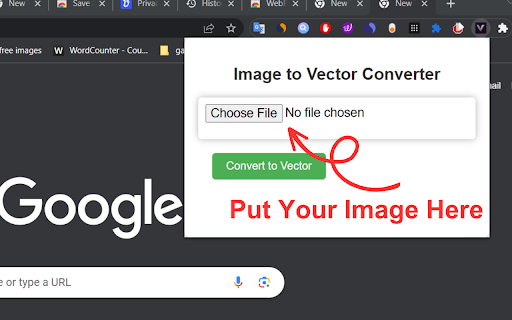

**Image to Vector Converter Extension** The "Image to Vector Converter" is a powerful and user-friendly Chrome extension designed to transform raster images into scalable vector graphics (SVG) effortlessly. Whether you're a graphic designer, web developer, or simply someone who enjoys creative projects, this extension is an invaluable tool for converting images into high-quality vectors with just a few clicks. 1. **Seamless Image Conversion:** The extension's intuitive interface makes image-to-vector conversion a breeze. Users can easily upload their images directly from their local storage or simply drag and drop images onto the extension window for quick processing. 2. **Highly Accurate Vectorization:** Powered by advanced algorithms, the extension ensures precise and accurate vectorization of images. It can handle various image formats, such as JPEG, PNG, and GIF, converting them into editable vector files that retain their sharpness and clarity at any scale. 3. **Real-Time Preview:** With a live preview feature, users can instantly view the vectorized version of their image before finalizing the conversion. This real-time feedback allows for quick adjustments and ensures the output meets their expectations. 4. **Regular Updates:** The "Image to Vector Converter" extension is continuously updated with new features, optimizations, and improvements to ensure users have access to the latest advancements in vectorization technology. Overall, the "Image to Vector Converter" Chrome extension empowers users to unlock the full potential of their images, enabling them to create stunning vector graphics suitable for a wide range of applications, including logos, icons, illustrations, and more. Whether you're a seasoned professional or a casual enthusiast, this extension revolutionizes the way you transform images into scalable, editable, and visually impressive vector art.

Save Image as Type — JPG PNG WebP PDF Converter
Save images as JPG, PNG, WebP, or PDF. Crop, convert WebP and AVIF instantly. 100% local, no data collection. Looking for a save image as type chrome extension that actually works? SaveAs lets you right-click any image on a webpage and instantly save it as JPG, PNG, WebP, or PDF. No complicated menus, no sign-ups, no limits. Whether you need to convert WebP to JPG, save WebP as PNG, or simply download images in the format you prefer, this lightweight image format converter handles it all. It works with WebP, AVIF, and every common image format your browser can display. 1. Right-click on any image on a web page 2. Select "Save image as..." from the context menu 3. Choose your format: JPG, PNG, WebP, or PDF 4. The image downloads instantly in your chosen format You can adjust JPG and WebP quality in the extension settings, and choose whether to be prompted for a save location. ✅ Save image as JPG — perfect for photos and universal compatibility ✅ Export to PNG — ideal for screenshots and images with transparency ✅ Download as WebP — when you need smaller file sizes ✅ Save image as PDF — turn any web image into a printable document ✅ Convert WebP and AVIF — stop struggling with formats Chrome forces on you ✅ Adjustable JPG quality — control the balance between file size and quality ✅ Default format setting — set your preferred format once, save faster every time ✅ "Ask where to save" option — choose your download location or auto-save ✅ Crop & save — built-in image crop tool with aspect ratio presets (1:1, 16:9, 4:3, and more) ✅ Download images from social media — save images from Twitter/X, Instagram, Facebook, Pinterest, and Reddit in original quality ✅ Works on overlays and backgrounds — save CSS background images, canvas elements, and images hidden behind other page elements No paywall, no trial, no limits. Some image converter extensions let you convert a few images, then lock features behind a subscription. SaveAs has zero restrictions — convert as many images as you need, always. Lightweight. While some alternatives weigh over 5MB, SaveAs is a fraction of that size. No bloat, no unnecessary code, just the conversion engine. 100% local conversion. Your images never leave your device. No server uploads, no external processing, no cloud dependency. Everything happens right in your browser using the Canvas API. This also means it works offline. No host_permissions. Unlike many similar extensions that request broad access to your browsing data, SaveAs deliberately avoids unnecessary permissions. 52 languages. The interface is fully translated to serve users worldwide. Input: Any image your browser can display. Output: JPG, PNG, WebP, or PDF. Common use cases: • WebP to JPG or PNG for compatibility with older software • AVIF to JPG when you need a universally supported format • PNG to JPG to reduce file size for email attachments • Save image as PDF for archiving, printing, or sharing • Any web image saved in the exact format your workflow requires • Download Twitter images in original quality — no more compressed thumbnails • Save images from Instagram directly to your device • Download Facebook and Pinterest images in full resolution • Crop any web image to exact dimensions before saving Who Is This For? Designers and creatives who need images in specific formats for their projects. Developers who want consistent file types for testing and assets. Students and researchers organizing reference materials. Content managers collecting visuals from the web. Anyone tired of Chrome saving images as WebP when they need JPG or PNG. If you've been looking for a reliable save image as type extension that respects your privacy and doesn't charge for basic functionality, SaveAs is built for exactly that. Q: Why are my images saving as WebP? A: Modern browsers like Chrome often serve images in WebP format for better compression. While WebP is efficient, not all software supports it. This extension solves the problem — just right-click and save as JPG or PNG instead. Q: How to save WebP as JPG? A: Install this extension, right-click any image on a webpage, select your preferred format from the context menu, and choose JPG. The conversion is instant and happens locally on your device. Q: How to save WebP as PNG? A: Same process — right-click, pick PNG from the menu. Transparency is preserved during conversion. Q: How to save an image as PDF? A: Right-click any image and select PDF from the menu. The image is converted to a full-page PDF document, perfect for printing or archiving. Q: Does this work with AVIF images? A: Yes. If your browser can display it, SaveAs can convert and save it in any of the supported output formats. Q: Is this a replacement for extensions that were removed from the store? A: SaveAs provides the same core functionality — right-click to save images in your preferred format. It has no paywall, and all processing stays on your device. Q: How to download images from Twitter or X? A: Right-click any image on Twitter/X and choose your format. SaveAs automatically requests the original quality version instead of the compressed thumbnail that Twitter normally serves. Q: How to save images from Instagram? A: Same as any other image — right-click and pick your format from the SaveAs menu. The extension works directly on the page without needing any special permissions or host access. Q: Can I crop an image before saving? A: Yes. Right-click any image, select Crop & Save from the menu. This opens a crop tool where you can draw a selection area, choose an aspect ratio preset, pick your output format, and save. Q: Does this work with images behind overlays or CSS backgrounds? A: Yes. SaveAs detects images even when they are covered by overlay elements, used as CSS background images, or displayed in canvas elements. Right-click anywhere and SaveAs will find the nearest image automatically.

Image Converter
Try different file formats with Image Converter. The smart picture converter tool for formats like JPG to PNG, JPG to WEBP and more. Say goodbye to complicated tools and endless online searches. The Image Converter is here to simplify your life, allowing you to transform the format of pictures in just a few clicks. Whether you’re dealing with PNGs, JPGs, WEBP or other formats, this tool makes converting images seamless and efficient. 💡 Why Choose the Image Converter? ◾ Fast and Easy: Convert images without delays. This extension is designed for speed and simplicity. ◾ Multiple Formats Supported: Whether you need an image converter to JPG, or even other formats this tool has you covered. ◾ User-Friendly Interface: A straightforward design ensures anyone can use it, from professionals to casual users. ◾ Secure and Private: Your pictures remain on your device, ensuring privacy and security. 💻 Key Features of the Image Converter ➤ Convert visual file to JPG with just one click. ➤ Change any format to PNG effortlessly. ➤ Use the Image Converter for quick format switching to WEBP. 🚀 Batch Processing: Work with multiple images at once with the visual file converter, saving you time and effort. With the power to convert a wide range of file types, this tool is invaluable for both professionals and casual users. No more opening different programs or dealing with complicated settings — everything you need is available at your fingertips. ▸ Turn a photo into a JPG format in seconds. ▸ Need to transform to PNG? Done in no time. ▸ Use the image converter for all your needs. ⚙️ Who Can Benefit From the Image Converter? ➡ Photographers and Designers: Use the photo converter to JPG to optimize your portfolio. ➡ Office Professionals: Quickly convert files for presentations or reports. ➡ Casual Users: Simplify tasks like turning a pic into a compatible format for uploading or sharing. 💼 How to Use the extension 1️⃣ Install the Extension: Find it in the Chrome Web Store and add it to your browser. 2️⃣ Upload Your File: Drag and drop or select from your device. 3️⃣ Choose Your Format: Select options like image convert JPEG, or convert image to PNG, etc. 4️⃣ Download Your File: Your newly converted file is ready to go. ⚫ Image to image converter for seamless format changes. ⚫ Convert file formats like PNG, JPG, and WEBP. ⚫ Photo converter for various uses, such as resizing or optimizing. ⚫ Pic converter that keeps quality intact. 📈 This extension is the ideal solution when you need to switch between file formats quickly and efficiently. Whether you’re transforming photos for social media posts, preparing design files for your website. It supports a wide range of formats and is easy to use, making it the go-to tool for individuals and professionals who deal with images regularly. ➽ It’s perfect for social media uploads. Some platforms only accept specific formats like JPG. ➽ Convert image files to reduce file size for faster website loading. ➽ The tool helps maintain high quality for professional use. ◼️ Bloggers can optimize pictures for web publishing using the converter. ◼️ E-commerce sellers can convert JPG to png for product listings. ◼️ Graphic designers can utilize the JPG converter to manage creative assets. 🔷 One-Click Conversion: No need for complex settings. Just select and convert your image. 🔷 Drag-and-Drop Interface: Makes the process even faster. 🔷 Multiple Output Formats: Choose from JPG, PNG, and more. - Never struggle with PNG, JPG image formats again. - Save storage space with the convert to JPG feature. - Enjoy high-quality results with the photo converter to JPG. ✅ Install the tool today and transform the way you manage files. Whether it’s image to JPEG, or anything else, this tool has everything you need. Don’t miss out on the ultimate solution for image file converter tasks. Start converting now and make every file format transition effortless. ❔ What does the extension do? ✔️ It allows you to convert various file formats quickly and easily. ❔ Can I convert from PNG to JPEG? ✔️ Yes, you can easily convert images from PNG to JPEG and vice versa. ❔ How many formats can I convert? ✔️ The extension supports many formats, including PNG, JPEG, WEBP, and more. ❔ Does the tool maintain file quality after conversion? ✔️ Yes, the conversion preserves the quality of your files.

Convert PNG to JPG
Try Convert PNG to JPG to easily change PNG to JPG format. Our picture converter ensures quality and speed in every conversion. 🎉 Transform your image workflow with Convert PNG to JPG. Simplify file conversions while preserving quality. Ideal for designers, marketers, and casual users. Enjoy instant results and cross-platform compatibility. 📚 Key Advantages: 1. Enjoy rapid processing powered by convert PNG to JPG to help you save precious time during each operation. 2. Benefit from robust architecture designed for smooth transitions and error‐free outcomes. 3. The integrated PNG to JPG converter feature optimizes your workflow, ensuring consistent performance in every task. 🚀 Essential Benefits: 💎 Achieve superior output quality that stands out in every project. 💎 Enjoy minimal processing time, reducing delays in your creative flow. 💎 Leverage the power of image converter PNG to JPG to boost accuracy in each transformation. 💎 Experience a user‐centric interface that makes every task both intuitive and efficient. 🎯 Experience enhanced productivity with our extension, meticulously crafted to reduce manual steps. By harnessing convert PNG to JPG, you streamline your process and minimize errors, ensuring that every file transition is executed with professional finesse and consistency. 💡 Designed with simplicity at its core, our extension integrates advanced functionalities into an intuitive interface. Harness the power of convert PNG to JPG format to seamlessly switch file formats, achieving professional-quality outcomes that cater to both creative projects and business needs. 📌 Online Convenience: 1️⃣ Enjoy the flexibility of a web-based tool accessible anytime. 2️⃣ Benefit from instant access via a streamlined interface. 3️⃣ Experience the efficiency of PNG to JPG image converter as it enables real‐time operations. 4️⃣ Rely on optimized performance that is tailored for fast online processing. 🚀 Reliability meets efficiency in every operation. Our solution ensures that every time you use convert PNG to JPG, the process is not only fast but remarkably consistent—delivering high-quality transitions that empower your creative and professional endeavors. 🧩 Efficiency Tools: 🔸 Boost your workflow with fast, integrated processing. 🔸 Achieve error‐free operations every time. 🔸 Streamline tasks using PNG convert to JPG for dependable output. 🔸 Enjoy consistent, high‐quality results with each use. 🔥 With a focus on precision and user experience, our tool adapts to varied work environments. Leveraging convert PNG to JPG, it delivers impeccable results that simplify the challenge of switching file formats—ideal for both novices and seasoned professionals. 🔔 Optimized for professionals and enthusiasts alike, our extension provides a seamless experience across diverse platforms. As a PNG file converter, it ensures that every file transition is executed with care and efficiency, meeting even the most rigorous standards. 🌀 Performance Highlights: ✔️ Enjoy fast processing that accelerates your daily tasks. ✔️ Navigate an interface built for intuitive operation. ✔️ Leverage the change PNG to JPG feature to simplify complex tasks. ✔️ Utilize the turn PNG to JPG option to enhance overall workflow. ✔️ Experience smooth, uninterrupted performance at every step. 💼 With features like image converter, picture converter, pic converter, and photo converter, it caters to a diverse range of file transformation needs, ensuring professional‐grade output and complete user satisfaction. 🤔 Q&A: ❓ How do I access the tool? 💡 Simply install the extension and follow the intuitive interface for convert PNG to JPG operations. ❓ Is the processing fast and reliable? 💡 Yes, every action of convert PNG to JPG is optimized for rapid and consistent results. ❓ Can I use it for professional projects? 💡 Certainly; the convert from PNG to JPG feature meets professional standards every time. ❓ Is the design user‐friendly? 💡 Yes, every step of convert PNG to JPG is simplified for effortless use. ⚡Embrace a new era of file format transformation with our extension. Every feature has been meticulously designed to ensure that your experience with convert PNG to JPG is efficient, reliable, and tailored to meet the demands of modern digital workflows.

Convert SVG to PNG
Quickly Convert SVG to PNG: Fast, easy SVG to PNG converter. Perfect vector converter for designers needing quick format changes! 🎯 Are you tired of struggling with vector format and need a reliable solution to convert svg into png? Look no further! Our cutting-edge Google Chrome extension is here to save the day. Whether you are a graphic designer, web developer, or just someone who frequently works with vector images, this tool is designed to meet all your needs efficiently and effortlessly. 🤔 Why choose our vector image converter? 🌞 Our extension is more than just a simple tool; it’s a comprehensive solution for all your needs. Here’s why you should make it your go-to tool: 🔸 Ease of Use: With a user-friendly interface, you can convert svg into png easily. 🔸 High Quality: Ensuring that your images retain their original quality during conversion is our top priority. 🔸 Speed: Convert your files in seconds, not minutes. 🔸 Compatibility: Works seamlessly on all modern browsers and platforms. 🔑 Key Features 💠 Convert SVG to PNG: do it with just a few clicks. 💠 High-Quality Output: Ensure your images are crisp and clear with our high-quality conversion algorithm. 💠 Online Access: No need to download heavy software. Convert your files directly online. 💠 Customizable Settings: Adjust settings to get the perfect output every time. 😳 How to use the svg converter 1️⃣ Install the Extension: Add our extension to your Google Chrome browser from the Chrome Web Store. 2️⃣ Upload Your Files: Click on the extension icon and choose your files. 3️⃣ Set your settings: Adjust the size, background, and other properties during conversion. 4️⃣ Transform: Hit the action button and convert .svg to .png in seconds. 5️⃣ Download: Save the svg as png to your downloads. 🎶 Additional Conversion Options 🌟 Our extension isn’t just limited to SVG to PNG conversion. We offer a variety of other formats to meet your needs: 1. Vector Format Converter: Our tool also serves as a vector file converter, allowing you to convert various vector formats with ease. 2. SVG Code to PNG: Do you have have the only svg code? Paste it into our tool and get a PNG output instantly. 3. Transform SVG to PNG: Adjust the size, background, and other properties during conversion. 🤗 Benefits of Using Our Extension 🦾 Using our extension provides numerous benefits: ▸ Efficiency: Convert SVG files to PNG swiftly, ensuring a smooth workflow. ▸ Flexibility: Convert from SVG to PNG with your settings. ▸ Accessibility: Use it anywhere, anytime, with an internet connection. ▸ Reliability: Trust in consistent, high-quality results every time with svgconverter. 💎 Our extension is perfect for: 🔹 Graphic Designers: turn svg into png for use in various design projects. 🔹 Web Developers: Ensure your SVG files are compatible across different platforms by converting them to PNG. 🔹 Digital Marketers: Easily transform SVG files into PNG for use in digital campaigns. 🔹 Hobbyists: Even casual users will find our tool easy and useful for various tasks. 🚀 Advanced Features 🔺 SVG to PNG High Quality: Ensure that every detail of your file is preserved during conversion. 🔺 Vector Art Converter: Ideal for artists who need to convert their vector artwork to different formats. 🔺 SVG Format Converter: Convert SVG files to PNG. 🔺 Vector Graphics Converter: Handle complex vector graphics and convert them to your desired format with ease. 🔎 Why Choose Our svg convert to png? ☑️ User-Friendly Interface: Ideal for both beginners and experienced users. ☑️ Fast and Efficient: Convert an svg to png online without compromising on quality. ☑️ Secure and Private: Your files are processed securely. We respect your privacy and don't send you files in any external storages. ☝️ Frequently Asked Questions ❓ How to change svg to png? 📜 Simply install the extension, upload your SVG file, and click convert. It’s that easy! ❓ Can I Convert SVG to JPG? 📜 Unfortunately no, our extension doesn’t support it, only svg a png. 💯 Stop struggling with SVG files and start converting them effortlessly with our tool. If you need to convert svg file to png, our tool has you covered. Download the extension today and experience the ultimate in svg file converter! 🔄 Transform .svg to png with ease, and enjoy the convenience and quality that our tool provides. Install now and make your design process smoother and more efficient! Now you know how to convert svg to png.
