
nciippededhnpbbecgdmmhbfocpjgaal
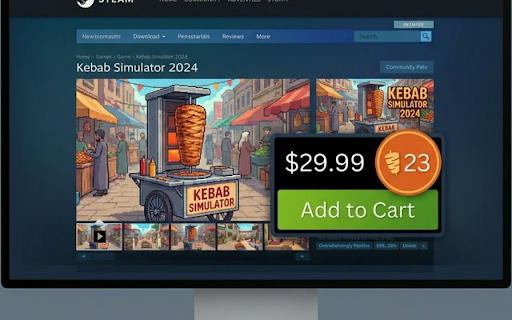
Steam'de oyun fiyatlarını döner cinsinden gösterir 🥙 🥙 Döner Fiyat Karşılaştırıcı - Oyun fiyatlarını anlamlı hale getir! Hiç "Bu oyun kaç döner ediyor?" diye merak ettiniz mi? Artık Steam'de fiyatların yanında kaç döner olduğunu görebilirsiniz! ✨ ÖZELLİKLER: 🎮 Steam Desteği - Tüm oyun sayfalarında çalışır - USD fiyatları otomatik TL'ye çevirir - İndirimli ve normal fiyatları destekler 💱 Anlık Döviz Kuru - USD/TRY kuru otomatik olarak çekilir - Her 6 saatte bir güncellenir - Manuel yenileme butonu mevcut ⚙️ KİŞİSELLEŞTİRME: - Kendi şehrindeki döner fiyatını gir - Fiyat değişikliklerini anında kaydet - Ayarlar yerel olarak saklanır 🎨 GÖRSEL TASARIM: - Şık turuncu döner badge'leri - Fiyatın hemen yanında görünür - Sayfayla uyumlu modern tasarım 📱 NASIL KULLANILIR: 1. Eklentiyi yükle 2. Araç çubuğundaki 🥙 ikonuna tıkla 3. Şehrindeki döner fiyatını gir (örn: 45 TL) 4. Steam'e git 5. Fiyatların yanında döner sayısını gör! 🔒 GİZLİLİK: - Hiçbir kişisel veri toplanmaz - Sadece döner fiyatı ve kur bilgisi saklanır - Tamamen yerel çalışır 💡 NEDEN BU EKLENTİ? Oyun fiyatlarını günlük hayattan bir referansla karşılaştırmak, harcamanızı daha anlamlı hale getirir. "Bu oyun 500 TL" yerine "Bu oyun 11 döner" demek çok daha akılda kalıcı! 🆓 Ücretsiz ve reklamsız! Keyifli oyunlar! 🎮🥙

SteamDB
Adds SteamDB links and new features on the Steam store and community. View lowest game prices and stats. - Display lowest recorded price on game pages (all currencies supported, price history) - Display concurrent players and peaks on game pages - Display latest game update on game page - Add links to SteamDB across Steam sites - Add a link to PCGamingWiki - Modernize personal achievements page, group achievements by update and DLC - Quick sell buttons in inventory - Skip age check page on the store - Accept Subscriber Agreement on market, inventory, and activate key pages automatically - Remove "You are leaving Steam" link filter from external sites - Highlight your owned games, DLCs and packages on steamdb.info - Allows wishlisting, following and ignoring games directly from steamdb.info - A lot of other smaller tweaks and features - Simpler and faster alternative to Enhanced Steam and Augmented Steam More information: https://steamdb.info/extension/ GitHub: https://github.com/SteamDatabase/BrowserExtension

Steam Fiyat Dönüştürücü
Steam'deki oyun fiyatlarını kullanıcıların yerel para birimi cinsinden hızlı ve kolay bir şekilde görmelerini sağlar. "Steam Fiyat Dönüştürücü" Chrome uzantısı, Steam üzerindeki oyun fiyatlarını kullanıcı dostu bir şekilde Türk Lirası'na (TL) çeviren yenilikçi bir araçtır. Bu uzantı, oyun severlerin döviz kuru hesaplamalarıyla uğraşmadan, doğrudan TL cinsinden oyun fiyatlarını görmelerini sağlayarak, alışveriş deneyimlerini kolaylaştırır. İşte bu uzantının kullanımı hakkında bazı bilgiler: Kolay Kurulum ve Erişim: Chrome Web Mağazası'ndan hızlıca yükleyebileceğiniz bu uzantı, tarayıcınıza entegre olarak çalışır. Yükleme tamamlandıktan sonra, Steam Web sitesini ziyaret ettiğinizde otomatik olarak devreye girer. Otomatik Döviz Dönüşümü: Steam'deki oyun fiyatlarını otomatik olarak TL'ye dönüştürür. Fiyatlar, güncel döviz kuru üzerinden hesaplanarak kullanıcılara sunulur, böylece fiyatların ne kadar olduğunu kolayca görebilirsiniz. Kullanıcı Dostu Arayüz: Uzantı, Steam sayfasındaki orijinal fiyat etiketlerinin yerine, TL cinsinden dönüştürülmüş fiyatlar ile değiştirir. Bu sayede, herhangi bir ek işlem yapmanıza gerek kalmadan, fiyatları TL cinsinden görebilirsiniz. Güncellenen Döviz Kurları: Uzantı, döviz kurlarındaki güncellemeleri düzenli olarak takip eder. Bu, her zaman en güncel kurla hesaplama yapılmasını sağlar ve size en doğru fiyat bilgisini verir. Gizlilik Güvencesi: "Steam Fiyat Dönüştürücü", kullanıcı gizliliğine önem verir. Uzantı, kişisel verilerinizi toplamaz veya üçüncü taraflarla paylaşmaz. Destek ve Geri Bildirim: Kullanıcı deneyiminizi daha da iyileştirmek için, geri bildirimlerinizi dikkate alırız. Herhangi bir sorun yaşarsanız veya önerileriniz varsa, bize kolayca ulaşabilirsiniz. Nasıl Yüklenir? Chrome Web Mağazası'na gidin, "Steam Fiyat Dönüştürücü"nü aratın ve "Ekle" butonuna tıklayarak uzantıyı tarayıcınıza ekleyin. Kurulum sonrası, Steam web sitesine gittiğinizde uzantı açmanız halinde otomatik olarak aktif olacak ve fiyat dönüşümünü yapmaya başlayacaktır. Kısacası, "Steam Fiyat Dönüştürücü", oyun alışverişlerinizi daha anlaşılır ve erişilebilir kılmak için ideal bir araçtır. Steam'de oyun fiyatlarını TL cinsinden görmek isteyen herkes için kullanışlı ve pratik bir çözüm sunar.

RoEarn: Custom Avatar Creator & Cashback
A smarter way to shop on Roblox: preview items on your avatar, build outfits, and earn shopping rewards. 🛍️ RoEarn adds the marketplace directly into the avatar editor so you can try on items, build outfits, and customize your avatar without constantly switching pages. 👕 Try on accessories, clothing, bundles, and outfits on your character before purchasing. Also view your friends' outfits and see what they're wearing. 🛒 Your cart follows you everywhere. Add items from the catalog, marketplace, or player profiles and buy everything later when you're ready. 💸 RoEarn also gives cashback on eligible purchases. Supported items will show how much you'll earn before buying. 🎥 Creators can submit videos and earn rewards based on views directly through the RoEarn dashboard. RoEarn may show an optional promotion for other extensions we partner with. This has no effect on how the extension works — it's simply there to introduce you to similar tools we offer. When you use RoEarn, we may receive affiliate commissions. We share those commissions with our users as cashback. Some bonus features, including a custom invite code and priority video review, are available through an optional subscription managed entirely through Roblox's subscription system. RoEarn is an independent third-party Chrome extension. We are not affiliated with, endorsed by, or sponsored by Roblox Corporation. Roblox®, the Roblox logo, and all related trademarks are the property of Roblox Corporation and are used for identification purposes only.

Steam TRY Converter
Converts USD prices to TRY on the Steam Store. Welcome to Steam Price Converter, the essential Chrome extension for gamers and shoppers in Turkey. With a simple click, see every game price in Turkish Lira (TRY) instead of US Dollars (USD) on the Steam Store. Enjoy a seamless shopping experience without the hassle of manual currency conversions! Instant Price Conversion: As you browse the Steam Store, all prices are automatically converted from USD to TRY, reflecting the most recent exchange rates. Seamless Browsing Experience: Our extension integrates smoothly into the Steam Store interface, maintaining the original look and feel while providing you with valuable price information in your local currency. Easy to Use: Just install and start browsing – no configuration needed. The extension does all the work for you. Safe and Secure: We respect your privacy. The extension operates entirely within your browser, without collecting any personal data or browsing history. Regular Updates: We keep the extension updated to ensure compatibility with the latest versions of the Steam Store and currency rates. Install the Extension: Add Steam Price Converter to Chrome with a single click. Browse Steam Store: Navigate to the Steam Store and browse as usual.
