
ncdpcgdgemdklhocjgecijjjhaboopbp

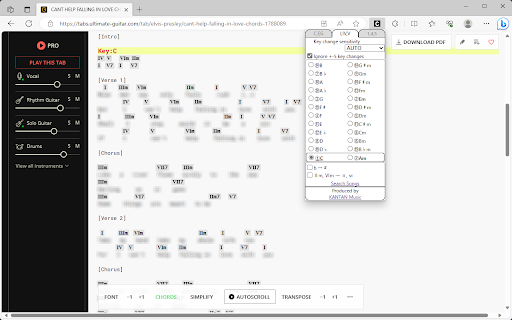

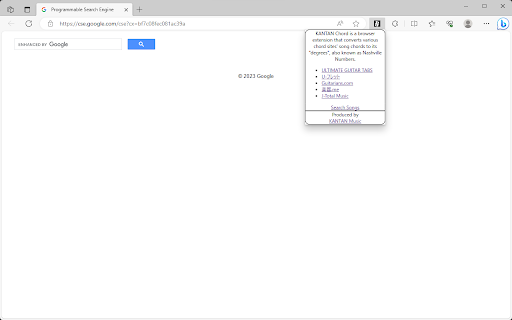
This extension will converts various chord sites' song chords to its "degrees", also known as Nashville Numbers. • Overview KANTAN Chord is a browser extension that converts various chord sites' song chords to its "degrees", also known as Nashville Numbers. (Former name: InstaChordizer) • How to use Open the chord web page. From the browser extensions, choose KANTAN Chord icon and it opens a pop-up window. Choose from tabs "C,F,G" (original) , "I,IV,V" (roman numerals), or "1,4,5" (degrees). - "C,F,G" (original) Displays the chords in its original form. Select radio buttons change keys. - "I,IV,V" (roman numerals) Displays the chords' degrees, in standard roman numerals format. - "1,4,5" (degrees) Displays the chords' degrees, in numbers. Different symbols follow the "KANTAN Chord" system, based on the Nashville Number System. For more details, please visit this page: https://instachord.com/instruction/icn/ • Key analyzation KANTAN Chord automatically analyzes the song's key and displays it in red text with a yellow background banner. When the key changes during a song, it will be displayed with additional banners. E.g. "Key:E(-3)" or "Key:Ab(+1)" Numbers such as (-3) and (+1) represent half steps. If your instrument can transpose, try adjusting to these numbers. If the key analyzation is wrong or is difficult to play, try adjusting the analyzation sensitivity. - Ignore +-5 key changes When changing to a dominant (+5 half steps) or subdominant key (-5 half steps) , chords used will be very similar to its original key. When this option is turned on, KANTAN Chord will ignore +-5 key changes and stay in its original key. • Displayed keys You can choose keys outside of the auto-analyzed key. - Song's analyzed key The song's auto-analyzed most likely key is outlined in a box. - Difficulty rank The numbers in front of the key (Eg. ①, ②, ③...) are difficulty ranks when playing on the InstaChord, from easiest to most difficult. Please use as reference, when the analyzed key if wrong or when the original key is difficult to play. ① and ② are in bold, and ① is underlined. - Changing they key (in C,F,G tab) When in the C,F,G tab, you can pick different keys to transpose to. - Changing they key (in I,IV,V or 1,4,5 tab) In I,IV,V or 1,4,5 tab, you can change the base key. Apply when the analyzed key is wrong, or when the original key is difficult to play. If other keys are greyed-out, turn off analyzation sensitivity. • Options for C,F,G tab - Disable automatic loading KANTAN Chord will not take effect until the icon is pressed. Use this option if there are compatibility issues with the site's features or other extensions. This option is only effective in the C,F,G tab. - Hide key display KANTAN Chord displays the song's key and displays it in red text with a yellow background banner. Use this option to hide the key display. This option is only effective in the C,F,G tab. • Options for I,IV,V tab - b → # All half tones are represented with # - IIm, VIm → ii, vi Minor chords are represented with lower case roman numerals. • Options for 1,4,5 tab - 3b/7b → 8/9 (5b/2b → 8/9 for minor key) For the InstaChord, commonly used chords are allocated on the 8 and 9 buttons. Using this option will make use of these buttons. - Use minor key Allows the use of minor key • Beginner mode By selecting 🥚LV.0 / 🐤LV.1 / 🐔LV.2 shown on the first line, you can adjust the difficulty of the chords. In 🥚LV.0 / 🐤LV.1 mode, chords will be simplified. In 🐔LV.2 mode, all chords will be in their original form. This mode isl not available when minor key is selected.

Chords View
The extension provides a friendlier way to view song chords. Whenever you visit a chords page on the web, just click the extension icon to instantly remove the clutter and see just lyrics and chords in a single multi-column view. You can also instantly transpose chords and change the font size. ⭐ A clean design without clutter and distractions, allowing you to focus on the music ⭐ Multi-column view of the song, so that you don't need to scroll while playing ⭐ One-click chord transpose (up/down) ⭐ One-click font size change ⭐ Piano chord charts ⭐ Support for dark mode Feedback and suggestions for improvements are very welcome!

Open in Chordify for YouTube Music™
Adds a button to open a song in Chordify for YouTube Music™. This extension makes it easier to open songs in Chordify directly from YouTube Music™, rather than manually copying and pasting the URL.

Chord Dictionary
After clicking the icon to start, mouse over any chords on any web pages and its notes constituted will be shown. Instantly show notes constituted of any chords when the cursor is over After clicking the icon to start, mouse over any chords on any web pages and its notes constituted will be shown. You can also click on it or press shortcut to listen to the chord. Characteristics • Support widely from simple chords to extended chords, slash chords, notations like +/-/Δ/○/omit and even roman numerals • Convert a chord to roman numerals when a key is set • Play the chord with customizable volume and instruments (piano, guitar, synth) • Switches to choose whether click, shortcut and/or hover is enabled for playing the chord

GuitarApp - Chord Chart
GuitarApp Chord Chart is a free chord dictionary chrome extension for guitar and ukulele. Tap to hear chords or individual notes. 🚀 Look up any chord while using online video lessons including Youtube, Truefire, Coursera, Udemy and more! 🚀 GuitarApp Chord Chart lets you explore over 2000 chords including many chord voicings for guitar and ukulele 🚀 Interactive chord diagrams allow you to tap on each note or hear the full the chord. 🚀 See the notes, chord fingerings or interval names
