
ncdkikkacogkekgnnmmiokebkkcblena


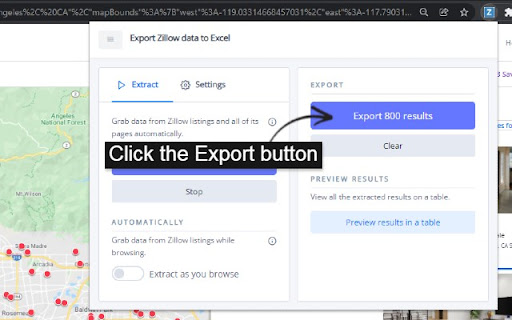

Export Zillow search results to Excel with one click. Do your own home real estate market analysis when buying or selling property. What the Zillow extension tool can do? ✓ Extract property search results from the side panel and all its pages automatically. ✓ Autosave current page results from the side panel as you browse. How to export Zillow data Excel? - View results with a list of properties - Click "Start extracting" - Wait for it to export - Click "Export" Features ✓ Visit each page results automatically ✓ Delay how long to visit all its page results ✓ Preview the extracted listings before exporting ✓ Alert you when there's a captcha to verify you're human What data does it export? - Zillow property ID - Status - Home type - Time on Zillow *if available - Price - Price per square feet - Zestimate *if available - Zestimate per square feet - Rent Zestimate - Sqft - Lot size - Number of beds - Number of baths - Address - Street - City - State - Zip code - latitude - longitude - Broke name *if available - Is Zillow owned - Date sold *new - Sold price *new - Image URL - Property detail URL - URL of the search result where the property is found Free & Paid Use Export Zillow Data to Excel free. You can export up to 25 listings at any time. This way you can see how it works for you and what you can export with no risk. If you want more, a paid plan gives you unlimited results to export. - No worries about maintaining any Zillow scrapers, scripts, or code. - One monthly payment gets you unlimited exports. No confusing payment. No cost of usage. No billing systems with points and limits. Changelog - 1.2.9: Zillow made an update that limited the # of extractions. Fixed! Thanks Kelley for reporting it! - 1.2.8: Fixed dateSold again. Thank you Jake for letting me know! - 1.2.7: Fixed dateSold. The real estate date sold was not extracting. - 1.2.6: Fixed the the duplicate word for days - 1.2.5: Fixed the time when a property is on zillow (timeOnZillow) - 1.2.4: Fixed the number of bathroom column - 1.2.3: Removed an unnecessary permission on the extension. - 1.2.2: Trying to fix the loading message for some users. If it still doesn't work, try reinstalling the extension. If it doesn't work, contact me with more info so I may continue to help find a solution. - 1.2.1: Updated to extract properties from the latest listing update. (Thanks Alex) - 1.2.0: Added when the real estate was sold (dateSold) and the price it was sold for (soldPrice) - 1.1.0: Sort the Zillow property table from the preview page

Zillow Exporter
Export Property Data from Zillow to CSV/Excel with 50+ fields and proper data types Zillow Exporter saves time by exporting property data from Zillow. Automatically records properties as you browse. Features: - Capture property data from Map, List, and Detailed views - Convert data formats (e.g., acres to sqft) - Support properties for sale and rent - Export to CSV/Excel, compatible with Google Sheets and Microsoft Office - Support 58 data points The Free version of Zillow Exporter allows limited exports, with up to 10 full records and 100 partial records. For unlimited exports and full access to all features, please upgrade to Zillow Exporter Premium. Zillow Exporter is not affiliated with Zillow, Inc. Zillow is a registered trademark of Zillow, Inc. All trademarks and brand names are the property of their respective owners.

SFR Spotter
The extension helps you find a profitable Single Family Rental on Zillow. Whether you're in wholesaling or a buy-and-hold investor, SFR spotter is the tool for you. Save your time and money by using this extension to "spot" profitable rental properties amongst Zillow search results without having to open each listing's individual page. The extension goes behind the scenes to get the rent Zestimate, does the math for you and present you with cash-on-cash ROI based on your preselected financial criteria. This is done for a whole page of results at a time. Just enter your financial preferences into the extension (down payment, mortgage plan and interest rate, insurance, ... etc), press the "Scout" button and voila!. Seconds later you'll see the expected ROI of each listing in the results right on top of its picture. You can also get into each property page to see a break down of the numbers in two scenarios: a) if you get the property on the asked price, and b) if you get it on Zestimate price. Important to know: - You'll need to sign up before you are able to use the extension. No credit card needed to sign up. - The SFR Spotter extension is in beta and it's free to use till further notice. - For now, the extension works only on Zillow. New sites are coming soon. - You no longer need a Zillow API key to run the extension. Please visit our website for more info and a detailed how-to guide to use the extension.

Zillow Data Exporter
Export listing data from Zillow's listings page to a XLS/CSV file 🔧 How it Works: 1️⃣ Open an Zillow search listing page. 2️⃣ Click open our extension, then click the Export button. 3️⃣ Done! Sit back and just wait a moment, let our extension handle the rest. 🔥 Key Features: 1️⃣ Run in the background without waiting for finish. 2️⃣ Export on multiple product pages simultaneous. 3️⃣ Export listing data for current item to Excel or csv file, data include: Zillow Property Id, Listing Status, Time On Zillow(days), Price, Property Area, Zestimate, Rent Zestimate, Lot Area, Bedroom And Bathroom Count, Address, Street, City, State, Zipcode, Geolocation, Broker Name, Is Zillow Owned, Image URL, Property Detail URL, Origin Search URL etcs. 🎯 Targeted Users: business owners, data analysts, and competitor researchers alike. 💡 Benefit from our dedicated support team! We're here to assist you at every step and provide prompt, knowledgeable help. 💪 Take control of your business data management and make informed decisions with Zillow Data Exporter today! Note: This extension is an independent creation and is not affiliated with or endorsed by Zillow ❗️🔒

Comp Crunch (Analyze Zillow Data)
Get insights on your Zillow search in just a few clicks! With the Comp Crunch Chrome extension, you can easily analyze and/or export any Zillow search. This saves you time spent talking to real estate agents or laboriously copy and pasting data points into excel! We offer the ability to export your Zillow search data as either a PDF or CSV file. Additionally, we provide a quick summary of your searched area by showing the average, median, 25th percentile and 75th percentile prices of the results in your search. You also can see how sold homes have trended in an area over time. How to use (free plan): 1. Conduct your search like you normally would in Zillow 2. Open the Comp Crunch chrome extension 3. Click the "Get Results" button to search over an area 4. Click the "Export CSV" button to export the data as a CSV file or the "Export PDF" button to export results as a PDF If using a paid plan, you can also get advanced results How to use (paid plan): 1. Make sure you have setup a paid account (if not, visit https://www.compcrunch.com/pricing) 2. Conduct your search like you normally would in Zillow 3. Open the Comp Crunch chrome extension and login to your account 4. Click the "Get Results" button to search over an area 5. Click the "Get Advanced Results" button in the extension to initiate a pro export 6. Visit your reports page available at https://app.compcrunch.com/reports to see your advanced results You also can, of course, use all the free features as much as you'd like with a pro plan. *Currently the pro export only supports exporting 250 urls at a time Want to search over a new area? Simply update your search criteria or search boundary, open the chrome extension and click the "Get Results" button again. What type of properties can I analyze? Properties for rent, sale and recently sold properties are all available. We also have introduced the ability to export saved homes. What data points are included? * Beds * Baths * Price (sold and for sale listings only) * Rent (rental listings only) * Date Sold (sold listings only) * Date Sold Numeric (sold listings only) * Sqft * Price Per Sf (sold and for sale listings only) * Rent Per Sf (rental listings only) * Lot Area (sold and for sale listings only) * Lot Area Type (sold and for sale listings only) * Address * Zip Code * City * State * Zillow Url * Latitude * Longitude * homeType * Zestimate * Rent Zestimate * imageUrl Looking for more data? Upgrade to our pro plan. You can see what pro fields are available here: https://www.compcrunch.com/pricing Note that each search result will return as many as 500 listings but possibly less. If you would like to capture all listings, keep changing your search criteria and exporting until you've gathered all your results. Does this cost any money? Nope! While there may be some paid features down the road, all features described above are completely free! Disclaimer: Comp Crunch does not own any of the data displayed in the extension. It simply makes this data easier to analyze and understand. Comp crunch has no affiliation with Zillow.com nor any of its intellectual property. All data and Intellectual property belong to Zillow.com and its owners. Listing data is bound to the data provided by Zillow and may be incomplete. Comp crunch is not legally responsible for the accuracy of the data provided and all information should be double checked.
