
ncbkofnnehldkacfhlodemjdcicdfopf
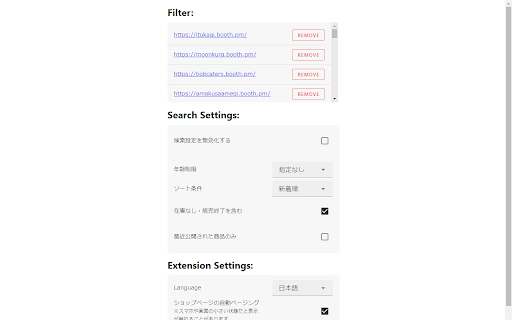
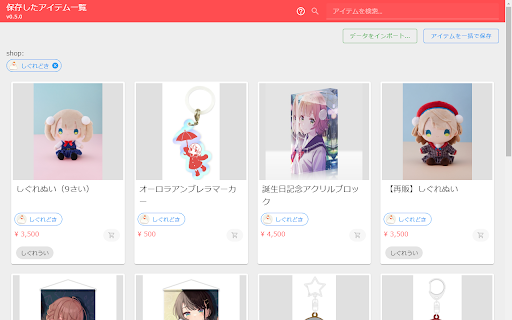


Improve your booth.pm experience with this extension. shop filter This filter is used to prevent stores that sell content that the user does not want to see from being displayed in the search field. The store's product listings will also be suppressed. search settings In Booth's search, the search criteria are cleared each time, so you will need to refine your search many times. By saving the settings from the options menu, the search will be performed in the same way each time. Supported items include age restrictions, sort criteria, out-of-stock and discontinued items, and only recently published items. translated by chatGPT, so you have some trouble, please make issue. https://github.com/TM0428/BetterBooth/issues

Reddit Enhancement Suite
A suite of modules that enhance your Reddit browsing experience Reddit Enhancement Suite is a community-driven unofficial browser extension for Reddit. Please note that RES is specifically designed to work on OLD reddit. Most functionality will not work on the redesign. NOTE: Reddit Enhancement Suite is developed independently, and is not officially endorsed by or affiliated with Reddit.

Enhancer for Letterboxd
Enhances the Letterboxd experience with additional features. Enhancer for Letterboxd is a lightweight browser extension that adds powerful tools, filters, and insights directly to Letterboxd. 🔍 Search - Search autocomplete: Shows instant film suggestions while typing in the search bar. 📊 Ratings - Friends histogram: Shows your friends' ratings on film pages. - Cast & crew histogram: Shows your ratings for films associated with the person on cast & crew pages. - Hide built-in histograms: Optionally hide Letterboxd's ratings histogram. ✍ Writing tools - Formatting toolbar: Adds formatting buttons and a preview mode to reviews, comments, and list descriptions. - Review tag autocomplete: Shows your most-used tags in the review tag field when empty, so you can add them instantly. 🏆 Awards - Academy Awards (Oscars): Shows an icon on films that have won an Oscar. - Golden Globe Awards: Shows an icon on films that have won a Golden Globe. - Critics' Choice Awards: Shows an icon on films that have won a Critics' Choice Award. - British Academy Film Awards (BAFTA): Shows an icon on films that have won a BAFTA. - Cannes Film Festival: Shows an icon on films that have won an award at the Cannes Film Festival. - Actor Awards (formerly Screen Actors Guild Awards): Shows an icon on films that have won an Actor Award (SAG Award). Clicking the icon opens the list for the ceremony year in which the film won. 🎲 Discovery - Pick a random film: Adds a button on lists, watchlist, and cast & crew pages to pick a random film. - Find twins: Find members who share the same four favorite films. - Criterion Collection: Shows an icon on films included in the Criterion Collection, displaying its spine number and linking to the film page on the Criterion Collection. - Release anniversaries: Shows a cake icon on films celebrating a release anniversary today. - Unofficial related films: Shows a selection of unofficially related films when available (like the "Three Flavours Cornetto" trilogy). ⚡ Profile activity - Recent likes: Shows the 4 most recently liked films on profiles. - Recent 5-stars: Shows the 4 most recently logged films rated 5 stars. - Recent year premieres: Shows the 4 most recently logged films released this year. 🧑 Profile stats - Viewing statistics: Shows additional stats on user profiles for the current year: average films per month, per week, and per day. - Diary activity: Shows when a user started logging films (first year) and how many years they have been logging. - Hide built-in stats: Optionally hide Letterboxd’s stats for a cleaner interface. 👥 Network - Highlight "Follows you": Adds a label on members who follow you on network pages. 🔎 Filters - New filters: Country, Language, Theme, and Runtime (BETA). - New content filter: "Hide shorts, TV and docs", a quick shortcut filter to instantly hide these categories. - Hide built-in filters: Optionally hide Letterboxd's filters for a cleaner interface. All features are optional and can be enabled or disabled individually. If you have ideas or feedback, feel free to share them on: https://github.com/leandcesar/enhancer-for-letterboxd/issues/

Kiosk Extension
Enhance the Kiosk Experience Add advanced browser controls for Chrome kiosk mode and Edge kiosk mode, designed to enhance the experience of touchscreen kiosks launched with the --kiosk flag. Whether you're managing a public terminal, self-service station, or retail display, this extension offers a comprehensive set of features to improve usability, enforce security, and simplify administration. Enterprise-Ready with Managed Settings Now supports Managed Settings via Google Admin policy, allowing IT administrators to configure and deploy kiosk settings across multiple devices with ease. Ideal for Chrome enterprise kiosk environments. See: https://www.chromium.org/administrators/configuring-policy-for-extensions • Back-to-home button on all pages • Navigation buttons • Custom extra buttons • Time and date overlay • URL rotator for dynamic content • Disable mailto: and tel: links • Force all links to open in the same tab/window • Apply custom CSS to all pages • Allow/Deny page lists for content control • Block common keys and keyboard shortcuts • Add QR code overlay with current page URL • Auto-refresh page after idle timeout • Password-protected Options page • Sync settings via chrome.sync across kiosks using the same account Notes Developed and maintained solely on my spare time. Buttons is repositioned via drag-and-drop Navigating to any URL containing kioskexit1337 will close the tab Back button appears automatically on PDF/media URLs Internal error pages (e.g. DNS_PROBE_FINISHED_NXDOMAIN) redirect to homepage May require enabling in Incognito/InPrivate mode ### Added - Adjust QR Code Size - Quit/Close Browser Button - Close Tabs on Refresh - CSS Validation - Block Drag and Drop ## [0.0.0.48] - 2026-02-25 ### Changed - Bug fix for editing extra buttons ## [0.0.0.47] - 2026-02-19 ### Changed - Bug fix for password bypass - Removed jQuery code ## [0.0.0.44] - 2025-11-08 ### Added - Custom Error Page when no Internet connection - Added so you can choose to include or exclude pages to remove browser data from ## [0.0.0.43] - 2025-10-18 ### Changed - Fixed CSS for Fontawesome - Replaced code so elements are not depented on the screen resolution used when setup - Minor fixes ## [0.0.0.42] - 2025-09-22 ### Added - Managed settings can now be used and pushed via Google Admin, see: https://www.chromium.org/administrators/configuring-policy-for-extensions ## [0.0.0.37] - 2025-01-13 ### Changed - Fix for having a local file as homepage when idle refresh - Small bug fixes ## [0.0.0.36] - 2024-12-12 ### Added - Option for logo in QR-code ### Changed - Idle detection for mouse/key/touch input on other windows/tabs - Changed QR Code library to by Intosoft - Small bug fixes ### Changed - Small fix for z-index of Navigation Buttons ## [0.0.0.34] - 2024-04-17 ### Changed - Fixed bug when saving options for exclude/include different buttons ## [0.0.0.33] - 2024-04-13 ### Added - Time and Date Overlay - Hidden Admin Button - Ignore Idle Refresh when media is playing - Refresh button for Navigation Buttons - Include/Exclude for Backbutton, Time/Date and Extra Buttons ### Changed - Changed CSS framework to beercss, completely new options layout - Fixed bug when using display with high pixel ratio (macbook) - Fixed a lot of small bugs in options - Switched to shoelace as colorpicker - Small changes to look of QR code - Remove Username field for password ## [0.0.0.30] - 2023-05-26 ### Added - New option to close the browser at a certain time, if the time has passed it will try the same time next day - New option to set a zoom level to revert to - You can now add edge://, chrome://, data: or javascript urls for buttons or homepage, note that chrome://restart can't be used but chrome://quit will close the browser ## [0.0.0.29] - 2023-03-13 ### Added - You can now choose if an extra button should open in new tab ## [0.0.0.28] - 2022-12-30 ### Changed - Even smaller bugfix for opening all links in same tab/window :) ## [0.0.0.27] - 2022-12-29 ### Changed - Small bugfix for opening all links in same tab/window ## [0.0.0.26] - 2022-12-27 ### Added - Option to use alternative page for idle refresh ### Changed - Rewrite of function for opening all links in same tab/window - Updated Coloris to new version - Updated materialize-css - Small fixes on the options page, added Ko-fi link ### Changed - Updated Coloris to new version - Small fixes on the options page ## [0.0.0.24] - 2022-06-17 ### Added - Option to hide Navigation Buttons if no history - Option for Back Button to change function depending on browser history ## [0.0.0.23] - 2022-05-25 ### Changed - Small bug fixes in options - Newer versions off materialize-css and coloris ## [0.0.0.22] - 2022-04-28 ### Added - Option to hide Extra Buttons from homepage - If you edit a button, you can press escape to exit editing ### Changed - Fixed a bug where the QR button text wasn't saved ## [0.0.0.20] - 2022-03-23 ### Added - Option to load a remote CSS-file as custom CSS - Option to Show all Extra Buttons at once for easier placement ### Changed - Replaced Back Button options with similar way like the extra buttons - Replaced Navigation Buttons options with similar way like the extra buttons - Replaced QR Button options with similar way like the extra buttons - Fixed a bug when editing an extra button - Fixed so you can move the extra buttons with touch - Fixed a bug not showing the correct resized image in an extra button Note! If you coming from earlier version and experience issues, reset settings! ## [0.0.0.17] - 2022-01-16 ### Changed - Updated the export/import function, JSON export now includes date and version - Smaller fixes ## [0.0.0.14] - 2022-01-11 ### Changed - Updated About page ### Added - Option to Block Common keys and keyboard shortcuts ## [0.0.0.13] - 2022-01-11 ### Changed - Fixed small bug when importing json-file - Fixed the buttons on options page that sometimes didn't work when clicking on certain places ## [0.0.0.12] - 2022-01-10 ### Changed - Fixed a bug if not defined a back URL the back button didn't work - Set a min limit to refresh if idle, 1 second is the lowest number now- - Fixed a bug where "don't refresh homepage" wasn't working. - Rewrite of the allow/deny rules, special characters in URLs are now working - New logo ### Added - Option to add navigation buttons: forward, backward, go to top, home - Dark Mode - Import/Export of settings - Options to always Allow SAML Redirections - About page ## [0.0.0.11] - 2021-12-09 ### Changed - Fixed a bug so "Do Not Refresh Homepage" now works - Small changes to default CSS for Back button ### Added - Option to change Text on the QR button - Option to link the QR button with the back button ## [0.0.0.10] - 2021-12-01 ### Changed - Fixed bugs redirect loops when using allow list - Fixed CSS for QR Code ## [0.0.0.9] - 2021-12-01 ### Changed - Divided the Option pages in tabs - Switches instead of Checkboxes - Included fonts and materializecss in the extension so it will work offline - If navigate to a file, example .jpg, it will always display the back button - Changed name of Black/White list to Allow/Deny list, NOTE: need to add the URLs again if upgraded from previous version! ### Added - Option to Enable/Disable Back button - Option to add a button that when clicked on will show a QR code with the current page's URL - Option to stop refreshing homepage - An exclusion list to be used with Allow/Deny list ## [0.0.0.8] - 2021-10-19 ### Changed - New icon and store graphics ## [0.0.0.7] - 2021-10-18 ### Added - If/When a chrome error page is loaded redirect to the homepage set in options ## [0.0.0.6] - 2021-10-11 ### Changed - Fixed some typos and added missing line breaks on options page. ### Added - New option to open all links in same window/tab - Reset button on options page to set default values, must save after clicking. - Started a changelog :)

Sink It for Reddit
Improve your Reddit experience. Sink It for Reddit is a hyper focused Safari extension that makes Reddit's web version usable. Features a ton of quality of life improvements including color coded comments, content muting, adaptive dark mode and more. Tired of seeing too many banners and buttons asking you to use the app or login? Sink It silently, and safely, removes all of them as well as the "promotional" content too! Make the "Modern" Reddit Experience Usable ------------------------------------------- Supercharge your Reddit experience with muting (subs, sites, words, users), antiprocrastination mode, color coded comments, ad blocking, and more. It's like RES, for mobile! Sink It also de-clutters and removes most “omfg please use our app” banners and buttons as well as the annoying login popups from Reddit in addition to removing advertisements. Yeah, we loathe them too! Privacy First -------------- Sink It has been built with a privacy first approach. - All the blocking happens on your device with literally ZERO data being recorded or sent back to be data mined. - We don't keep usage data like the count of how many popups and banners it has blocked or links it has redirected. - We don't even come with basic app analytics or telemetry to keep track of how many times you've opened or use the app. - It does check whether you have dark mode on or not so it can show you the correct tutorial video. (I hate opening a bright video on dark mode as much as you.) If you're a security researcher, feel free to poke around to make sure the app isn't up to anything funky.
