
nbpecchpcfacahhekolpaofpmogkmmok
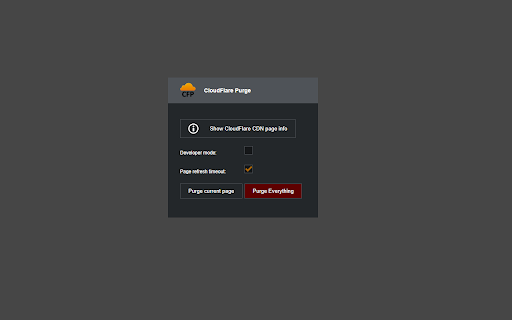

This extension can purge the CloudFlare cache for the current page of your CloudFlare enabled website The Cloudflare purge plugin uses the Cloudflare API to purge any page of a website that serves its contents through the Cloudflare CDN. After you set your CF e-mail and API key in the options, you can purge the cache of any page of your CF enabled website. After version 1.3, you can purge the entire cache for the domain of your current tab. Updates: ========================================= v 1.8.0: Migrated the extension to use Chrome Manifest V3 for improved security and better compatibility with Google Chrome. Added a list of all user owned cloudflare zones for the current API key on the options page. v 1.7.0: Added the ability to have multiple Cloudflare tokens and select between different profiles. Fixed a bug with the domain parsing logic. Special thanks to the active members of the community for their great feedback. v1.6.2: Refactored the way the extension makes asynchronous requests to the Cloudflare API to follow the Chrome safety requirements and use a background page. v1.6.1: Added support for Cloudflare API Tokens. Please check https://www.cf-purge.com/token-setup.html to find out more. v1.6.0: Rewrote the whole extension using the latest ECMA script 7 APIs. The extension executes code in a non-blocking manner. Refreshed the UI with a new design. The next version (1.6.1) will support the long awaited CloudFlare restricted API keys. Stay tuned. v1.5.1: Added a new feature for managing CloudFlare DEV mode for your domains v1.5.0: Added support for Mozilla Firefox v 1.4.3: Masked the API key input. Fixed issues with the parsing of second level domains in the URL. v 1.4.2: Added an option to show/hide the "Purge Entire Cache" button v 1.4.0: Changed the design to reflect the new CloudFlare design guidelines. Refactored the extension code and optimized the API calls. v 1.3.6: Included the ability to purge multiple URLs at the same time from the options screen. v 1.3.5: Added a way to check the error message that gets returned from Cloudflare by clicking on the "Purge failed" red text v 1.3.3: Changed the logic for the "Info" button to show the info even when some parts of it are missing v 1.3.2: Added a new "Info" button that shows the Cloudflare node, Ray ID and the current Cache-Control header values. v 1.3.1: Pushed a fix for a bug related to anchor links with spaces in the URL. Thanks to "solarroger". v 1.3: Added a new option to purge the whole cache for the domain of the current tab v 1.2.2: A small bug fix for the refresh functionality caused by auto updates. v 1.2.1: Added a new refresh timeout option that delays the page refresh. v 1.1: Includes a refresh function that refreshes the page on a successful purge v 1.0: The extension includes all the basic functionality that you need to purge the URL in your active tab.

Chrome Cloudflare Helper
A Chrome extension to detect whether the response is coming from a Cloudflare CDN and display its cache status. A Chrome extension to detect whether the response is coming from a Cloudflare CDN and display its cache status.

reCAPTCHA Solver: auto captcha bypass
An extension to automatically solve any type reCAPTCHA reCAPTCHA Solver: auto captcha bypass extension An extension to automatically solve any type reCAPTCHA. How does it work. To get your API key you need to create an account on the solving service. Without API key extensions do not work. It is not guaranteed that challenges are always solved. The limitations of the technology need to be considered. Motivation The difficulty of captchas can be so out of balance, that sometimes they seem friendlier to bots than they are to humans. The goal of the project is to improve experience with captchas, by giving us easy access to solutions already utilized by automated systems. reCAPTCHA challenges remain a considerable burden on the web, delaying and often blocking access to services and information depending on physical and cognitive abilities, social and cultural background, and the devices or networks connected from.

Cloudflare Buddy - DNS Record Manager
Quickly create, edit, and delete DNS records for your Cloudflare domains — A, AAAA, CNAME, MX, TXT Quickly create new DNS records for your domains that are added on Cloudflare. Simply add your API Token with correct permissions and you are good to go. You can add 'A' and 'CNAME' records. How to get Cloudflare API Token: 1. Login to your Cloudflare account 2. Visit https://dash.cloudflare.com/profile/api-tokens 3. Click "Create Token" button 4. Scroll down to "Create Custom Token" and click "Get Started" button 5. Give your API Token a name so you can identify it later 6. From "Permissions" select "Zone" -> "DNS" -> "Read" and add one more as "Zone" -> "DNS" -> "Write" 7. From "Account Resources" keep "Include" -> "All Accounts" or specify account that you want to manage. 8. You may keep other settings as is or change them according to your needs. 9. Proceed to next steps and copy the API Token. Note: Your API Token is saved on your browsers local storage and not uploaded anywhere else.

Captcha Solver: Auto Recognition and Bypass
SolveCaptcha Solver plugin allows you to automatically solve CAPTCHAs found on any webpage. SolveCaptcha is a powerful and fast browser extension that automatically solves captchas, including reCAPTCHA, hCaptcha, FunCaptcha (Arkose Labs), GeeTest, image captchas, and Cloudflare Turnstile. Seamlessly integrated into Chrome, it eliminates manual captcha solving, improving your browsing experience. No coding required – just install and let SolveCaptcha do the work! 🚀 Automatic captcha solving SolveCaptcha runs in the background, instantly solving captchas and ensuring smooth web navigation without interruptions. Designed for both technical and non-technical users, it also assists individuals with disabilities by automating captcha recognition and clicking. 🔹 Supported captcha types SolveCaptcha auto-solves reCAPTCHA, Cloudflare, and other captcha types across the web. SolveCaptcha delivers high-speed, accurate captcha-solving, making it a reliable tool for automation, accessibility, and effortless browsing. 🔥 Who benefits from SolveCaptcha? 🔹 Accessibility support – Helps users with visual impairments and motor disabilities by automating captcha solving. 🔹 Effortless web access – Removes barriers to captcha-protected websites, allowing uninterrupted browsing. 🔹 Faster logins and authentication – Streamlines verification processes and reduces manual input. 🔹 Automation-friendly – Perfect for web scraping, content access, and online workflows without interruptions. SolveCaptcha makes the web more accessible, fostering digital inclusivity for all users. 📌 How to install SolveCaptcha for Chrome 1️⃣ Visit the SolveCaptcha Chrome Web Store page. 2️⃣ Click "Add to Chrome" and confirm the installation. 3️⃣ Pin SolveCaptcha for quick access: Click the puzzle piece icon in the Chrome toolbar. Find SolveCaptcha and click the pin icon. Now you're ready to enjoy seamless captcha-solving! 🔹 For browsing: ✅ Install SolveCaptcha in Chrome. ✅ Sign up and add funds on SolveCaptcha.com. ✅ Enter your API key in the extension settings. 🔹 For automation & Puppeteer scripts: 1️⃣ Download the SolveCaptcha Browser Extension.zip. 2️⃣ Open /assets/config.js and enter your API key. 3️⃣ Enable Developer mode in Chrome Extensions settings. 4️⃣ Remove previous SolveCaptcha versions. 5️⃣ Click "Load unpacked", select the extracted folder, and start using SolveCaptcha! 💡 Why choose SolveCaptcha? ✔ Instant captcha solving – Works in the background for a seamless experience. ✔ Accessibility-friendly – Automates captcha-solving for all users. ✔ Cross-browser support – Chrome now, Firefox, Opera, and Edge coming soon! ✔ Secure & private – SolveCaptcha does not store or track personal data. 💰 Pricing & support 📌 Check our pricing page for cost details. 📩 Need help? Contact us at info@solvecaptcha.com. 📥 Install SolveCaptcha now and bypass captchas effortlessly! 🚀
