
nbkoadcgedjmhppjldoffhcmjlpcnfjd
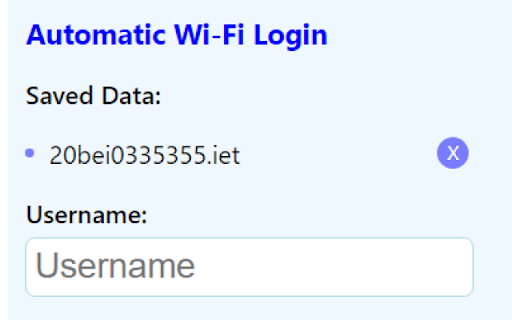
Automatically fills and submits a Wifi Login. 1. Automatic Login: The extension allows users to automatically log in to their accounts without the need to manually enter credentials each time. 2. Multiple IDs Support: Users can manage and switch between multiple IDs or accounts within the extension, making it convenient for those who need to handle various profiles. 3. Redirect URL: Users can specify a custom redirect URL after successful login, ensuring a seamless experience and directing them to their preferred destination. 4. Logout Button: The extension provides a prominent logout button that allows users to log out of their accounts easily, even if they have closed the main window. 5. Keepalive Window: With the keepalive window feature, the extension will maintain an active session, eliminating the need for users to log in repeatedly when the session expires.

VIT WiFi Auto Login
This is a Chrome Extension used to automate your login process to connect your VIT 2.4G/5G. Provide Your Login Credentials and Connect to VIT WiFi like an ordirnary WiFi. Your Passwords are Stored on Your Browser. It is not sent or stored on any external storage. Support and Share it to others. Designed and Developed by Rahul Davamani. * 1.2.0 - Added Logo, Icons and Tiles - Simplified the Name of the Extension and other Patch Works - 16/10/2019 * 1.2.1 - Cleaned Up the Code - 17/10/2019 * 1.3.1 - Minified the Code with Gulp.js - 20/10/2019

AutoFi
Streamline the LNMIIT network access with AutoFi, the ultimate Chrome extension This extension is designed to fully automate your… Streamline the LNMIIT network access with AutoFi, the ultimate Chrome extension This extension is designed to fully automate your network login process, so you can focus on what truly matters. With AutoFi, you can forget the frustration of manual login processes every time you need to connect to the campus network. 1. Automatic Login: AutoFi handles the login process for you in the background. Once configured, it will automatically log you in to your university’s network without requiring any further input. 2. Effortless Integration: Easily integrates with your Chrome browser and operates silently in the background. No need to interact with the extension every time you connect—just set it up and forget it. 3. Customizable Settings: Adjust your login preferences and update your credentials anytime through the extension’s intuitive settings panel. 4. Timed Logins: It calculates the optimal time for the next login and ensures you’re logged in without you ever needing to switch tabs or manually intervene. 5. Toggle auto-login: Whenever you leave the campus premises you can simply toggle auto-login feature off. 6. System Idle Detection: If your system remains idle for more than 4 hours then after any activity on chrome you get logged back to the network. (Works in auto-mode only) 1. Saves Time: No more repetitive logins—spend less time logging in and more time focusing on what matters. 2. Improves Efficiency: Automatically handles network connections, so you can seamlessly transition between tasks and devices. 3. User-Friendly: Designed with simplicity in mind, AutoFi is easy to set up and use, with clear instructions and support available. ❗️Important Note: For the best results, use instant login once just after saving your credentials in AutoFi when using for the first time for the extension to caliberate the 4 hours login-logout cycle. This ensures that your automatic login will function smoothly and securely. Currently Supported: AutoFi supports all LNMIIT Wi-Fi networks only. Want this magic for your university too? Feel free to email me, and we can discuss how to bring this extension to your network. Download AutoFi today and enjoy the convenience of automatic, background logins for the LNMIIT network!

SpeedMate: Speed Test & Internet Connection Monitor
SpeedMate Speed Test is the ultimate Chrome extension for measuring speed, testing internet connection quality, and troubleshooting connectivity issues in real time—and it’s free to use! Key Features of SpeedMate Speed Test: ⚡ Speed Testing: Measure your Download, Upload, and Ping speeds to ensure smooth streaming, gaming, and video calls. 📊 Live Latency Monitoring: Visualize real-time latency to detect and resolve lag issues quickly. 🌐 Internet Connection Testing: Automatically test new connections and stay ahead of potential issues. 📈 Performance Indicators: Track and compare past speed tests to monitor trends over time. 🛠️ Capabilities Overview: Quickly check if your network can handle bandwidth-heavy tasks like music streaming, video conferencing, and gaming. 🔔 Real-Time Alerts: Stay informed of internet slowdowns or connection disruptions. Built by the Team Behind Fix-IT Mate: SpeedMate Speed Test is powered by HubbleIQ, the creators of Fix-IT Mate, the go-to solution for autonomous tech support. Together, these tools deliver a seamless experience for diagnosing and resolving tech and connectivity issues. Who Is SpeedMate Speed Test For? 🛠️ IT Professionals & Network Engineers: Proactively manage and troubleshoot network performance. 💻 Remote Workers & Students: Ensure seamless video calls, online meetings, and uninterrupted learning. 🎮 Gamers: Minimize lag and enjoy uninterrupted, high-speed gaming. 🏠🏢 Home & Office Users: Optimize internet performance wherever you are. Why Choose SpeedMate Speed Test? 🎉 Free and Easy to Use: Accessible to all skill levels, with no cost to get started. ✅ Trusted Technology: Built by the creators of Fix-IT Mate, ensuring reliability and innovation. Advanced Tools: Combines speed testing, real-time connection monitoring, and proactive insights for better internet performance. Ready to Boost Your Internet Performance? Install SpeedMate Speed Test now for free on the Chrome Web Store and experience faster, smoother connections. For enterprise solutions, SDK details, or to learn more about Fix-IT Mate, visit HubbleIQ.com.

Wi-Fi Connect Print
Load the Wi-Fi Connect custom voucher theme to your Omada Controller. Wi-Fi Connect Print is the Wi-Fi Connect custom voucher on a browser extension for Omada Controller. This extension simply injects a CSS style when the page load. This is one of the best solution for me to easily print a customized vouchers in just a few click, compared to Voucher Design Generator that has a difficult steps just to generate fast. Note: You might still need Voucher Design Generator when you want to print some using your smartphone. View the source code here: https://github.com/MinecraftJohn/wifi-connect-print If you need the Wifi-Connect portal webpage for Omada Controller: Source code: https://github.com/MinecraftJohn/wifi-connect Portal Preview: https://minecraftjohn.github.io/wifi-connect/ If you want to print some but using your smartphone, use this instead: https://minecraftjohn.github.io/voucher-generator/
