
nbiddhncecgemgccalnoanpnenalmkic
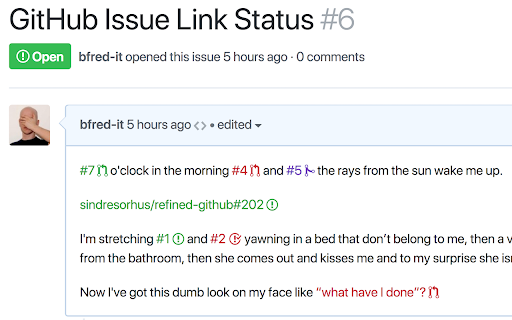
Colorize issue and PR links to see their status (open, closed, merged) It uses GraphQL to make a single HTTP request to check all the links on a page at once. This means that you'll need to create a API token and add it to the Options page or else the extension will not work. GitHub Enterprise is also supported. More info in the options.

Octohint
IntelliSense hint for GitHub With Octohint installed, when you view code at GitHub (For example this demo), you'll get features as follows: - Mouse Hover: Show information of current token - Left Click: Show all references of current token - [⌘] + Click: Go to definition of current token (For Windows and Linux user, use [Ctrl] instead) Octohint is a pure client thing. All code analysis are performed at your browser, which means your code and actions log like click, mousemove will never be sent to any server.

Dashboard filter for GitHub
This adds an activity filter menu to GitHub.com dashboard page so user can choose to see only the activities they care about.

GitHub Isometric Contributions
This extension allows you to toggle between the normal GitHub contribution chart and an isometric pixel art version.

File Icons for GitHub and GitLab
A simple browser tool changes file's icon on GitHub, GitLab, gitea and gogs. On GitHub, no matter what kind of file is, their icons are all same. However, in your fancy editor, there are some packages which give every filetype an unique icon. Therefore, I build a simple extension to replace original file icon with filetype-specific icons. This improves visual recognition on GitHub, GitLab, etc. Hope you like it! **This extension is not a project of GitHub or any company**
