
nbgemdmmeiheaopanlgfgdniphldgbol
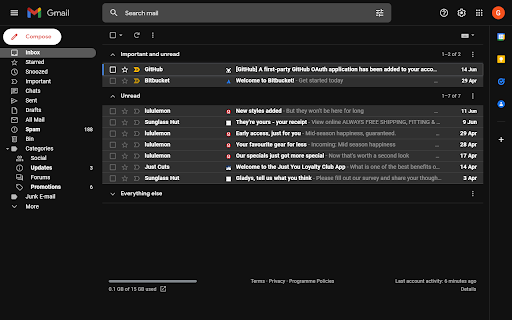
Quickly identify the sender of email messages in Gmail. Quickly identify the sender of email messages in Gmail without opening the message. Gmail Sender Icons is a Google Chrome extension that makes it easy for you to quickly and visually identify email senders in Gmail. It shows the official logo (favicon) of the sender's organization alongside the email message. For instance, if you receive an email from larry@google.com, the Gmail extension will add a logo of the Google website next to the message so you can immediately identify the sender in the email list. The Gmail Chrome extension uses the Google S2 service for generating the website's favicon while the Gmail messages are parsed with the Inbox SDK framework. All processing is done locally in your browser and no Gmail data is ever shared or uploaded anywhere. The add-on is open source and the code is available on Github. Based on the Gmail Sender Icons extension by Amit Agarwal with additional support for all TLDs. Source code is available at https://github.com/gregbradley/gmail-icons

Streak Email Tracking for Gmail
Know when your email is viewed. Real-time tracking built into Gmail for sales, support, hiring, and outreach. 👀 KNOW WHEN YOUR EMAILS ARE OPENED - Get real-time notifications when your emails are opened or links are clicked - Track activity from your Gmail inbox—no extra tools or apps needed - Use open data to follow up at the right time and close more deals ✉️ BUILT INTO GMAIL - Recently viewed folder helps you engage with active recipients - See full tracking details, including timestamps and devices - Toggle tracking on or off for individual messages 💁 WHO IT’S FOR - Sales reps who want to follow up when leads are warm - Founders and recruiters doing cold outreach - Anyone who wants to know what happens after hitting send 🤝 WORKS ALONE OR WITH STREAK CRM - Pairs with Streak CRM to track emails across your pipelines - https://chromewebstore.google.com/detail/streak-crm-for-gmail/pnnfemgpilpdaojpnkjdgfgbnnjojfik 📌 Install & Get Started 1. Click “Add to Chrome.” 2. Authorize Streak in your Gmail account. 3. Compose an email and turn email tracking on

Gmail Sender Icons
Quickly identify the sender of email messages in Gmail without opening the message. Gmail Sender Icons is a Google Chrome extension that makes it easy for you to quickly and visually identify email senders in Gmail. It shows the company domain name of the email sender and the official logo (favicon) of the sender's organization alongside the email message. For instance, if you receive an email from larry@google.com, the Gmail extension will add a virtual label google.com to your email message and also a logo of the Google website next to the message so you can immediately identify the sender in the email list. Gmail Sender Icons has been featured on Product Hunt, LifeHacker, The Next Web and host of popular websites. The favicons and the sender's domain are visible across Gmail including search results. The sender's label is applied virtually and the actual labels of the email message are left unchanged. The Gmail Chrome extension uses the Google S2 service for generating the website's favicon while the Gmail messages are parsed with the Inbox SDK framework. All processing is done locally in your browser and no Gmail data is ever shared or uploaded anywhere. The add-on is open source and the code is available on Github.

Lemicons
Quickly identify the sender of email messages in Gmail without opening the message. Quickly identify the sender of email messages in Gmail without opening the message.

Sender Icons for Gmail™
Add a sender icon for all emails in your Gmail inbox. Sender Icons for Gmail™ is an extension that lets you easily add icons for individual emails (based on the sender's address) in the Gmail inbox. Simply add the addon to your browser and open or reload your Gmail inbox. You will see an icon next to the - subject - column for each email. The icon is derived from the email's domain address. Please note that icons are set to be 16 pixels in width and height. To change the icon size to 32 pixels, please visit the extension options page. Note: to hide icons, please press on the toolbar button once to disable the addon, then reload the Gmail tab. Important note: Sender Icons for Gmail™ add-on does NOT belong or relate to Google Inc at all. It is an unofficial extension that is developed and maintained independently by its author. Gmail™ is a registered trademark of Google Inc. If you see any bug(s) or have a feature request, please fill out the bug report form on the addon's homepage (https://mybrowseraddon.com/sender-icons-for-gmail.html).
