
nbfhlbpkebiejihbipapniegllacifhb
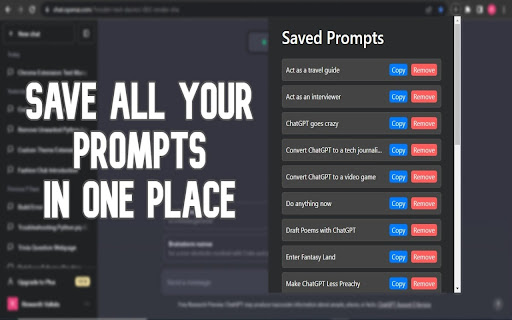
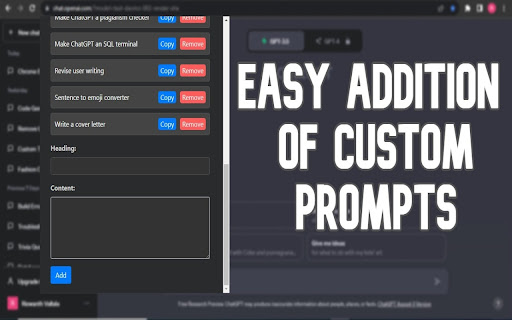

An extension for saving and copying useful Chatgpt prompts with headings. ChatGPT Prompt Saver: Preserve and Manage Your High-Quality Prompts Tired of losing track of your thought-provoking ChatGPT prompts? Meet ChatGPT Prompt Saver, your ultimate tool for effortlessly storing and organizing high-quality prompts right in your browser. Experience a streamlined way to maintain your creative ideas and engaging conversation starters. 1. Effortless Prompt Capture: Seamlessly save your meticulously crafted ChatGPT prompts, creative brainstorming, and engaging conversation openers. The user-friendly interface makes preserving your prompts a breeze. 2. Custom Headings: Categorize your saved prompts with personalized headings. This ensures quick retrieval and easy reference, even when you have an extensive collection. 3. Dark Mode Enhancement: Immerse yourself in a visually pleasing experience, even during late-night brainstorming sessions, with the extension's stylish dark mode interface. 4. Instant Access: Access your stored prompt entries conveniently from your browser's toolbar. No need to switch applications or juggle between tabs. 5. Copy and Remove Functionality: Copy prompts to your clipboard for immediate use or remove entries with a simple click when they're no longer needed. 6. Pre-built Examples: Upon installation, discover a set of pre-built prompts showcasing the extension's capabilities. Easily tailor or delete them to match your preferences. ChatGPT Prompt Saver simplifies the process of capturing and managing your creative prompts, brainstorming, and unique conversation initiators. Whether you're a writer, content creator, or simply enjoy generating engaging dialogues, ChatGPT Prompt Saver offers a convenient and reliable solution. Say farewell to losing your creative sparks and welcome an organized repository of prompts that's always accessible. Install the ChatGPT Prompt Saver extension from the Chrome Web Store. Click the extension icon in your browser's toolbar to access the interface. Begin saving your high-quality prompts effortlessly and experience the benefits of streamlined organization. Elevate your creativity and stay organized by adding ChatGPT Prompt Saver to your browser today. Try it now to keep your valuable prompts right at your fingertips and fuel your imaginative journey!

PromptSave: Discover, Save & Share Prompts
Beautifully save your Chat GPT, mid-journey, Bing, or any other AI prompts you use & easily within your reach. Beautifully save your Chat GPT, Mid-Journey, Stable Diffusion, or any other AI prompts you use. Right click and save anywhere on the internet to add a prompt to a folder. Create reusable templates with variables and organize them with folders, colors, and icons to make them easily accessible. The best part is that it's compatible with all AI tools, making it a one-stop solution for all your AI workflow needs. Whether you're a digital artist, copywriter, or productivity hacker, our extention will revolutionize your AI workflow, helping you keep your most-used prompts safe, organized, and looking great! ✅ Discover What's Trending ✅ Right Click & Save A Prompt Anywhere On The Internet ✅ Create reusable prompts ✅ Organize with folders, colors, & icons ✅ Works with all AI tools Share your prompts with your team or audience using public links Prompt Library

AI Prompt Saver
Save, re-use and manage AI prompts for OpenAI, Gemini, Copilot and other AI tools. ☆ Save and re-use prompts ☆ Add prompts by selecting the text on a web page or via the extension toolbar button ☆ Store prompts securely in your browser only in offline mode ☆ Inserts prompts by right clicking on a text input area ☆ Organize prompts into folders ☆ Sync prompts across browsers

Prompt Save Reuse: ChatGPT, Gemini & More
Save and reuse prompts across popular AI chat platforms. Save prompt or retrieve a saved one. Supports keyboard shortcuts. Welcome to Prompt Save Reuse: ChatGPT & Gemini! This browser extension enhances your productivity by allowing you to save and reuse prompts effortlessly on ChatGPT and Gemini. This guide will help you understand and utilize the extension's features effectively. Features Overview Single Click: Save or retrieve text prompts. Double Click: Append saved text prompts to your current input. Right Click: Access additional options like clearing all saved data or navigating to the GitHub page. Purpose: Save the current text from the input field to the browser's local storage or retrieve saved text if the input field is empty. Type your prompt into the input field on either ChatGPT or Gemini. Click the extension icon once. The text will be saved to the browser's local storage for the current URL. A console message will confirm that the text has been saved. Retrieving Text: Ensure the input field is empty. Click the extension icon once. If there is saved text for the current URL, it will be pasted into the input field. A console message will confirm that the text has been retrieved. Scenario: Imagine you have a specific prompt you use frequently. Type it once, click the icon, and it will be saved. The next time you need it, just click the icon again, and your prompt will reappear, ready to be used. Purpose: Append the saved text from local storage to the current content in the input field, with an empty line before the appended text. Type or paste any text into the input field on either ChatGPT or Gemini. Double-click the extension icon. The saved text will be appended to the current input, separated by an empty line. A console message will confirm that the text has been appended. Scenario: You’re in the middle of a conversation and need to add a frequently used prompt to your current message. Just double-click the icon, and it will be appended to your existing text, making it seamless to continue your conversation. Purpose: Access additional options such as clearing all saved data or navigating to the GitHub page. Right-click the extension icon. Select "Clear All Saved Data" from the context menu. All saved prompts will be cleared from the local storage. A console message will confirm that all saved data has been cleared. Navigating to the GitHub Page: Right-click the extension icon. Select "Go to GitHub Page" from the context menu. A new tab will open, directing you to the GitHub repository for this extension. Scenario: If you want to start fresh and clear all previously saved prompts, simply right-click the icon and choose to clear the data. Or, if you want to check for updates or contribute to the project, you can easily navigate to the GitHub page.

Open Prompt Manager
Open Source Prompt Manager for ChatGPT, Claude, Gemini, Grok and more. --- Free, open-source prompt manager. Save, organize, and load your AI prompts across ChatGPT, Claude, Gemini, Grok, and other LLMs - with full privacy. Organize your best prompts, switch between models instantly, and streamline your workflow. Whether you’re a prompt engineer, researcher, or just an AI enthusiast, Open Prompt Manager gives you the tools to manage your prompt library with speed and simplicity. - Multi-service compatibility: Works with ChatGPT, Claude, Gemini, Grok, and 15 other LLMs. - **NEW** : Custom website support : now supports any website you want to use it on :) - Create your prompt library : Save, tag, and organize your prompts for quick access. - One-click prompts: Get your prompts sent in a single click. - Variables support: Create reusable prompts with dynamic placeholders. - Import / Export: Backup or share your prompts with others. - Lightweight & private: No login required, no data collection, no hidden costs. - Customizable UI: Auto dark-mode, hot-corner trigger, keyboard shortcuts, and more. - 100% free & open source, transparent and community-driven. - Works everywhere: Compatible with ChatGPT, Claude, Gemini, Grok, and 15 other LLMs. - Privacy-first: No data leaves your browser. - Boost productivity: Save time by organizing your prompts once and reusing them anywhere. - Keep a library of ChatGPT prompts for writing, coding, marketing, or learning. - Quickly switch between LLMs prompts for side-by-side benchmarking - Store prompts for customer support, content creation, or research workflows. - Share prompt collections with teammates via import/export. Open Prompt Manager runs entirely locally in your browser. No logins, no accounts, no tracking. Your prompts belong to you — always. 👉 Install Open Prompt Manager today and simplify your AI workflow with a free, open-source prompt manager built for the future of LLMs.
