
nbdaijdcnmhjhoekcdcgdjcjheajgpad
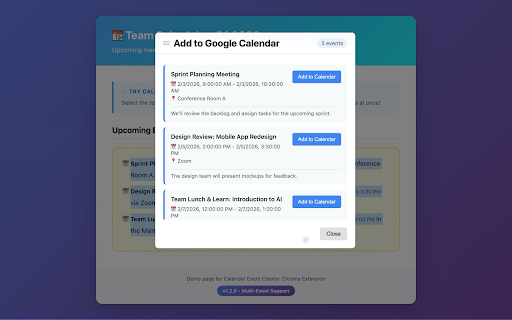


Calendar Event Creator is a powerful Chrome extension that simplifies event creation using AI. Simply select any text containing event information, right-click, and let the extension automatically extract event details using OpenAI's advanced language processing. **NEW in v1.2.0**: Multi-event extraction, auto timezone detection, and draggable modal! **v1.2.1**: Fixed UI issue where the "Add to Calendar" button was hidden when event details contained long text or URLs. **v1.2.0 Highlights:** - **Multi-Event Extraction**: Select text with multiple events and extract them all at once - **Auto Timezone Detection**: Automatically uses your browser's timezone for accurate event times - **Draggable Modal**: Reposition the confirmation window by dragging the header - **Individual Event Buttons**: Each event has its own "Add to Calendar" button **Two Usage Modes:** - **Sign in with Google** (Recommended): Get 50 free calendar event creations per month - no API key needed - **Bring Your Own API Key**: Use your personal OpenAI API key for unlimited client-side processing **Core Functionality:** - One-click event creation from any webpage text - Smart extraction of event title, time, location, and description - Preview and confirm event details before adding - Seamless integration with Google Calendar - Visual usage tracker with color-coded progress bar (for signed-in users) Perfect for quickly creating calendar events from emails, messages, web pages, or any text containing event information. Save time and reduce errors by automating event creation with AI-powered text understanding. **For signed-in users**: Enjoy 50 free event creations per month with automatic usage tracking. **For advanced users**: Provide your own OpenAI API key for unlimited processing without monthly limits.

APIsec BOLT
Discover APIs from browser traffic and auto-generate OpenAPI specs. APIsec BOLT automatically discovers and security-tests APIs by capturing real application traffic directly from your browser—without proxies, agents, or configuration. As you interact with an application, BOLT identifies API endpoints, detects security vulnerabilities in real time, and provides a streamlined path to analyze and test those APIs using APIsec.ai. BOLT converts real runtime behavior into accurate API definitions and actionable security findings, eliminating guesswork and accelerating documentation, onboarding, and security workflows. 1. Automatic capture of application traffic BOLT captures API calls directly from your active browser tab. No proxies or traffic redirection required. Start capture and browse normally; BOLT records API interactions on the fly. 2. Real-time threat detection As traffic is captured, BOLT automatically surfaces BOLA, RBAC misconfiguration, and Mass Assignment findings — no manual trigger needed. A live findings banner alerts you to issues as they appear, with grade badges and expandable threat details in the APIs tab. 3. Automatic identification of API endpoints Captured traffic is analyzed to identify API methods, paths, parameters, hostnames, and request/response metadata — producing a reliable API inventory based on how your application actually behaves. 4. Auth token harvesting BOLT automatically detects and catalogs auth tokens from captured traffic — JWT, API keys, Basic auth, and cookies — in a dedicated Auth tab. Your token inventory builds itself as you browse. 5. Request editing and replay The Manipulator tab lets you edit and resend any captured request. A smart param picker surfaces suggestions from all captured traffic, with editable path parameters for IDOR and BOLA testing. 6. Automatic generation of OpenAPI (Swagger) specifications BOLT converts captured API calls into structured OpenAPI definitions. Use the OAS picker to select exactly which APIs to export for documentation, modeling, or integration with APIsec.ai's testing workflows. 7. APIsec.ai–powered API security analysis API definitions discovered by BOLT can be analyzed using APIsec.ai's automated security engine, covering authentication and authorization issues, BOLA/IDOR, logic flaws, injection risks, misconfigurations, and complex multi-step attack paths. 1. Open a web application and launch APIsec BOLT from the Chrome or Firefox toolbar. 2. Start capture to automatically collect API traffic from your active browser tab. 3. Review discovered endpoints, real-time threat findings, and captured auth tokens. 4. Use the Manipulator to edit and replay requests, or export auto-generated OpenAPI specs. 5. Send APIs to APIsec.ai to onboard or run automated security analysis. Non-intrusive and privacy-respecting by design APIsec BOLT operates completely on the user's local machine. All traffic capture, API identification, threat detection, and OpenAPI generation occur locally within the browser extension. BOLT does not intercept, modify, or block network traffic. It passively observes requests from the active browser tab solely for the purpose of API discovery, documentation, and security analysis. Transmission of API data to APIsec.ai occurs only when the user explicitly initiates it. No data is sent externally without user action.

Calendar Automator – AI Scheduler & Planner
AI turns your words into Google Calendar events. Smart weekly planner, routines & event templates. Save hours every week. Turn Google Calendar into your personal AI assistant — without switching apps. Calendar Automator brings four powerful tools to your browser, designed to eliminate the friction between your plans and your calendar. ── AI EVENT CREATOR ── Just type what you need: "Team meeting tomorrow at 3pm for 45 minutes" or "Dinner Friday at 8pm at Nobu" — and Calendar Automator instantly parses your words into a ready-to-save event with title, date, start time, end time, and location. No forms to fill. No clicking through date pickers. It works in multiple languages, so you can describe events the way you naturally think. Google Calendar automation has never been this effortless. ── SMART WEEKLY PLANNER ── Stop staring at a full calendar wondering when your tasks will get done. The smart scheduler analyses your free and busy slots across a date range, then places your tasks in available gaps automatically. Define each task with a name, estimated duration, preferred time of day, and how many times per week — the planner handles the rest. Time blocking on autopilot. ── ROUTINE BUILDER ── Your morning routine, your client onboarding process, your pre-meeting preparation — anything with repeating steps can become a Routine. Build a named sequence of steps (each with a name and duration), reorder them with drag-and-drop, then run the whole routine by dragging it onto any time slot in Google Calendar. Every step lands as a sequential event, perfectly timed. ── EVENT STUDIO ── Every event has preparation before it and a wind-down after it. Event Studio lets you search your existing calendar events, select one or several, and automatically create "before" and "after" companion events using customizable templates. Prep time before a big presentation. Recovery time after a long workout. Buffer time before a flight. It takes seconds. ── WHO IS IT FOR ── Calendar Automator is built for professionals, students, coaches, project managers, and anyone who relies on Google Calendar to structure their day. If you've ever wished your calendar could think ahead, automate the repetitive parts, and just keep up — this extension is for you. ── PRIVACY ── Calendar Automator only accesses the calendar data needed to display free/busy slots and create events. No data is sold or shared with third parties. Add Calendar Automator to Chrome today and take back control of your week.

Offset start-times in Google Calendar
Want to start all of your meetings at 5 minutes after the hour by default? That's what this extension does! It offsets start-times by default when adding a new event in the Google Calendar web UI, using an offset you configure (default 5 minutes). Works with the Speedy Meetings setting in Google Calendar too, so you can leave some room before and after your meeting. Back-to-back meetings are draining; give your attendees time to eat! Installing: After adding the extension, you need to refresh your Google Calendar page in order for it to work

Text to Calendar - AI Event Scheduler
Text to Calendar – AI Event Scheduler is a productivity extension that makes scheduling effortless. Instead of copying, pasting, and retyping event details, simply highlight text on any webpage such as emails, articles, invites, or project tools and the extension instantly creates a clean Google Calendar event for you. Powered by LLM technology, it understands dates, times, and even meeting links, so your events are accurate from the start. No more messy scheduling or missed details because everything is structured, formatted, and created for you. • Save time: Skip manual data entry and add events in just two clicks. • Stay accurate: AI detects titles, times (with time zones), and links automatically. • Works everywhere: Gmail, Outlook web, news sites, project boards, any page with text. • Smooth experience: Instant feedback lets you know when your event is ready. Whether you are scheduling meetings, classes, webinars, or personal reminders, Text to Calendar – AI Event Scheduler cuts out the hassle and keeps your calendar organised with zero extra effort. Whats new (v1.05) • Outlook Calendar support, better parsing logic. Whats new (v1.04) • Bug fixes and overall improvement in experience Whats new (v1.03) • Added support for Brave Browser
