
nbbjofaonjahdkegkjknppmepcbcegnn
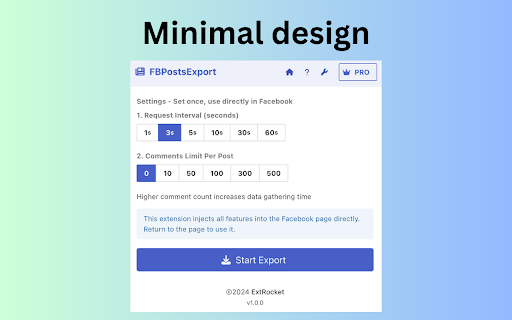


Download facebook group posts and comments from facebook group page and profile page. 🏆Best tool made for people who want to export Facebook posts and comments. A brilliant export tool that allows you to quickly export Facebook posts and comments with just one click! Download FB posts and comments with one click. 1.Click the export button. Using Facebook's official API to export data. Free user can export the first 20 records. Paid users can export without limits. Only $4.99! No password required. All the data you export is processed locally, so no one knows what you download.

Comments Exporter
Extract Facebook post comments. Export in CSV, JSON, or Excel. Ideal for social media managers and researchers analyzing engagement Comments Exporter for fb is a powerful browser extension, allowing you effortlessly export comments from any Facebook™ post with just a few clicks. Comments Scraper for fb bridges the gap between raw social media data and actionable insights. This innovative tool enables users to harness the full potential of user-generated content, making it an invaluable asset for social media managers, market researchers, and content creators alike. How It Works Using Comments Extractor for fb is straightforward and user-friendly: 1. Click the download icon beside the comment icon. 2. Or copy the URL of any Facebook post. then paste the URL into the extension's input field to start the extraction process for comments and replies. 3. Click "Download Items" to save the data once completed or paused. You can choose your preferred format: CSV, JSON, or Excel (XLSX). Comments Downloader for fb offers numerous advantages for various professionals. It saves time by automating the tedious task of manually copying comments. The tool captures both top-level comments and nested replies, providing a comprehensive view of the conversation. With flexible export options, you can easily integrate the data into your preferred analysis tools. This wealth of information enables deeper understanding of audience sentiments and engagement patterns, ultimately informing content strategy and customer service improvements. This powerful tool is ideal for social media managers analyzing engagement and sentiment, market researchers gathering consumer insights, content creators understanding audience reactions, community managers monitoring user discussions, and businesses aiming to improve customer service through social listening. Comments Exporter for fb empowers users to make data-driven decisions by providing easy access to valuable user-generated content. Whether you're tracking campaign performance, conducting market research, or trying to understand your audience better, this extension streamlines the process of gathering crucial social media data. Don't let valuable insights slip away. Download Comments Exporter for fb today and unlock the full potential of your Facebook engagement data. Transform the way you interact with your audience and make informed decisions based on real user feedback. Data Privacy Your data stays on your device and is not stored or transmitted to our servers. We prioritize keeping your information secure and confidential. Disclaimer This extension is an independently developed product by ExtensionsBox and has no association with META LLC.

F.B Data Scraper - Posts, Comments
This chrome extension allows you to export m.facebook.com's web page information into an editable spreadsheet file. You can now extract the post list, brand name, likes and shares, and customer comments for a given post with this plugin. In contrast to other Facebook scrapers, our plugin pulls more than just the post titles and captions. - We extract almost all the page information including Page Name, PostID, Post Caption, Post Likes, Post Shares, Post Date and Time, Post Date & Comments, Links in caption, Hashtags, Attherate, PostURL, PageURL. - It works with Facebook's mobile version, thus the URL must be m.facebook.com. - Bulk URL allows you to add up to 100 pages/posts URLs, single post URLs, or both, separated by commas, and export data to an excel file. - The scraper grabs post data automatically when you press the Start Extraction button. - Click the restart button to resume extraction from that product if the extension shuts for any reason throughout the procedure. 1. Go to www.facebook.com/m. 2. Type any keywords you want in the search area, such as a brand name, post keywords, etc., or choose any Facebook user profile. 3. Use the filtering option and then press enter to fine-tune the search results. 4. Launch the chrome extension and click the start button after the search results have appeared. The information will be saved in an excel spreadsheet. What you get out of this product is: - Competitor analysis: Export the entire list of posts, as well as the Brand name, Likes, and Shares, to Excel for additional study. - Get to know your client: Customers' reviews and comments on specific posts are extracted. - Market research: Learn how customers react to varied post times, brands, and other factors. - Restart functionality: If the scrapper closes in the middle of a job, you can resume scraping data from the post. - Bulk URL: A comma-separated list of post URLs from which data can be collected is required for the bulk URL. What data you can extract: - Page Name - PostID - Post Caption - Post Likes - Post Shares - Post Date and Time - Post Date & Comments - Links in caption - Hashtags, Attherate - PostURL, PageURL. What types of posts are supported: - All of the categories How many numbers does the data support: There is no limit. Exception: - This suggests retrieving no more than 1000 data points at a time. - Depending on the volume of data, the extension may hang or require an unusually long loading time. Technical assistance: Any suggestions or ideas for improving the items are welcome. Please send an email to hello@datasunday.com. Developer: www.datasunday.com We specialize in data extraction for E-Commerce platforms like most of the social media platforms and E-commerce platforms also. Please visit www.datasunday.com to request a free pass right now.

FB post Scraper - Facebook Posts Scraper
Extract and export Fb posts from accounts, groups or pages for analysis and growth. facebook posts scraper Instantly extract public Facebook posts from any page , profile or feeds and export them into structured datasets. Facebook Posts Scraper is a lightweight Chrome extension designed for marketers, researchers, and analysts who need fast access to public Facebook post data. Simply paste a Facebook page or profile URL from the extension then a new tab opens when a page fully loaded click start scraping, and export the collected data in seconds. or use injected export button on the facebook site and then click start capture on the new opened panel and scroll down to get and export posts. ✔ Scrape Public Facebook Posts – Extract posts from any public page, profile , feeds or groups . ✔ URL-Based Scraping – Paste a Facebook profile or page URL ✔ Easy scraping - simple export posts button and realtime scraping progress , and exports ✔ Automatic Data Collection – The extension captures post data automatically as it loads. ✔ Multiple Export Formats – Export data to CSV, Excel (.xlsx), or JSON. ✔ No Login Required – Works without Facebook credentials or cookies. ✔ Fast & Lightweight – Simple browser extension with minimal resource usage. ✔ Local Processing – All scraping runs inside your browser. 🔎 Data You Can Extract • Post text content • Post ID and URL • Timestamp / post date • Reaction and engagement counts • Image or media URLs (when available) • Page or profile name • Profile link • Additional metadata All data points depend on what is publicly visible on the page. Export your collected data instantly: • CSV – Ideal for Google Sheets or spreadsheets • Excel (.xlsx) – Advanced analysis and reporting • JSON – Perfect for developers and automation 👨💻 Perfect For Marketers Analyze competitors and track social content performance. Researchers Study posting trends and engagement patterns. Content Creators Monitor popular posts and audience interaction. Data Analysts Build datasets for social media insights and reporting. 1. Install the extension. 2. Sign up with your Google account. 3. Open the extension panel. 4. Paste a Facebook page or profile URL next to the . 5. Or click Export Posts button on the page site Click Start Capture to begin scraping posts. 6. Stop the capture when finished. 7. Export your data instantly in CSV, Excel, or JSON. • Access to core scraping features • Limited number of extractions • Export in CSV, Excel, and JSON • Unlimited scraping • Unlimited exports • Faster extraction speeds • Priority support and updates • No Facebook login required • No cookies accessed • No personal messages or private data collected • All processing runs locally in your browser • Only publicly available information is extracted Your data never leaves your device. This extension extracts publicly available information to assist research, analytics, and data collection workflows. Facebook is a trademark of Meta Platforms, Inc. This extension is an independent tool and is not affiliated with, endorsed by, or sponsored by Meta or Facebook.

ESUIT | Posts Exporter for Facebook™
Bulk-export Facebook posts from profiles, groups & search results. Stream to server via webhook for CRM, database, or automation. Support exporting or downloading posts, attachments, comments, and screenshots for: - Any group's posts - Any user's posts in a group - Any page's posts - Any user's profile posts - Your saved posts - Search results - Post's link Effortlessly export Facebook posts with this dynamic extension. Unlock the power to effortlessly bulk-export posts from any timeline, page, or group. This versatile tool supports multiple export formats such as JSON, HTML, and CSV, and even allows you to export directly to Google Sheets. This extension allows you to bulk-export all posts from ANY one timeline, any page and any group and your saved posts. Unlike the tools provided by facebook, this extension allows you to export other people's data. You can import the exported posts to other platforms, such as wordpress or blog, or you can use these posts for data analysis. JSON type files can be processed by any programming langs. If you are a developer, this is very useful for you. If you need to subscribe to our service, we will collect your email address to verify your subscription status. (We only collect this data from subscribers; if you do not subscribe, we will not collect any of your data.) This is our privacy policy. https://esuit.dev/privacy-policy Notice: this extension has In-App Purchases. This extension includes features that require payment to unlock unlimited usage. Please refer to our pricing page for more details. https://esuit.dev/pricing/export-posts-for-facebook Additional Features: In the Popup, we provide the following additional features: Function Description: A brief description accompanied by a video tutorial demonstrating how to use this extension. Login Button: Use when you need to subscribe to premium features or log in with an existing subscription. Relevant-Ext: We provide brief recommendations and introductions to relevant extensions in a small section. Encountering an issue? Report it to us 💪: If you encounter any issues, you can get in touch with us through this link, and we will assist you in fixing it. Warning Facebook™ is a trademark of Facebook Inc., registered in the U.S. and other countries. This is an independent project developed by ESUIT. and has no relationship to Facebook™ or Facebook Inc. this extension is not officially developed by Facebook™, The author is @William Chen Got feedback or experiencing any issues? Let us know on Facebook! Your input is important to us and we're here to help. https://www.facebook.com/esuitdev
