
napglpohnjmijfegeilfpipbjdjebdnc
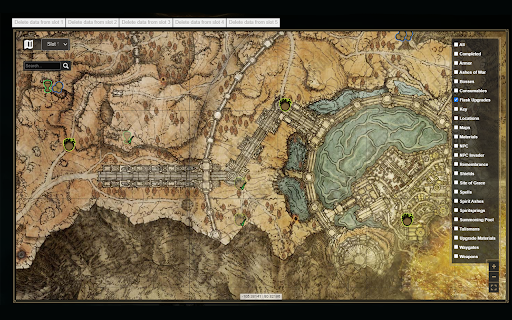
Enables Fextralife VIP-only map features without having to pay for it Enables features blocked behind the VIP paywall for the Interactive Map of Elden Ring, Hogwarts Legacy and GOW: Ragnarok. Features: - Option to use fullscreen by clicking the expand screen icon - Progress Tracker: Click on any item and "mark as complete" to save your progress locally - Progress Reset - Multiple Character Slots

Emoji Combiner
Emoji Kitchen Extension – Mix & Match Fun Emojis! Get creative with your expressions! The Emoji Kitchen extension lets you visit TheEmojiKitchen.in where you can combine two different emojis to make fun, unique mashups – just like Google’s Emoji Kitchen. Download your custom emojis as images Easy to use, fast, and no sign-up needed Works right in your browser Whether you’re chatting with friends or spicing up your social media posts, Emoji Kitchen gives you a fun way to say exactly what you feel. From 😍 + 🐱 to 💀 + 🍕 – the combos are endless and hilarious! Perfect for anyone who loves emojis and wants more ways to express themselves. Try it today and unlock your emoji creativity! 🧠✨

Elden X
Elden Ring experience for X (Twitter) Elden X brings the thrill of discovery from Elden Ring to X (Twitter). See a dramatic full‑screen “Post sent”, “Reply posted”, "Post Liked" or "Retweeted" banner with a subtle cinematic fade, and hear iconic “New item” style sounds. You can also enable sounds for Likes and Retweets. Everything is customizable from the popup. What you get: - Cinematic banners: Full‑screen “Post sent”, “Reply posted”, "Post Liked" or "Retweeted" visuals, smoothly animated in and out. - Authentic audio: Choose from New item, New key item, or New location sound styles. - Per‑action control: Toggle sounds for Likes and Retweets independently. - Themes and tinting: Pick Golden Grace, Bloodflame, or your own custom overlay color and intensity. - Live preview: Test your post/reply effects instantly on your current X tab. - Volume control: Set global audio volume (0–100). How it works: - Elden X detects when you post, reply, like, or retweet on `x.com` and plays the matching effect. - Banners are masked and tinted via an overlay so you can switch themes or fine‑tune colors and opacity. - All settings are stored locally via Chrome Sync and can be adjusted anytime from the popup. Note - Preview works when your active tab is on X/Twitter.

Elden Ring Wiki Shortcut
Get to the Elden Ring Wiki faster Barebones shortcut for searching on the FextraLife Elden Ring Wiki. Clicking the extension icon or using the keyboard shortcut "Alt+Q" brings you directly to the wiki and focuses the search bar. Don't you dare go hollow.

YouTube Members-Only Cleaner
Hides videos marked as Members Only from all YouTube feeds. Hides videos marked as Members Only from all YouTube feeds.
