
nanhambbggdgkloeldahjngdmngjgmhk

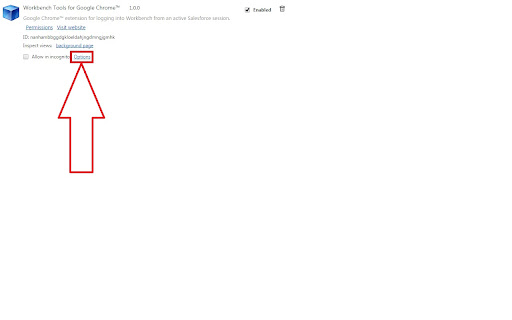

Google Chrome™ extension for logging into Workbench from an active Salesforce session. Extension to log you into the Salesforce Workbench in one click from Google Chrome or Brave. This is *NOT* the Workbench itself. For information on how to install the Workbench, please refer to the Github repository (which is now in maintenance only mode) https://github.com/forceworkbench/forceworkbench Once you have installed the Workbench locally, for the extension to work, you have to set the base URL of the Workbench by clicking on "options" like shown on the Screenshot. If you want to browse the source code, or log issues, or simply star the repository, please come here https://github.com/Krisa/Salesforce-Workbench

Salesforce Inspector Reloaded
Productivity tools for Salesforce administrators and developers to inspect data and metadata directly from the Salesforce UI. This extension is based on the original Salesforce inspector extension made by Søren Krabbe. IMPORTANT: If you have any question or facing bugs, please use the GitHub repository : https://github.com/tprouvot/Salesforce-Inspector-reloaded/issues - Analyze Field Usage in Show All Data - Multi Query tabs in Data Export - Download & Deploy Metadata - Security improvements - Field Creator page to bulk create fields from the extension - Event Monitor page to subscribe to Platform Events from the browser - Import / Export configuration from Option page - Customise extension shortcuts - Support SOSL and GraphQL languages - REST Explore page to run any API from the extension without external tool - Load recent records from popup - Customize extension favicon and Sandbox banner - Check QueryPlan on data export - Enable Logs from User tab - Customize settings in Option page - New Org tab - Search for a particular flow, profile or permission set from Shortcut tab - Restrict Salesforce Inspector usage with a default connected app - New "Shortcut" tab to quickly access setup menu - Link to permission sets assignment from User tab And many more !

Workbench Extension
Some new functionalities form the Salesforce Workbench application (https://workbench.developerforce.com/): - Resize the window - Query page: checkbox for fields selection. Paste a request, click "Refresh" => that fill the form. Searching filter. Download displayed result (JSON & CSV) - Execute page: saving scripts to load easier later. 2018-10-30 (v1.5.0): Functionality: - Save script into the Execute page 2018-10-26 (v1.4.0): Functionality: - Download the result displayed on the page. Two format: JSON & CSV Bug: - After query, field not displayed.

Kojin
Kojin is an all in one extension bringing practical Salesforce tools directly into the pages you already use. Enable only the apps and modules you need from a single settings page. 🔒 Your preferences and data stay in your browser. Kojin does not use a backend or store your org data externally. 📝 Review Marker Export Reports as PDF and mark report rows as reviewed directly on Lightning Report run pages. Track review progress per report, add optional notes, and generate shareable review summaries for standups, QA reviews, or handoffs. Export your Salesforce ListViews to Excel/CSV format 📈 Coverage Analysis View deployment code coverage and test runtime breakdowns with clear charts and tables for Apex classes, triggers, and flows directly from Deployment Status pages. 🕘 Metadata History Search metadata change history from deployment monitoring pages to quickly see who changed what and when. 🌩️ Trust Tracker View live Salesforce Trust status directly from Salesforce Setup Home, including historical incidents, active maintenance windows, and upcoming maintenance events. ⚡ Async Apex Monitor Monitor async Apex job usage against org limits directly from the Async Apex Jobs setup page. 🔐 Permissions Diff Compare permission sets or profiles side by side with filters and a compact floating panel you can minimize while working. 🌐 Cross Org Comparison Compare permissions across multiple Salesforce orgs you are logged into using the same side by side experience. 🧩 Modular by Design Kojin is organized into focused apps and modules so you can enable only the functionality you actually use. Kojin is provided "as is" without warranty of any kind, either express or implied, including but not limited to the implied warranties of merchantability, fitness for a particular purpose, or non-infringement. In no event shall the developers or contributors be liable for any direct, indirect, incidental, special, exemplary, or consequential damages (including, but not limited to, procurement of substitute goods or services, loss of use, data, or profits) however caused and on any theory of liability, whether in contract, strict liability, or tort (including negligence or otherwise) arising in any way out of the use of this software, even if advised of the possibility of such damage. The developer is under no obligation to provide maintenance, support, updates, or modifications. By using this extension, you acknowledge that the developers and contributors are not liable for any damages arising from your use or inability to use it. You assume full responsibility for any consequences and for ensuring that your use complies with all applicable laws and regulations. The developers and contributors reserve the right to modify, suspend, or discontinue this extension or any individual feature in this extension at any time without prior notice.

Salesforce advanced Code searcher
By using the advanced quick find you can get your code few clicks shorter. Also, you can search any string your code Using this extension you can search your code components your salesforce instance: 1) apex Classes 2) Apex Triggers 3) visualforce Pages 4) Visualforce Components 5) Lighting Component In addition to the above you can use this extension to jump to classes / pages / triggers from the advanced quick find section on the left hand side. How to make it work in Lightning: 1) We embed the extension in the setup page. Please navigate to the setup home page where you can find the extension injected in the right. 2) You need to authorize (this is a one time activity) for the application to make the API calls. 3) On clicking the button, you will be navigated to the Salesforce to authorize. Once you have successfully completed the authorization, you will be redirected back to the home page. 4) Once this is done, all the functionalities will be enabled. Both the below section get added in the set-up pages, so this is only useful for developers and Admins, this tool will not make any sense for salesforce users. 1) Advanced Quick Find section:This part gets added in side navigation bar on all set-up pages. Select the code component that you want to go to, then start typing the name of the code,an autocomplete suggestion pops up, select the one that you want to go to. 2) Developer Utilities: 2.1) This component get added in force.com home page only. Let's say you want to know where you have hard-coded a profile name in your code, like if(profile.name =='sys Admin'){//you're doing something}. Right now to find this out you have to either go thru all the code individually or create a force.com project in eclipse and then search there. There's no way we can do this directly in salesforce. This string search will help you do that. You have to check the code components in which you want to search the code, enter a string in the input text field and hit enter. You will be presented with a list of code components where the string is used. 2.2 ) Code Coverage Extract: You can View and download the code coverage in your org. 2.3 ) This extension now allows you to lint the lightning code via the Lightning Linter tab. 2.4 ) You can now run PMD against your code 2.5 ) Added a new tab which will allow the users to view the record and its child information . update 1.22 Improved the static code analysis functionality update 1.15 Added the LWC Editor with Autocompleting for html & xml files. update 1.10 Added the ability to get the record Information by just giving the record Id. update 1.8, 1.9 Added support for the application to work on lightning update 1.4.2 Added support for Custom label Addes support for Apex PMD Update 1.1.1 Expanded the quick search scope to Email Templates, Validation Rule, Workflow Rule, Custom Object Added edition checks. Update 1.2 Update the UI to be more in sync with Lightning Update 1.3 Added Code coverage Extract section allowing user to view and download the code coverage. Update 1.3.3: UPdated the cookie issue. NOTE: 1) Salesforce's REST API is used to accomplish the above functionalities Update 1.3.5 1) Added support to delete all the Debug logs 2) Added a button on traceflag to renew the startDate / expiration date.
