
nangghhladpnhlllolmdbdgeggionole

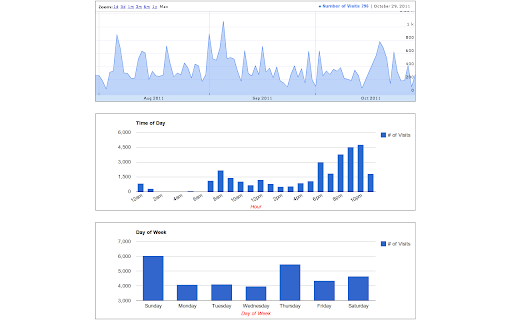
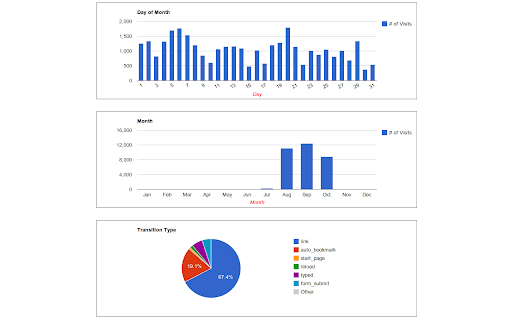
Displays interactive charts and statistics of your entire browsing history. History Trends analyzes your entire browsing history and displays a variety of charts and statistics. It's interactive, too: just click a link or a chart to filter your history by different criteria. Examples: * Find your Top 10 most-used bookmarks: Click the "auto_bookmark" pie slice on the Transition Type chart. * View the Top 10 domains you've visited today: Click the "Today" link in the "Daily Stats" section. * Find out what URLs you visit at 3 in the morning: On the "Time of Day" chart, click the bar (if it exists) for 3am, then click the URLs tab. History Trends displays the following stats and charts: * Total URLs visited and total number of visits * Top 10 most visited domains * Top 10 most visited URLs * Top 10 busiest days (i.e., days with most visits) * Daily Visit stats (e.g., average and median visits per day) * Chart of visits per day as a time-series * Chart of visits by hour of day * Chart of visits by day of week * Chart of visits by day of month * Chart of visits by month * Chart of transition type (e.g., link, bookmark, reload, etc) Notes: * Please be aware that clearing your history will reset all of your stats to zero! * Chrome only allows access to the past 3 months of history. Recent Changes ------------------------ 1.5.5 - Upgraded to manifest v3 - Charts are now drawn with Apache eCharts - Removed Google Analytics - Fixed broken link to definition of transition types 1.5.4 - Removed the unnecessary "tabs" permission to comply with the Chrome Web Store guidelines 1.5.3 - The extension had stopped working due to a change in the Google charts URL. Updated the extension to use the new URL.

History by Date
Browse your history by date, instead of infinite scroll. This extension is open source. It respects your privacy, and doesn't track… Browse your history by date, instead of infinite scroll. This extension is open source. It respects your privacy, and doesn't track you or send anything to a server. * Navigate browser history by date * Break usage down by continuous sessions * See what domains you visited most, per session * Example: "I used Chrome for 3 hours in the morning (mostly StackOverflow), and 2 hours in evening (mostly Gmail)" * Calculates total hours spent online each day * Filter out specific domains (Example: "Ignore Youtube.com") * See code here: https://github.com/richgong/history-by-date

Webtime Tracker
Discover your browsing habits! Time tracking at its best. Webtime Tracker keeps track of how you spend time on the web and presents the stats in a useful and intuitive way. 🚀 What you'll see ⭐️ Time spent on individual websites ⭐️ Detailed domain stats ⭐️ Total time spent browsing ⭐️ Usage visualized by colorful graphs 🚀 Extras ⭐️ Backup and restore, export to CSV ⭐️ Screenshots (e.g. for sharing) ⭐️ Works even offline ⭐️ Precise algorithm measuring time only when Chrome window is active (not covered by other windows) 🚀 Customizable features ⭐️ Idle time interval ⭐️ Keep tracking when media is playing ⭐️ Doughnut graph gaps (for readability) ⭐️ Time tracker in icon Completely free and with no ads Made with ♥ by Peta Sittek

Most Visited (Top Sites)
Access your most visited pages from a quick drop-down menu. (The extension uses Chrome's Top Sites API.) "Most Visited" is a browser extension that shows you your most visited pages (top sites) in a simple drop-down list. Just click on a page to open it. That's all this extension does... (By default the pages will be opened in new tab, but you can change this behaviour from the "Options" page.)

TimeYourWeb Time Tracker
TimeYourWeb: The Ultimate Dashboard for Your Online Life. Unlock insights into your daily web activities with unparalleled precision 🌟 TimeYourWeb Chrome Extension 🌟 The Most Detailed Online Time Statistics Know exactly how much time you spend on any site on any given day. TimeYourWeb is perfect for you if: - 🎯 Accountability: You spend a significant portion of your life online and want to ensure your time is well-spent. - 📈 Efficiency: Looking to optimize your internet usage? TimeYourWeb gives you the insights you need to make effective changes. - 👨👩👧 Parental Concern: While not a parental control tool, TimeYourWeb can give you a glimpse into your child's online activity. - 💼 Workplace Productivity: Employers can instill a more time-conscious work culture. - 💻 Freelancers: Maintain detailed reports on your work hours spent online. - 📊 Detailed Time Tracking: See how much time you spend on each page of any domain. Download this information as CSV. - ⏲ Active vs Total Time: Know the difference between your active engagement and total time on any page. - 📅 Timeline Stats: See your internet activity evolve over a day, week, or month. - 📈 Summary Chart: Daily, weekly, and monthly summaries. Understand your internet usage with both "Active" and "Total" time tracking metrics. - 🔍 Flow Chart: Dive deep into your internet habits and scrutinize your activity. - 📊 Stacked Chart: Get a bird's-eye view of your month-long internet usage. - 🌈 Sunburst Chart: Newly added! Visualize your summarized internet activity for any time period in an engaging, easy-to-understand format. - 🔘 Toggle tracking - 🗓 Set the first day of the week - 🚫 Customize URLs to ignore - 🎬 Does it track time when I watch films online? Yes, provided the browser is in focus. TimeYourWeb requires the lowest permissions compared to other time-tracking Chrome extensions. It requires "Read your browsing history" permission to operate. 🚫 TimeYourWeb is 100% ad-free. Manage your time wisely and make your work more effective with TimeYourWeb. ✅
