
namjbmodiicoacjgjjbkblpmmlhacldo
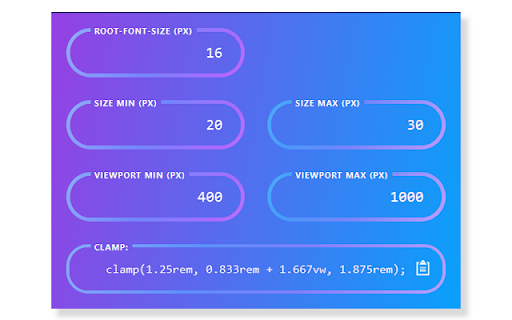
Helps you to calculate clamp() Clamptastic is a Chrome extension that simplifies the calculation of CSS clamp values. With this handy tool, you can effortlessly calculate clamp values for your CSS properties. What sets Clamptastic apart is its ability to dynamically fetch the root font size from the current tab, ensuring accurate calculations every time.

PX to VW
Easily convert PX to VW and VW to PX. This extension provides px to vw (Pixels to Viewport Width) and vw to px (Viewport Width to Pixels) css unit converter. This extension has a modern and easily accessible UI. Key Features ✔️ View and copy the result of calculation ✔️ Configurable CSS media breakpoints ✔️ Light/Dark theme ✔️ Sidebar support ✔️ Keyboard hotkeys to make the calculations faster ✔️ Calculation result's rounding precision settings 1) Click on the extension icon 2) A popup window will appear 3) Enter what units you want to convert and hit "Calculate" button. We hope you find our CSS Unit Converter tool useful! We are waiting for your feedback and ratings! If you're experiencing problems, please contact us.

Hoverify: All-in-one extension for web developers
All-in-one browser extension that helps you inspect, edit, test, debug, capture, and optimize websites faster. ⭐ Inspector: Hover to Inspect, Click to Edit • Inspect any site by hovering over the element. • Don't miss any styles. Inspect pseudo-elements and classes. • Inspect and edit styles for all screen sizes and animations in real time. • Style elements visually with our powerful visual editor in real time. • Edit HTML, styles, media queries, and animations in real-time. • View source CSS from different selectors in the code tab. • The code is syntax-highlighted for better reading and editing. • Copy or export the whole component with children to CodePen. • Edit Copy - Check how different copy looks on your page by editing the element's content in real-time. • Hide or Remove Elements - Debug page structure by hiding or removing elements. • Color Palette - Get every color from the page. • Font Viewer - Know what fonts each tag is using. • Search - Find the element through tag name, id, or classes. Even with CSS selectors! • CSS Box - Visually inspect the padding, margin, border, and size of the element. • Keyboard Shortcuts - Fully customizable shortcuts so you can work without lifting your hands off the keyboard. ⭐ Color Eyedropper: Spot, Point, and Select Colors • Pick colors from anywhere on the page, even from images and iframes. • Get RGB, OKLCH, CMYK, HSL, and hex values. ⭐ Responsive Viewer: Preview on Multiple Devices • Test your websites on multiple devices under multiple conditions in parallel. • Click or scroll on one device and other devices will follow. • Simulate modern devices with frames, frame styles, and OS. Includes iPhone 16, iPhone 15, Nothing Phone, Pixel 7 Pro, and more. • Switch between device frame styles and colors to match real-world hardware. • Works on any site - can be injected directly into the page for full compatibility. • Add new custom device profiles to fit your needs. • Test sites on viewports bigger than your display. • Toggle horizontal and vertical scrollbars per device. • Change user-agent. ⭐ Assets: Extract all the assets in one place • Extract images, videos, SVGs, PDFs, Lottie animations, and favicons from the page. • Extract assets from iframes and hidden elements. No valuable content is overlooked. • Preview video thumbnails directly in the images tab. • Filter and sort assets by type, size, and format. Find what you need quickly. • Select all or pick individual assets, then zip and save in one click. ⭐ Library: Save assets directly to the cloud • Save any extracted asset to your connected cloud storage without leaving the browser. • Access your saved assets anytime from your library. ⭐ Site Stack: Discover the tech stack behind any website • Uncover what's powering any site from frameworks and hosting to DNS and SSL, all in one place. • Technologies - Detect frameworks, libraries, CMS platforms, analytics tools, and plugins with confidence scoring and version detection. • Hosting - Identify the hosting provider, server IP address, location, and infrastructure details. • DNS - View DNS records, nameservers, and domain registrar information at a glance. • SSL - Verify the SSL certificate, issuing authority, validity period, TLS version, and key details. • WordPress - Detect WordPress sites automatically and reveal the active theme, installed plugins, and ratings. • Export - Download the full tech stack as a JSON file or generate a professionally designed PDF report. Choose exactly which sections to include, perfect for client handoffs and site audits. ⭐ SEO: Optimize your site for search engines • Run a complete SEO audit on any page, right from your browser. • Insights - Get Core Web Vitals with real user data from Chrome UX Report and lab performance scores from Google's PageSpeed API, all in one view. • Meta Tags - Audit your title, description, Open Graph, and Twitter Card tags with character count validation and social preview checks. • Headers - Visualize your H1 through H6 hierarchy. Spot duplicate headings, missing H1s, and structural issues that hurt readability and rankings. • Images - Find oversized images, compare original vs rendered dimensions, and catch missing alt text that hurts accessibility and SEO. • Links - Scan all internal and external links on a page. Filter by type, detect broken URLs with one-click status checks, and audit anchor text. • Schema - Detect existing structured data (JSON-LD, Microdata, RDFa) with validation, or generate new schema markup from ready-to-use templates. • Export - Generate a professionally designed PDF report. ⭐ Capture: Take stunning screenshots of any website • Showcase the full webpage or just any part of it with our screenshot tools. Save screenshots in JPEG, PNG, WEBP, or PDF format. • Visible Part - Capture the visible part of the viewport of the page in high resolution. • Full Page - Capture the full page and showcase the entire page in one image. • Select Area - Click and drag to select any area of the page to capture. • Select Element - Capture any component on the page by clicking on it. • Screenshot Editor - A full editing suite for your screenshots. Add gradient backgrounds, annotations, branding (your logo and text), and crop with precision. Zoom, pan, paste images from clipboard, snap annotations into place, and export in any format. Turn raw screenshots into polished visuals ready for portfolios, docs, or social media. ⭐ Debug: Optimize and debug your site with ease • Clear Browsing Data - Instantly remove browsing history, cache, cookies, local storage, and more. • Custom Code - Inject HTML, CSS, and JavaScript to tailor websites in real-time and make changes persistent. • Optimize Images - Improve loading times by optimizing images on your landing page. Please note: This is a paid extension, you can buy it from here- https://tryhoverify.com. 💡 Bug Report and Suggestions To report a bug or for a feature request, you can send an e-mail to tryhoverify@gmail.com.

Fluid Design System Studio
Create fluid typography, spacing, and color systems with CSS clamp() **Fluid Studio: Master Responsive Typography with Ease!** Transform your web typography with Fluid Studio, the ultimate Chrome extension for creating, managing, and implementing perfectly fluid and responsive text styles directly within your design system workflow. Are you tired of juggling countless media queries and breakpoint-specific font sizes? Do you struggle to maintain typographic consistency across all devices, from tiny mobile screens to expansive desktop displays? Fluid Studio is here to revolutionize your approach to web typography. We empower you to define text styles that scale seamlessly and proportionally, ensuring a beautiful, accessible, and readable experience on any screen. Fluid Studio isn't just another typography tool; it's a dedicated solution for mastering the art and science of responsive typography with unparalleled ease and precision. Build sophisticated typographic systems that adapt intelligently to user environments. - **True Fluidity:** Effortlessly create type scales that adapt gracefully to any viewport width. Say goodbye to clunky, stepped font-size changes and hello to smooth, proportional scaling that just *feels* right. - **Precise Control:** Define minimum and maximum font sizes, along with the viewport widths at which they apply. Our engine intelligently calculates the optimal `clamp()` CSS function values for you, ensuring your text behaves exactly as intended. - **Visual Feedback:** Understand how your text will respond across different screen sizes with clear inputs and (soon!) live previews, giving you pixel-perfect control over your design. - **Centralized Dashboard:** Organize your entire typographic system with a robust and easy-to-use token interface. Create, name, and manage all your text styles (e.g., `heading-xl`, `body-md`, `caption-sm`, `button-text`) in one convenient location. - **Comprehensive Editing:** Easily edit every aspect of your tokens: font families, weights, line heights, letter spacing, and, of course, their crucial fluid scaling parameters. - **Efficient Workflow:** Duplicate existing tokens to quickly iterate and build out your complete typographic hierarchy without repetitive manual input. Add custom tokens on the fly to cater to unique design needs. - **Preset Power:** Utilize built-in presets for common typographic scales to get started quickly, then customize them to perfectly match your project's requirements. - **Jumpstart Your Design:** Hit the ground running with a selection of commonly used typographic scales and presets. These provide a solid foundation that you can adapt to your project's specific aesthetic and branding. - **Experiment Freely:** Explore different scaling ratios and methodologies to discover the typographic rhythm that best suits your content and enhances readability. - **Save & Reuse:** (Coming Soon) Save your custom configurations as new presets for consistent application across multiple projects or sections. - **💻 Seamless Workflow for Designers & Developers:** - **Bridging the Gap:** Fluid Studio is meticulously designed to integrate smoothly into your existing design and development process. It empowers designers to define complex typographic behavior without writing code, and provides developers with clear, actionable outputs. - **Iterate Faster:** The intuitive interface makes it easy to experiment and refine your typography, leading to a more polished final product. - **Production-Ready Code:** Generate clean, efficient, and modern CSS for all your fluid typography tokens with a single click. - **Modern CSS:** Our exported CSS utilizes the `clamp()` function, ensuring optimal performance and wide browser compatibility for truly responsive text without JavaScript dependencies. - **Easy Integration:** Simply copy the generated styles and paste them directly into your project's stylesheets, CSS-in-JS solutions, or any CSS environment. - **🛠️ Your Evolving Design System Hub:** - Fluid Studio is the foundational module of an expanding in-browser design system toolkit. While our powerful Typography tools are ready for you today, get excited for what's next! - **Spacing (Coming Soon):** Define and manage consistent spacing scales and layout principles. - **Colors (Coming Soon):** Organize, apply, and manage your color palettes with ease and precision. - Our vision is to provide a comprehensive suite of tools to help you build, maintain, and utilize a cohesive design system directly within your browser. **Who is Fluid Studio For?** Fluid Studio is an indispensable tool for anyone passionate about creating exceptional, user-centric web experiences: - **Web Designers & UI/UX Designers:** Craft sophisticated, adaptive, and accessible typographic systems. Ensure your designs look stunning and provide an optimal reading experience on every device, without getting bogged down in complex calculations or endless media query adjustments. - **Frontend Developers & Web Developers:** Implement fluid typography quickly, efficiently, and reliably. Reduce manual CSS tweaking and ensure pixel-perfect consistency with design specifications. Spend less time wrestling with responsive text and more time building amazing features. - **Design System Architects & Maintainers:** Centralize, standardize, and manage your project's or organization's typographic standards with a dedicated, powerful tool. Foster consistency, collaboration, and scalability across teams. - **Product Teams & Startups:** Quickly establish a professional and responsive typographic foundation for your web applications, ensuring a high-quality user experience from day one, even with limited resources. **Elevate Your Web Projects.** Stop fighting with responsive text and start designing with true fluidity. Fluid Studio empowers you to create typography that is not just responsive, but truly adaptive, elegant, and a joy to read. **Install Fluid Studio today and experience the future of web typography!** We are dedicated to continuously improving Fluid Studio and adding features that make your design process smoother and more powerful. Your feedback is invaluable to us – please share your thoughts and suggestions!

Starify Links
Add star badges to links to GitHub, GitLab, Chrome Web Store, Reddit, and more Scans all links on a page and adds a stars badges to links pointing to GitHub user/project, Subreddits, Chrome/Firefox Extensions, Youtube Channels/Videos, Bluesky actors, Twitch players, HackerNews users, etc... Runs immediately on Google search results, StackOverflow sites, Github.com, npmjs.com etc. Use Alt+Shift+S or click the extension icon to activate on other pages. All badges and the shortcut are configurable.
