
namadahddjnkmjgdnncdlhioopmjiflm

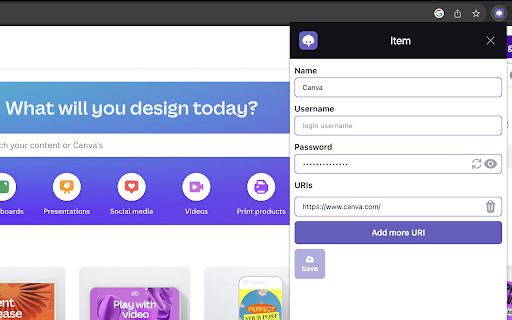

Free, open source, and decentralized. Vault utilizes zero-knowledge encryption and stores data on NOSTR network. Vault saves all your passwords and notes securely by encrypting your data twice; once with your secret key and once with your passcode. Your data are not stored on any centralized server, but rather on a set of relay servers. This means that it is resilient to attacks and that you are the only one who can access your passwords. Security experts recommend that you use a different, randomly generated password for every account that you create, and Vault makes this easy. Vault can generate passwords and store them for you, this means that you only need to remember one password, your passcode. Looking to store and swiftly retrieve your data? Vaults facilitate searchable items, allowing you to effortlessly copy the desired information with a single click. Vault is free, open source, and decentralized; and will always be.

AKA Profiles
Nostr Signer Extension supporting multiple public / private key pairs. Are you an advanced Nostr user? AKA Profiles is a Nostr signing extension (NIP-07) supporting multiple public / private key pairs. The primary purpose is enabling web apps to request the signing of events using the locally stored private key, thereby eliminating the need to give the private key to web apps. Key Features - Keeps your private key safe as local signing replaces sharing your private key - Chose which public key to share per app request - Each key pair has its own app permissions & preferred relays - most recent visits lets you jump back into to apps for current key - supports NIP-07 including (signString() and .on('accountChanged')) - supports NIP-04/44 encryption / decryption - supports NIP-26 delegated event signing requests

Today's Dollars - Inflation Calculator
Today's Dollars💰 is an inflation calculator that allows you compare the purchasing power of a specific dollar amount across different years. **Updated with March 2026 data** Features: - Simple and intuitive interface 👌 - Enter dollar amount, including decimals 💲 - Select the base year and target year; data going back to 1913 📅 - Calculate the equivalent value based on the CPI-U inflation data from BLS* 🔢 - Copy the result to your clipboard with just a single click 📄🖱️ - Save your results to the collapsible Calculation History panel 🔖 - Light and Dark theme support 🌞🌙 - Inputs, theme, calculation history is saved even when extension is closed. ✅ - Clear inputs and history items easily ❌ How to Use: 1. Install the Today's Dollars extension from the Chrome Web Store. 2. Open the extension popup by clicking on the extension icon in the toolbar. 3. Enter the dollar amount in the amount field. 4. Select the base year and target year from the dropdown lists. 5. As you type or select years, the result amount will automatically be displayed. 6. Click the copy icon to quickly copy the result to your clipboard. 7. Click flip years button to flip calculation. 8. Click save button to save the result to the history panel. 9. Click the history icon in the bottom right corner to see Calculation History data. 10. Choose between a light or a dark theme from the toggle on the top-right corner. 11. The reset icon at the top-left corner will clear your previous selections, and amount, but keep your theme preference. What does this calculation mean? 🤔 Let's use the example of $35 and the years 1979 and 2025. Due to inflation and changes in the cost of living, the amount of goods or services that $35 could buy in 1979 would require $153.15 in 2025 to purchase the same quantity of items. 😮 If we reverse the years in that calculation (2025 and 1979), what $35 could buy in 2025 would have been roughly equivalent to what $8 could buy in 1979. So even though you have $35, it's like having only $8 in terms of what you can actually buy with it. 💸 Support me. I don't collect data. I don't have ads. If you feel giving, buy me a coffee :D https://buymeacoffee.com/ashhhh * Disclaimer: 1. Today's Dollars is designed to calculate the inflation-adjusted value of amounts in USA dollars. Please note that the calculations and results are based on USA inflation data (CPI-U) from the Bureau of Labor Statistics. For accurate currency conversions and specific regional considerations, please consult appropriate financial sources or tools specific to your region.

Alby - Bitcoin Wallet for Lightning & Nostr
Your Bitcoin Lightning wallet and companion for accessing Bitcoin and Nostr apps, digital payments and passwordless logins. With the Alby Browser Extension, sending & receiving bitcoin payments on web becomes a smooth experience for everybody. Our mission is to make Bitcoin, the Lightning Network and Nostr more accessible to everybody. The Alby Browser Extension is your companion to navigate these ecosystems on the web. The Alby Browser Extension works great together with Alby Hub, your self-custodial Lightning wallet, and Alby Go, the easiest to use mobile app for Bitcoin payments. With the Alby Extension you can: • Send & receive Bitcoin over the Bitcoin Lightning Network, onchain and over Liquid • Use Bitcoin, Lightning and Nostr apps in your browser • Set custom budgets for the websites you use • Manage multiple Lightning Network wallets and nodes • Sign events and send messages on the Nostr network without sharing your private key • Passwordless logins with Lightning and Nostr • Tipping on Twitter, GitHub, Reddit and other websites • WebLN and NIP-07 authentication support for seamless interactions with apps Privacy and security: With Alby you have control over your assets and data. Your private keys are encrypted and stored on your device only. No one sees your keys & actions Open-source: Alby Browser Extension is built by the community for the community. You can always view and contribute to the source code on: https://github.com/getAlby/lightning-browser-extension

Higlighter Extension
Highlight text on web pages into Nostr Highlight text on web pages into Nostr
