
najkpicijahenooojdcnfdfncbaidcei
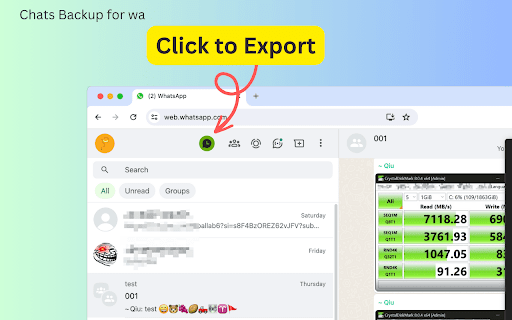


Export WhatsApp chats to HTML, CSV, JSON, or Excel. Save conversations & media with WA Chats Backup! Chats Backup for wa is a powerful browser extension that allows users to export WhatsApp chat history directly from WhatsApp Web App. With this tool, you can save your conversations in various formats, including HTML, CSV, JSON, and XLSX (Excel), catering to different needs and preferences. Detailed Features The process of using Chats Backup for wa is straightforward, but its technologically advanced features are what make it stand out: - It supports multiple export formats: You can choose from HTML, JSON, CSV, and Excel formats for your exports. The HTML format even allows you to preview attachments, making it easier to manage media files shared in chats. - Time frame selection: Select the specific time you want to export. If no time is chosen, the entire chat history will be exported. - One-click backup: A dedicated export button appears prominently, enabling quick access to the tool's features. - Auto-generate filenames: If you don't provide a filename, “WhatsApp Chats Backup” will automatically assign one, simplifying the process. How to Use 1. Navigate to https://web.whatsapp.com/ and open any chat you wish to export. 2. you'll find an 'Export' button in the top left corner. Click it to open the export settings interface. 3. In the pop-up window, adjust the settings for your export. Choose the desired time frame for the chats you wish to export. If you leave this blank, the extension will export the complete chat history. 4. Select your preferred export format from the options available (HTML, JSON, CSV, Excel). 5. Provide a filename for the exported data or leave it blank for an automatically generated one. 6. Click ‘Export Chats’ to initiate the fetching process. 7. Once fetching is complete, click ‘Download Items(number)’ to save the chat logs onto your computer. Whether you're a professional needing to archive client conversations or someone looking to preserve memories, Chats Backup for wa offers you a reliable solution. Its user-friendly interface combined with powerful export capabilities makes it the perfect choice for anyone using WhatsApp. So why wait? Give it a try today and take the first step towards secure and efficient chat management! Data Privacy Your data stays on your device and is not stored or transmitted to our servers. We prioritize keeping your information secure and confidential. In-App Purchases Our Extension is a freemium product with a nominal subscription fee. With a paid subscription, you can export all synced chats and media. The exact cost is displayed in the extension's interface, ensuring transparency and ease of understanding. Disclaimer This extension is an independently developed product by ExtensionsBox and has no association with WhatsApp LLC.

WA Chat Backup Exporter | WASBB.COM
Backup and export WhatsApp chats to HTML, CSV, JSON, or Excel, saving conversations and media files for flexible access and use. 🔥 Looking to safeguard essential conversations, photos, and videos? WhatsApp Chat Backup Exporter | WASBB.COM is the ideal solution! Effortlessly backup your chat history, images, and videos, while choosing specific date ranges to save exactly what matters. From recent conversations to cherished memories, WASBB.COM lets you keep it all securely stored. Protect critical work messages and precious personal moments with ease and efficiency. ✅ Complete Chat Backup: Backup all chat history in four formats—HTML, Excel, JSON, and CSV—ensuring essential conversations are always safe. ✅ Media Backup: Supports backup of photos and videos, allowing you to save valuable memories and important files without hassle. ✅ Date Range Filtering: Flexibly select specific date ranges for backup, making it easy to manage and retrieve content from particular periods. ✅ Group Data Selection: Choose to backup data from specific groups, ensuring that key group information remains protected. ✅ Contact-Specific Backup: Optionally backup chats and media from selected contacts, offering a personalized data protection solution. - User-Friendly Interface: Simple to use, even for beginners, with an intuitive interface that lets you complete backups effortlessly. - Customizable Date Selection: Allows users to specify date ranges, helping to organize and access particular periods of chats while avoiding unnecessary data redundancy. - Personalized Data Protection: Offers a flexible and targeted backup solution, increasing backup efficiency and relevance to your needs. This is an independent tool with no official association with WhatsApp LLC.

WAexport: Export WhatsApp Chats and Contacts
Export WhatsApp contacts from groups and chats. Download and Save your chat history in HTML (web view), CSV or plain text. Download/Backup your WhatsApp chats and contacts in just a few clicks. Whether you’re looking to backup and store chats or get a list of all contact in a group, WAexport makes it easy to capture your WhatsApp data in just a few clicks. Export/Backup your chats in multiple formats, including HTML, CSV, and TXT, ensuring compatibility with various tools and platforms. Whether you need a visually rich HTML file (web view) for easy readability or a CSV file to integrate with other data, WAexport has you covered. For contacts, WAexport offers flexibility like never before. You can download contact lists from all your groups and individual chats, or if you prefer, select specific groups to export. This means you can easily manage your contacts, organize your network, or even use the data for more targeted outreach—all in a format that works for you

WA Chat Backup - Export whatsapp chat
WA Chat Backup is a browser extension that makes it easy to backup chats from WhatsApp. It helps you backup all your chats and group chats quickly. Whether you need to backup whatsapp chats, analysis, or importing to other tools, this backup tool for whatsapp works reliably with HTML, CSV, Excel, and JSON export options. ⚙️ Key Features * Backup all WhatsApp chats, including personal chats and group chats. * Save exported chats in HTML, CSV, Excel or JSON formats for easy use. * One-click export — no complicated setup. * Works directly with WhatsApp Web so you stay in control of your data. 🚀 How It Works 1. Install the WhatsApp Chat Backup extension in your browser. 2. Open WhatsApp Web and log into your account. 3. Click the extension icon to launch the tool. 4. Select the time period and the chats to back up. 5. Select your preferred file format (HTML, CSV, Excel or JSON) and click “Export”. 🔒 Privacy & Disclaimer WhatsApp Chat backup runs entirely in your browser — all chats exporting happens locally and no data is uploaded or stored externally, so your information stays private and secure. This extension is independently developed and is not affiliated with or endorsed by Meta or WhatsApp Inc.

WA Chat Backup
WA Chat Backup is the fastest and easiest way to back up WhatsApp messages securely to your laptop or desktop. Whether you want to save your WhatsApp chat history, export WhatsApp messages, or store important conversations in PDF or Excel format, WA Chat Backup has you covered. 🔐 Protect Your Data & Keep a Permanent Record of All Important Conversations. 💡 Core Features of WA Chat Backup: ✅ Backup Chats by Message Count & Date Range • Choose how many messages you want to back up- 5, 20, 50, or more. • Export chats based on specific date ranges directly from WhatsApp Web. • Get flexibility and control with custom chat export options. ✅ Export as PDF, TXT, CSV (Multiple Format Support) • Choose your preferred format to download chats • Great for reporting, documentation, or legal use ✅ Back Up Individual or Group Chats • Export one-on-one conversations or entire WhatsApp groups • Perfect for professionals, teams, or customer communication tracking ✅ Download Media with Chat (Optional) • Optionally include images, videos, and documents with the chat backup • Organize everything neatly in folders ✅ Works Smoothly on WhatsApp Web • No need for mobile access to export chats. • Fully functional via WhatsApp Web in your browser. • Ideal for professionals, researchers, legal teams, and more. ✅ In-Built Support & Tutorial • Stuck somewhere? Access step-by-step video tutorials directly inside the extension. • Chat with the support team from the extension interface. ✅ User-Friendly Interface • Simple and intuitive design- no technical skills required. • Export WhatsApp chats in just 3 clicks. ✅ Secure & Private • Your chat data is processed on your device- nothing is stored on external servers. • 100% privacy guaranteed. 🚀 Why Choose WA Chat Backup? ✔️ Best tool to download WhatsApp chat history ✔️ Multiple format options (PDF, CSV, TXT) ✔️ Easy-to-use Chrome extension – no software required ✔️ Ideal for professionals, freelancers, and legal advisors ✔️ Secure – data saved only on your device ✔️ Perfect for users who need permanent WhatsApp chat records ✔️ Lightweight – doesn’t slow down your browser ✔️ No sign-up required 🎯 Use Cases ✅ Lawyers & Legal Teams – Export chats for evidence or case filing ✅ Freelancers & Coaches – Save client communications for invoicing or future reference ✅ HR & Recruiters – Back up candidate conversations ✅ Customer Support Teams – Archive WhatsApp interactions with customers ✅ Event Planners – Document group discussions and RSVPs 🔧 How to Install the Extension Step 1: Visit https://wa-chat-backup.com Step 2: Click "Add to Chrome" and pin the extension Step 3: Open web.whatsapp.com and log in Step 4: Open any individual or group chat Step 5: Click the WA Chat Backup extension → Select format → Export & download ⚠️ Disclaimer This extension is not endorsed by WhatsApp™ or Meta™. It is an independent tool developed to help users export their chat history from WhatsApp Web. Users must comply with WhatsApp’s terms of service. LEGAL WhatsApp™ is a trademark of WhatsApp Inc., registered in the U.S. and other countries. WA Chat Backup is not affiliated with WhatsApp™ or Meta™.
