
naeibcegmgpofimedkmfgjgphfhfhlab
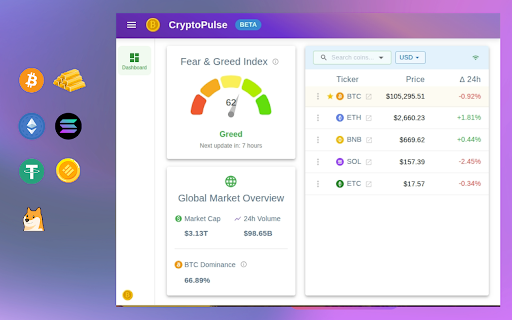
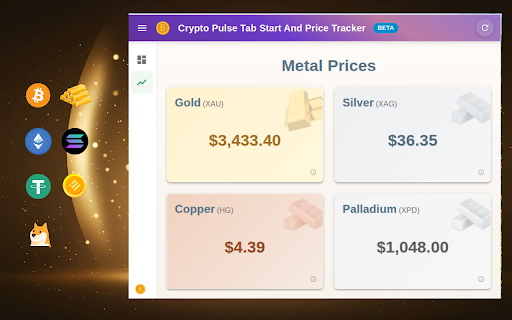
Check realtime crypto (Bitcoin, Etherium, Sonala ...) price. Track 3000+ crypto-currencies and gold price, fear and greed index. Get instant, focused access to real-time Cryptocurrency and Gold prices, accessible right from your browser's toolbar. The extension serves as your dedicated, lightning-fast price monitor, giving you a decisive edge by analyzing the latest crypto market and gold and metal prices. Transform your browser into a pure financial data tool. Quickly track vital market data with a single click, allowing you to rediscover your focus and redefine your workflow without distractions. CORE FEATURES 📈 Comprehensive Crypto & Gold Market View: Instantly access a complete overview of the cryptocurrency and Gold markets, including prices, key market metrics, and investor sentiment. 🪙 Focused Price Monitoring: Track your essential currencies and metals with no clutter—just the data you need. ⌨️ Lightning-Fast Access: Click the extension icon for immediate, focused access to your real-time price feed. DATA POWERED BY 🪙 Cryptocurrency Ticker: Your dedicated crypto dashboard. Live Prices: Monitor real-time prices for over 350 coins like Bitcoin, Ethereum, Solana, Ripple, and Binance. Market Overview: Track key live data including total Market Cap, 24-hour Volume, and BTC Dominance. Market Sentiment: Gauge investor emotion with the live Crypto Fear & Greed Index. Personalized Watchlist: Keep your most important currencies front and center. Metal Price: Gold, Silver, Copper, and Palladium. ADDITIONAL DETAILS Data Attribution: Price data is sourced from the Binance public API, alternative.me, gold-api.com, and several sources. Privacy First: Your security is paramount. The extension operates without requesting any questionable permissions. Troubleshooting: If the crypto ticker isn't working, please check if sites like binance.com are accessible in your region.

TimeCrunch Tennis
AI-powered extension that removes non-playing time from tennis matches on Tennis TV and Tennis Channel Plus. The TimeCrunch browser extension is essential for anyone with an ATP Tennis TV or Tennis Channel Plus account. TimeCrunch uses AI to find and then skip over downtime during a tennis match. TimeCrunch is very light weight and will not increase your data usage. We also do not collect any of your browser data.

Ask YouTube Videos - AI Summarizer & Chat by TunePaw
AI-powered chat assistant for YouTube videos 💬 Interact with YouTube Videos Like Never Before! With Chat with YouTube by TunePaw, you don’t just watch videos - you ask questions, get summaries, and extract highlights in real time. Powered by advanced AI, the extension turns any YouTube video into an interactive learning and research tool, perfect for students, professionals, creators, and lifelong learners. ⏱️ Save Time & Avoid Scrubbing Stop wasting time scrubbing through timestamps or rewatching long videos. Our AI assistant provides fast, structured, and clear answers, letting you focus on what matters most. 🌟 How It Works • Install the extension and open any YouTube video. • Click the Summarize & Start Chatting button on the Chat with YouTube panel. • Ask questions to the YouTube video transcript, receive instant summaries, or explore suggested prompts. • Switch seamlessly between Summaries and Interactive Chat mode. Our AI adapts to your viewing style - whether you want quick highlights or detailed conversational answers. 🌟 Key Features • AI-powered instant answers from any YouTube video • Generate structured summaries and video highlights • Suggested questions for deeper understanding • Works on any video including lectures, tutorials, and long-form content • Compatible with multiple languages and global content Free Plan • 3 video analyses per day • Up to 10 questions per video • Instant summaries and highlights • Suggested prompts for deeper insights Pro Plan • Unlimited videos and questions • Priority AI responses for faster answers • Premium support and updates 🌟 Who Benefits Most? • Students: Summarize lectures, tutorials, or educational content in seconds • Professionals: Extract insights from webinars, talks, and industry videos • Lifelong Learners: Turn any YouTube video into an interactive Q&A session • Content Creators: Analyze competitors, research trends, and find key highlights fast 🌟 Why Choose Chat with YouTube by TunePaw? • Interactive AI assistant for faster learning and research • Works on any video, supporting global content and multiple languages • Save time, study smarter, and never miss important insights 📌 Ready to Transform Your YouTube Experience? Stop passively watching - start chatting with your favorite videos today! Install now and unlock instant summaries, answers, and interactive insights.

Crypto Pulse - Tab start and price tracker
Compose your newtab with nature images, widgets & realtime Crypto & Bitcoin RSS. Track 3000+ crypto-currencies price Analyzing the latest crypto market & gold price and market RSS news & sentiment, your new tab becomes a centralized hub for clarity and productivity. (Supporting Binance Square, Cointelegraph & others) Tailor every detail to your workflow: choose from eight minimalist color schemes, layer widgets over tranquil landscapes, or infuse daily inspiration with motivational quotes. Tracking your to-dos and calendars. Transform your browser's new tab into a serene, productive canvas—crafted for focus and flow. Seamlessly organize your digital life with customizable widgets that you can arrange freely and nest in folders. Rediscover your focus. Redefine your workflow. Make your homepage truly yours. 📈 Comprehensive Crypto Dashboard: Get a complete overview of the cryptocurrency & Gold market, from individual prices, latest RSS news, to broad market sentiment 🎨 Customize Your Space: Add, remove, and arrange a variety of widgets on your homepage to fit your workflow. 📂 Organize with Folders: Neatly group your widgets into folders for a clutter-free view. ⌨️ Lightning-Fast Access: Use the Alt+K menu to quickly find and launch your widgets. 🌈 Stunning Themes: Personalize your dashboard with 8 beautiful color schemes and backgrounds. - - - - - - - - - - - - - - - - - - - - WIDGETS AT YOUR FINGERTIPS 🔖 Bookmarks & Bookmark Groups: Access your saved sites instantly. 🪙 Cryptocurrency Ticker: Your all-in-one crypto dashboard. - Live Prices: Monitor real-time prices for over 350 coins like Bitcoin, Etherium, Solana, Ripple, and Binance. - Market Overview: Track key live data including total Market Cap, 24-hour Volume, and BTC Dominance. - Market Sentiment: Gauge investor emotion with the live Crypto Fear & Greed Index. - Personalized Watchlist: Keep your most important currencies front and center. - Metal price: Gold, Silver, Copper and Palladium. 🌍 World Time: Keep track of time across different zones. ☀️ Weather: Get current weather updates. 📝 Notes: Jot down quick thoughts and reminders. ✅ Tasks: Manage your to-do list. 🧮 Calculator: Perform quick calculations. 📰 RSS Reader: Stay informed with a built-in RSS reader. 📅 Calendar: Keep track of your schedule. (Todo) 🖼️ Pictures: Display your favorite images. 📑 Recently Closed Tabs: Quickly reopen tabs. 🌟 Top Sites: Access your most visited sites. 💻 System Load: Monitor CPU and RAM usage (Chrome only). 🔗 Embedded Page: Display any webpage directly on your dashboard. (Todo) * Crypto Data Attribution: Price data is sourced from the Binance public API, alternative.me, gold-api.com, and several sources. * RSS Feeds Attribution: Our curated news presets are sourced from leading publications including Binance Square, Cointelegraph, Bitcoin Magazine, and Investing.com. * Privacy First: Your security is paramount. The extension operates without requesting any questionable permissions. * Troubleshooting: If the crypto ticker isn't working, please check if these sites (binance.com, cointelegraph.com, bitcoinmagazine.com and investing.com) are accessible in your region.

RandomTV for Trakt
When we have a big list and don't know what to watch, choose a random item can be the solution. That's what RandomTV does! The extension will pick a random item from any list on Trakt. You just have to click on the Random button on the list you want a random item. Then, RandomTV will show the item in a modal, or highlight in the page or even redirect. You can set different ways to show the chosen item. RandomTV also offers one more advanced thing: in lists with more than one pages (120+ items), all the items can be choose, even the ones not in the current page. This works because of the use of the API. Features: Main • Pick a random item from any list on Trakt; • Add a button on the list page which have a similar design to Trakt icons and have the tooltip when the mouse is hover, like in Trakt icons. Display Settings • Display the picked item in three ways: modal (a popup with the cover and details), scroll and highlight the item in the current page and redirect to the item page; Advanced Settings • Use Trakt's API when the list have more than one page to consider all the items that the list have; • Disable or enable the Trakt's API method; • Show which method (Local or API) was used to choose the item; • Set a custom Trakt API key. RandomTV is not related to Trakt and is an independent project.
