
nabdhpalkaljcoklklippkljpepdbbab

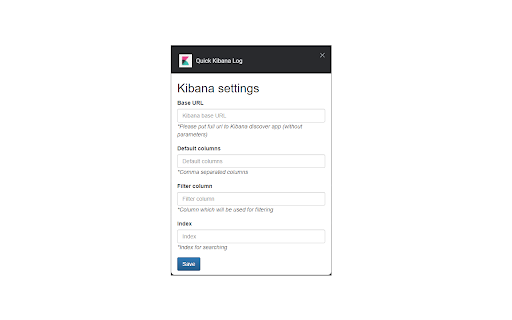
Quick Kibana Log extension is designed to speed up your workflow. With the simple button you can find logs based on provided filter value. It mostly used to find all related logs by traceId column. But could be customized and used every available column to filter logs. There are three ways to quick search: - Press extension icon and put value for search in the input - Select some text which you want to search and open context menu and click `Quik Kibana Log` item - Select some text which you want to search and press hotkey `Ctrl+Shift+K` or `Cmd+Shift+K` (on Mac) You MUST define settings for the extension: - Kibana Base URL - this url must be pointed to the discover app - columns - comma separated columns which will be shown in discover view - filer column - this column will be used for logs filtering by provided value - index - elastic index which contains logs

Gmail Advanced Copy
This extension allows to copy text with images to clipboard and paste it to external editors. Images are converted to Base64 format. This extension can be useful when you need to copy text with images from Gmail letter to external editor (for example CRM, help center, etc.). Since access to images inside the email is restricted only to user that is logged to Gmail, simple copy-paste doesn't work. Gmail Advanced Copy extansion converts all images you select into inline Base64 format that allows you to paste them into external editor.

Kibana Enhancer
Enhance Kibana Discovery for streamlined log analysis: custom query condition and automate decoding. The Kibana Enhancer lets users quickly select and manage query conditions directly within the Discovery page. It supports variable-filled templates for dynamic queries and allows importing and exporting templates in YAML format.

Elasticsearch Explorer
The extension allows you to connect to and explore Elasticsearch indices. Has an option to download the entire index, given that the database supports it.

JSON Unstringify
JSON Unstringify helps you make deeply nested JSON strings readable right on the page. It adds two context menu actions: 1. Unstringify block – detects and expands a nested JSON string into a readable object in the selected block (Cmd/Ctrl+U) 2. Unstringify same class blocks – does the same for all elements sharing the same CSS class (Cmd/Ctrl+Shift+U) This extension is especially useful when working with Kibana, OpenSearch Dashboards, and other tools where JSON often appears stringified. Ideal for developers, analysts, and anyone who deals with complex or nested JSON in web apps.
