
naacaojnmeaeglpekgfdmoihhfckbeah
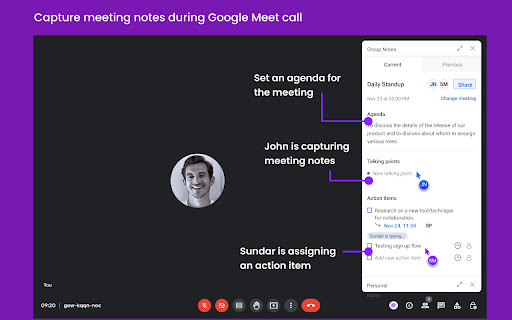
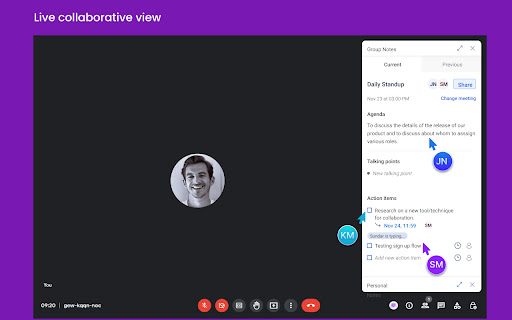
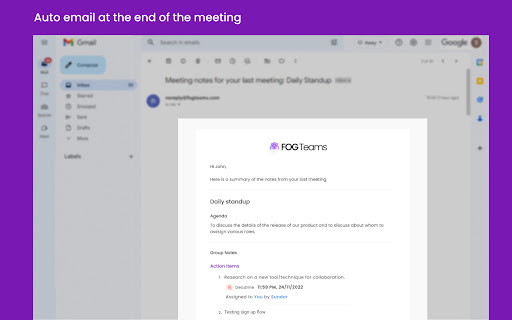

Fully align team & stakeholders during meetings and automate follow ups. As a team lead, manager or leadership, you attend a lot of meetings. The fundamental objective of most meetings is to align the participants through minutes of meetings, and next steps, prioritisation & visibility of updates on next steps. However, how many times have you had to explain the direction & prioritisation after the meeting ends and how many times have you “discussed” something, when a peer or team member considered it a decision? Also, how many times have you joined a meeting and felt wanting on what was discussed in last meeting and next steps from previous discussion? Again, how many times have you not written next steps because unlike Tech your tasks move very fast (same day deadlines!)? Finally, how many times have you had to call a meeting to see progress on the next steps so you and other stakeholders are updated on progress. We are here to fix that. Introducing FogTeams, which is your one-stop solution for alignment, prioritisation, & visibility for all participants in async. Without losing the human touch with voice & video, and context from Screen share. So you spend your time in meeting just for specific decisions and leave with full alignment of all participants, while automating, prioritisation, visibility and updates in Slack. AI-enabled Full Alignment: Create a meaningful minutes of meeting and extract relevant action items with owners & deadlines from the meeting with one-click AI assistant, right within the meeting so all participants agree before it ends. Add context and collaborate on the auto generated notes with manual edits & additions. With FogTeams for Google Meet, you can: - Access notes and action items from previous meetings automatically - Capture meeting notes collaboratively with real-time updates visible to all participants - Generate minutes of meetings and next steps on 1 click - Create and assign action items with deadlines to all participants - Get an email report at the end of call with meeting notes and action items - Create personal notes accessible only to you - Download to Slack to access full dashboard of all tasks or any meeting notes or any qualitative or quantitative information from a recurring meeting on-demand on Slack Again, currently, teams spend long hours duplicating the effort of taking meeting notes & assigning action-items offline and then communicating them to all via Email, Slack, Google docs and others. FogTeams improves team’s productivity by removing duplication of effort and allowing real-time collaboration during meetings FogTeams for Slack will be launched soon for synchronising information across multi-communication channels At FogTeams, we are building Collaboration AI for GTM teams that lets you: - Be as organized as Tech team with Jira, without spending time & effort on another tool - Access and track project reports across multiple communication channels such as Slack, Google Meet, Zoom, Google Docs / Sheets and through the FogTeams platform - Improve organisation’s productivity by reducing time consumed in meetings by substituting meeting with offline video/ audio/ text updates - all accessible via emails, on FogTeams dashboard, on Slack and other channels - Intelligently take away some of your cognitive load and manual tasks by automating follow-ups etc. There is a 15-days free-trial after you sign up on the Fogteams platform. Post that, there are in-app purchases, if you wish to continue using our product. If you have any queries, please email us at support@fogteams.com. Please see here our privacy policy and terms. Terms of Use : https://www.fogteams.com/terms_conditions Privacy Policy : https://www.fogteams.com/privacyPolicy - We collect the call transcript during all meetings for the AI-assisted notes generation process. We store the transcribed notes, and related information, safely in our databases, with a strict data & privacy policy. - Please refer to our privacy policy for more information

Bluedot: AI notetaker & Meeting Recorder
Bot-free AI note taker & AI meeting notes for Google Meet, Zoom & Teams meetings. 🤖 AI notetaker for Google Meet, Zoom and MS teams. Generate AI meeting notes adapted to your use case (customer calls, all-hands, etc.) ⚙️ Automatically update your CRM, Notion, and more. ✨ Meeting highlights: Clip and share meeting moments. 💬 Annotation & comments: Annotate a particular part of your screen and leave time-based comments. 🎞️ Video editing: We transcribe all your recordings and then let you edit your video simply by editing the transcript. Delete an umm, an ah or a whole sentence! 💾 Video hosting: Store and organise all your videos in one place, using collections.

MeetGeek: AI Meeting Notes, Transcripts & Screen Recording
Get automatic recordings, transcripts, and summaries for online meetings on Google Meet, Zoom, and Teams. MeetGeek transforms online calls with AI meeting automation 🤖 Say goodbye to manual note-taking and hello to seamless integration across Zoom, Google Meet, Microsoft Teams, and more! Using the MeetGeek Chrome extension is FREE. Here’s how to enable it: - Install the extension and pin it to your browser bar - Log in or sign up for a free MeetGeek account - Start a meeting on your preferred platform—MeetGeek joins in one click! How it works: ✔ To record without the bot: Click the video camera icon in the MeetGeek widget during the meeting and select the Chrome tab you want to record. ✔ To use the AI notetaker automatically (record with bot): Sync your calendar with MeetGeek and enable the “Automatic join” setting. ✔ To invite the bot to ad-hoc calls: Click the widget’s “Invite notetaker” option or paste the meeting link into the extension sidebar. With the MeetGeek extension, you’ll be able to: 🎥 Record online meetings anywhere without an AI bot or notetaker 📝 See live transcription during your meetings (Google Meet supported) ⏸️ Pause or resume note-taking anytime through the floating widget ⚙️ Easily control whether the notetaker joins your scheduled meetings 🪢 Instantly invite the AI notetaker to your Zoom, Google Meet, and Microsoft Teams calls 📂 Access your latest meeting summaries & transcripts directly 🚀 How MeetGeek already boosts meeting productivity for 30k+ teams: - Instant AI note-taking: Save time with automated notes and searchable transcripts - Automated AI meeting summaries: AI extracts key points, decisions, and action items - Live AI transcription: Follow conversations in real time and revisit them later with searchable transcripts - Multi-language transcription: Transcribe in 60+ languages including English, French, Spanish, Portuguese, German, Arabic, Chinese, and more - Meeting insights & analytics: Track speaker talk time, engagement, meeting trends, and more - Custom automation: Sync meeting insights directly into tools like HubSpot, Salesforce, Notion, ClickUp, and set up tailored workflows (10,000+ apps through Zapier, Make & n8n) - Easy sharing & collaboration: Share meeting summaries and action items with your team 🔒 MeetGeek secures powerful data encryption, GDPR compliance, and SOC2 Type 2 certification. Read more about it at [https://meetgeek.ai/security](https://meetgeek.ai/security) Turn every meeting into a productivity powerhouse ⚡ Get started with MeetGeek today—a FREE plan is available! Need help? Visit meetgeek.ai for more info or explore our Help Center at [https://support.meetgeek.ai/en/articles/9148521-meetgeek-chrome-extension](https://support.meetgeek.ai/en/articles/9148521-meetgeek-chrome-extension) Follow us for updates:

Trackr : Meet Attendance Tracker
Automatically track Google Meet attendance — join times, leave times, duration, and more. 100% free. Trackr : Meet Attendance Tracker — The most powerful free attendance tracker for Google Meet. Automatically records every participant's join time, leave time, duration, rejoins, and chat messages — no setup, no accounts, no limits. Unlike paid alternatives like AttendList (€3.99/mo) or basic extensions with limited exports, Trackr gives you everything for free — forever. Automatic Attendance Tracking Trackr starts recording the moment you join a Google Meet. Every participant is logged with precise join/leave timestamps, rejoin events, and total time in call. No buttons to click, no manual roll calls. Smart Participant Detection Built-in bot filtering automatically excludes Otter.ai, Fireflies, Gong, Read.ai, Fathom, and 10+ other meeting bots from your attendance records — so your reports only include real people. 5 Export Formats (All Free) Export attendance data as CSV, PDF report, Excel (.xls), Google Sheets, or Email — more formats than any competitor. Every export includes late arrival flags, absent attendee lists, and attendance rate percentages. Live Sidebar Panel Inside Google Meet See attendance in real time without leaving your meeting. The embedded sidebar shows who's present, who left, who arrived late, rejoin counts, and a full join/leave timeline — plus a live chat capture tab. Cross-Session Participant Analytics Track attendance patterns across multiple meetings. See each person's total meetings attended, cumulative time, average attendance rate, and last seen date — perfect for identifying attendance trends over weeks. Dashboard with Charts & Analytics A full-page dashboard with meetings per day, average duration, participant trends, and meeting breakdown charts. Search, filter, rename meetings, and manage your entire attendance history. Expected Attendees & Roster Management Add your class list or team roster. Trackr highlights who showed up and who's absent with color-coded chips and an instant absent summary. Save and load rosters across meetings. Late Arrival Detection Customizable late threshold (3, 5, 10, or 15 minutes). Late arrivals are flagged in reports, exports, and the live sidebar — automatically. Attendance Rate % See exactly what percentage of the meeting each participant attended, color-coded: green (80%+), yellow (50-79%), red (below 50%). Meeting Nicknames Rename any meeting after the fact for better organization — turn "abc-defg-hij" into "Monday Standup" with one click. Privacy-First Architecture Zero network requests. Zero data leaves your browser. No cloud storage, no accounts, no analytics, no telemetry. All attendance data stays in Chrome's local storage on your device. Period. 10 Languages Supported English, French, German, Spanish, Italian, Portuguese, Romanian, Russian, Turkish, and Ukrainian. Free forever — no premium tier, no hidden limits, no "upgrade to unlock" 5 export formats vs 1-2 in competing extensions Live sidebar inside Google Meet — competitors don't have this Cross-session analytics — see patterns across all your meetings Chat message capture — competitors miss this entirely Bot filtering — clean reports without Otter, Fireflies, or Gong noise Roster management — know who's absent at a glance Works offline — no server dependency, no downtime How to Use: Install Trackr — tracking starts automatically Join any Google Meet — attendance is recorded in the background Click the extension icon to see live data, or open the Dashboard for full history Export your report in any format Stop doing attendance manually. Install Trackr and let it handle the rest.

AttendList: Google Meet Attendance Tracker & Reports
Automatically track attendance in Google Meet (even if you join late!) AttendList is the most advanced way to track attendance in Google Meet. Use it solo, or with your entire team. Our extension automatically tracks attendance in your meetings, so you can view a detailed attendance report afterwards. (Even if you join a meeting late, AttendList tracks attendance from the beginning!) After the meeting, view your attendance report to see who joined, how long for, and if they left and rejoined during the meeting. Plus, you can download your report as a CSV spreadsheet, PDF, or auto-upload it to Google Drive. ✅ Automatically track attendance in Google Meet. ✅ Detailed attendance report after the meeting. ✅ Reliable, easy to use, and free to get started! ⏱️ View full timeline for each attendee (including when they joined, rejoined and left) 🙋🙋♂️ Explore a full participant overview (see their average attendance %, plus all the meetings they've joined) ✍️ Add notes to your attendance reports for later. ⏬ Export a CSV spreadsheet or PDF (PRO) of any attendance report. 🔄 Auto-upload reports to Google Sheets / Google Drive (PRO) 📆 Auto-sync reports with Google Calendar events for attendance and email tracking (PRO) 🏅Excellent reviews — 4.9/5 stars and 3,000+ happy users. 💃 FOR TEAMS 💃 AttendList supports advanced features for teams managing attendance across many meetings: 1. Pro access for your team — Teams from 5-100+ people get discounted access to AttendList Pro, including unlimited reports, PDF export and Google Drive auto-upload. 2. Centralized reports — Admin users of the team can view and download attendance reports recorded by all team members. 3. Auto-uploading — Each team member can configure where they auto-upload their meeting reports, allowing for easy organization and categorization in Google Drive 4. Bulk-discounts — Save up to 60% vs. AttendList Pro with team discounts (based on team size). Upgrade in the AttendList app or email admin@attendlist.com for more info (or to schedule a demo call). ⬇️ 1. Install our free Chrome extension Begin by installing the free AttendList extension and logging in. Our extension securely integrates with Google Meet for easy attendance tracking and reports. 👥 2. Automatically track attendance AttendList automatically records attendance & chat history when you join any Google Meet meeting. Even if you join late, AttendList can track attendance from the start. 📋 3. Review your report after your meeting View your attendance report after the meeting. See who joined your meeting, how long for, and whether they left and rejoined your meeting. [v1.3.0]: Update extension to handle the new chat UI rolling out to Google Meet over the next couple of months. [v1.2.3]: Update AttendList icon inside extension to take you directly to your attendance reports within your dashboard. Q: How do I track attendance in Google Meet? A: The AttendList extension is designed to make tracking Google Meet attendance easy. Just install our extension to automatically track attendance in Google Meet and get a detailed attendance report after the meeting. Q: What information is included in the attendance report? A: Each attendance report contains details about the meeting and participants. See who joined, how long they stayed in the Google Meet for, and whether they left and rejoined at any point. It also includes all chat messages from your meeting. Q: How can I turn on attendance tracking in Google Meet? A: Just install the AttendList extension and we'll handle the rest! We automatically track attendance in all your Google Meet meetings, and generate handy attendance reports afterwards. Q: Can I track attendance manually with AttendList? A: Absolutely. If you wish to disable automatic attendance tracking, simply untick the "Auto Attendance" setting in our extension. You can still record individual Google Meets manually by opening the extension and clicking "Track Attendance" during a meeting. Q: How can I see my Google Meet chat history? A: AttendList automatically saves your Google Meet chat history (chat only records while you're in the meeting). After the meeting, you can view a transcript of all the chat messages from your meeting by going to the "Chat Log" tab of your attendance report.
