
mpnmjbcgbfnbfjmljblfngeofmnehdig
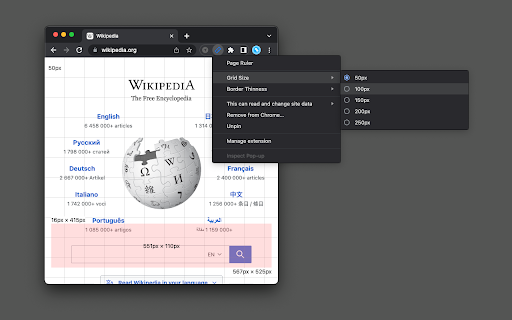
Draw a grid view, get page dimensions in pixel (px) unit and draw a rule Features: - Displays a grid view with a customizable grid size. - Presents a reference box. - Shows a ruler indicating width, height, start, and endpoints. How to Use It: 1. Navigate to a page and activate the action button. 2. The extension transitions to grid mode, allowing you to create a personalized ruler. 3. The ruler dynamically displays width, height, start, and endpoint measurements. 4. To return to normal browsing mode, press the "Escape" key or click the action button once. 5. Use mouse wheel to resize grid size Does this extension support "mm," "cm," or "in" units? No, it does not provide precise values in these units. Instead, the extension employs pixel units. To convert pixel units to "cm" or "in," you'll need the screen's PPI (pixel density or resolution) value. How can I modify the default grid size? Right-click on the action button. Two menus will appear, allowing you to adjust the grid size and thickness.

Liner. The Real Ruler
Simple and convenient rulers for web developers. They help to create a perfect pixel web application.

Simple Ruler
A very simple ruler to check your webpage, without ads, without secrets, just a ruler. Check the measures of components can be easier than open the dev tools and check the size of a component. With the simple ruler extension, you just click and move your mouse over the components to see the width and height.

Designer Tools
A collection of tools to help you design and develop websites with precision. Designer Tools helps web designers and developers achieve pixel-perfect results with ease. It includes features like rulers, guidelines, and multiple ways of measuring elements and spacing. You can customize your setup with grids, move or remove guides, and tweak settings to match your workflow. PLUS subscribers gain access to extra tools and resources to enhance their design process.

Metric Spy Page Ruler
Quickly Measure Elements on Web Pages with a Ruler Tool, Free Selection, and Convenient Keyboard Shortcuts. Attention web developers, designers, and marketers! Presenting Metric Spy: your solution for precise web page measurements. Simplify element gauging, ensure flexibility in measurement, and optimize workflow using convenient keyboard shortcuts. Elevate your design precision with Metric Spy, enhancing your web development process with ease. 📏 Ruler tool for precise measurements 🌐 Measure elements on web pages easily 🖱️ Free selection for flexible measuring ⌨️ Convenient keyboard shortcuts for quick access Enhance your web page analysis with Metric Spy! Quickly measure elements, ensure accurate pixel sizing, and simplify your workflow.
