
mpjaoplmcdeknomnaphnfipccfbppidl
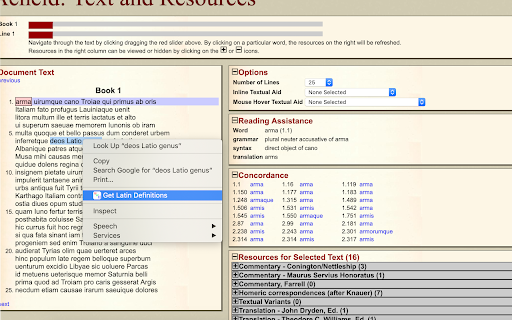
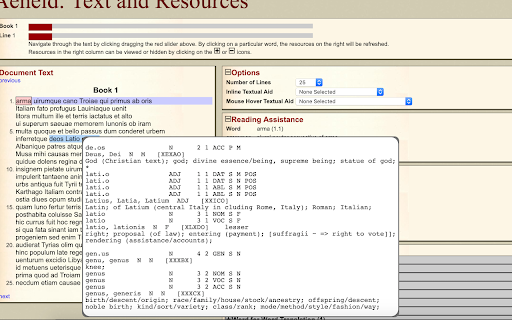
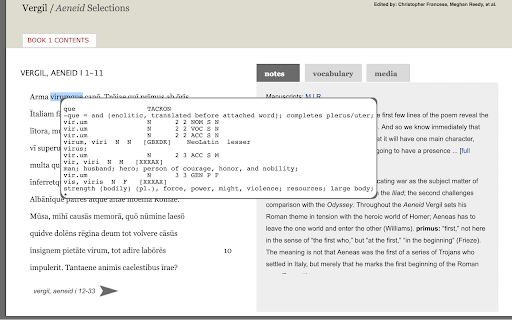
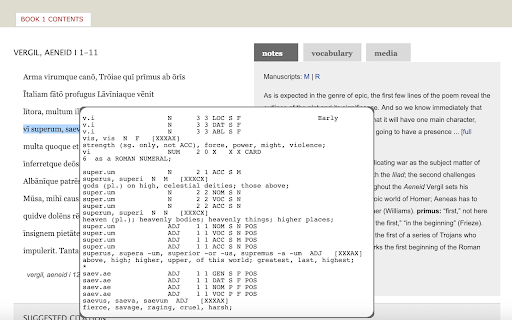
This extension uses the wonderful program, designed by William Whitaker, to easily get detailed and accurate Latin definitions. Update: The extension has been restored to full functionality and any new bugs will be dealt with as soon as possible. The development team apologizes for the app breaking. As a Latin student myself I was often frustrated with constantly switching tabs to look up Latin vocabulary and I'm sure I wasn't the only one irritated by this. Wouldn't it be so much better if there was a way to look up words without switching tabs? This extension uses the wonderful application designed by the late William Whitaker (through a website set up by University Notre Dame) to seamlessly bring you Latin definitions while you're working, without ever needing you to leave the page you're working on. Carpe diem! How To Use: Using this extension is incredibly easy, all you have to is double click on a word and the definition will appear. If you want to look up many words at once you can either drag-highlight the words and then right click and select 'Get definitions' from the Whitaker's Words Helper menu, or double click and drag. If you want to see only definitions, without the possible parts of speech, check the definitions only option. The Whitaker's Words Helper right click menu also has a 'Get scansion' option that will scan the selected text for dactylic hexameter. Finally, if you want to disable the extension, click on the icon in the top left, next to the search bar and click the toggle to disable the extension. The original Whitaker's Words site can be found at https://latin-words.com. Copyright © 1993-2007 The scansion is provided by The Latin Macronizer at www.alatius.com/macronizer/. Copyright 2015-2021 Johan Winge.

All Find Seek
Extension adding All Find Seek search engine to browser. Change default search engine to make AllFindSeek your search in Chrome browser address bar (omnibox). To get a new search experience, you only need to install this extension and leave it as the default search in the address bar. Features of the extension: - Free and safe Google Chrome extension - Оne-click installation, small size and minimum browser resource usage By click on the "Add to Chrome" button and installing the AllFindSeek extension, you are agreeing to install this extension, you are agreeing to our Privacy Policy, and you are agreeing to our Terms of Use.

Thymeline
Add events to your timeline the easy way Keep track of everything important about your projects all in one place. Meet Thymeline, the free Chrome extension that will magically transform your project chaos into an organized masterpiece. Created for Project Managers. Here is how Thymeline saves you time. No APIs. No integrations. As simple as copy & paste. Easily copy relevant information from any of your existing tools or apps without any hassle. Once you download the chrome extension... Step 1: Visit any website. Step 2: Highlight any text. Step 3: Click on the Thymeline Chrome extension Step 4: Add to existing Thymelines. That’s it! Thymeline can handle as many projects as you’re juggling. Create as many Thymelines as you need! Multiple projects, multiple Thymelines, we can handle it. Keep track of it all in a simple interface. Share with others Share your Thymelines with others on your team with view or edit privileges, keeping everyone on the same page. Want to keep it private? You can do that too.

Anti FeR toolkit
Adds features and extensions for the bushtarion web game (formerly Canola toolkit formerly Antisback's bushtarion toolkit) This adds some functionality to the Canola toolkit, which it is forked from. Fixes the regex for Company name matching (no more oddities with names that include '@', '~', or '^'), adds information about who someone has attacked, includes stealth mobs in the activity chart, and maybe more! 1.2.22 Changes: Defaults for options set to "on" 1.2.21 Changes: Additional options for the military page and supply depot 1.2.18 Changes: Includes an options page, navigate by right-clicking the icon and selecting "Options" 1.2.13 Changes: Displays development information for technologies unlocked for a given dev/construction Shows troop count on a hack Shows a horribly formatted estimate on the flak needed to land on a target given the visible units Display information about what you are 30% and 70% of in the score breakdown overlay Show gov defense in spy report incoming (but doesn't account for when it recalls) 1.2.12 Changes: Fixes seed/income calculation Adds a button to hack from the search page in a new tab Spy report incoming/outgoing is now sorted by ETA Spy report incoming/outgoing displays original mob ETA Adds an input so that dynamic AR calculation can be done from the spy report 1.2.11 Changes: Attacks on an HQ don't show a huge number for ETA Stealth mobs sent now default to ETA 5 sent New "Plant Max" feature calculates how many seeds you are able to plant given how many gards you have home. Updates grass seed bonus in Spring 1.2.10 Changes: Fixes single person mobs not showing up on spy reports Fixes HQ incoming/outgoing not showing HQ outgoing mobs stay in the outgoing screen "until recalled", which I don't know when it is recalled so take the info as an alert more than a reality Alerts if the user does not have enough harvesters to cover the max needed (in total, not at home) 1.2.9 Changes: Reverting mob notes and loving on Alci 1.2.8 Changes: Makes mob notes on alliance incoming screen more interesting for some :) 1.2.7 Changes: Fixes score evaluation for players with public ID's Fixes military mob calculations for "all" Income calculator now reasonably accounts for exponential seed loss and nighttime seed penalty Search results include a "Total" row for acres and score 1.2.6 Changes: Fixed spy report when spying a member of your own alliance Finished searching by Public Name Added full Hack output to console debugger when hacking from Alliance incoming page Added troop cost calculation on Military page 1.2.5 Changes: Fixes score calc for insurance that is "claimable early" Alliance incoming "Defend" and "Retaliate" links are now buttons Added "Hack" button on alliance incoming to make a best guess at route and fill out incoming notes Added "Recall" button on alliance incoming to recall from alliance page 1.2.4 Changes: Add Land Fat percentage to search results Fix Alliance page incomings when AHQ! is targeted Add Unit Stats quick link in side panel Add ID list generation with search results (in console debugger output) Add "Has Attacked" information on news page 1.2.3 Changes: Alerting when the user has uncultivated acres Maintenance page additionally displays the seeds you can grow with troops home Alliance page has quick links to setup defensive or offensive mobs from the incoming screen

Latin Word Lookup
Double-click Latin words for local Whitaker and Wiktionary lookup without leaving the page. Latin Word Lookup, formerly Latin Wiktionary Lookup, now includes local Whitaker lookup as the default mode. This major update adds generated dictionary and morphology data derived from William Whitaker's WORDS, so common Latin forms can be analyzed directly in the popup without leaving the page. The original Wiktionary lookup mode is still available and can be selected from the same popup when you want Wiktionary's article-style entries and inflection pages. Highlights: - Local Whitaker-based Latin dictionary and morphology lookup - Wiktionary lookup still available as an alternate mode - Double-click lookup directly on the page you are reading - Improved display for nouns, adjectives, pronouns, verbs, participles, gerunds, gerundives, supines, and irregular forms - No account, no analytics, and no browsing-history collection Latin Word Lookup is a lightweight reading aid for Latin texts in your browser. When you double-click a Latin word, the extension opens a compact in-page popup with dictionary and morphology results, letting you keep your place instead of switching tabs or opening a separate dictionary. The default Whitaker mode uses local packaged data derived from William Whitaker's WORDS. It is designed for quick reading support: identify dictionary headwords, see grammatical information for inflected forms, and compare possible analyses when a form is ambiguous. The optional Wiktionary mode remains available for readers who want Wiktionary's entries. You can switch between Whitaker and Wiktionary directly in the popup. Privacy and data use: - No sign-in is required. - No analytics are included. - The extension does not collect browsing history. - The extension reads the word you double-click or select in order to show the lookup popup. - Whitaker lookup runs from local packaged data. - Wiktionary mode contacts en.wiktionary.org only when Wiktionary lookup is used. Attribution: Local Whitaker lookup uses generated data derived from William Whitaker's WORDS, created by Colonel William A. Whitaker (USAF, Retired), under the permissive WORDS license. Wiktionary results are fetched from Wiktionary and remain subject to Wiktionary's license and terms. This extension is independent and is not affiliated with, endorsed by, or produced by Wiktionary, the Wikimedia Foundation, William Whitaker's estate, or the maintainers of Whitaker's WORDS. Note: Whitaker results are intended as a reading aid and may contain parsing or morphology errors; for important readings, please verify with a trusted dictionary or grammar.
