
mpihcpkdfimljiacokccaamakgifhcim
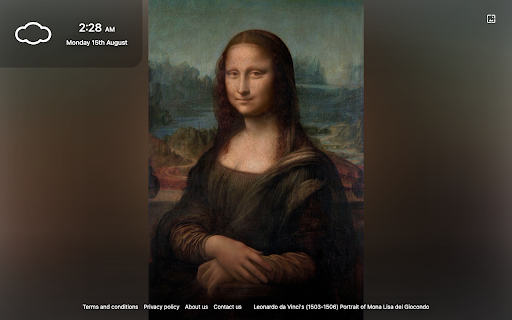

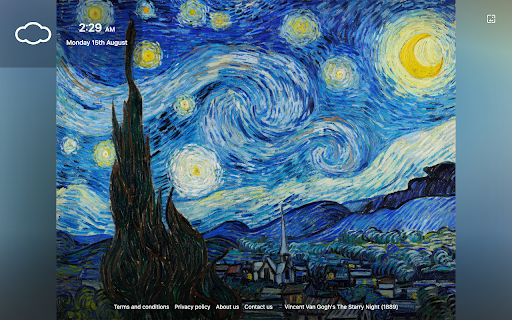
Designed by art lovers for lovers of art this extension will provide you with a pleasant backdrop to a refreshing search experience. Once the extension is active you will be able to select your desired work of art as your search backdrop from our curated collection. You will also enjoy information about the current time and weather in your area and a useful widget to keep track of your tasks. By clicking "Add to chrome", I accept and agree to installing the Art Tab extension and setting Chrome™ New Tab search to Microsoft Bing provided by the service and the Terms of Use at https://art.mnsdigitalmedia.com/terms-and-conditions and Privacy Policy at https://art.mnsdigitalmedia.com/privacy-policy.

Wingman Clock
Wingman Clock: Keep track of time with style. A sleek and reliable Chrome extension for your daily time management needs. Introducing the WingMan-Clock Extension for Chrome! This user-friendly extension allows you to easily add and customize multiple clocks to your browser, so you can keep track of the time in various cities around the world. Simply select the cities you want to monitor and view their current time at a glance on your new tab. The extension also conveniently displays the time differences between the selected cities, making it easy to schedule meetings and stay organized across time zones. With its sleek design and practical functionality, the WingMan-Clock Extension is a must-have tool for anyone who works with colleagues or friends across different regions. By clicking “Add to Chrome”, I accept and agree to install the WingMan-Clock Extension, to set the Chrome™ New Tab search to Yahoo, and to our Terms of Use - https://searchologic.com/Terms-Conditions/, and Privacy Policy -https://searchologic.com/Privacy-Policy/. You may uninstall the extension at any time. To remove our extension from Google Chrome: 1) Click on the three vertical dots icon in the upper right-hand corner of your Chrome browser. 2) Go to "Settings.” 3) In the left menu that appears, click on "Extensions.” 4) From the list of installed Extensions, locate the extension you would like to uninstall.

Car Tab
Car tab is a novel extension designed to bring images of beautiful cars to your every day peripheral. You can now enjoy a wide range of wallpapers in HD quality. Customise your background by selecting an image from our custom library. Our extension provides an enhanced search experience as well as quick navigation to your most visited sites, Facebook, Instagram. Amazon, YouTube, plus time, date and local weather for your convenience. By clicking "Add to chrome", I accept and agree to installing the Car Tab extension and setting Chrome™ New Tab search to that provided by the service and the Terms of Use at https://sites.google.com/onezephyr.com/car-tab/terms-and-conditions and Privacy Policy at https://sites.google.com/onezephyr.com/car-tab/privacy-policy. The search will be powered by Microsoft Bing. We hope you enjoy all the new features offered in this updated extension. We value your feedback so please contact us with suggestions and your wish list of features and functionality as we are contently adding and upgrading.

Art Project - New Tab
Displays random masterpieces from Google Cultural Institute in your every new tab This extension replaces the default "New Tab" page with a clean and organized page showcasing a wide range of masterpieces, from renowned artists like Van Gogh and Monet to contemporary works by street artists worldwide. Key Points: 1. The extension utilizes the Google Arts & Culture database to display these artworks. Each artwork includes clickable titles and links to the creators. 2. The extension stores up to 5 artworks in the browser's cache storage to improve responsiveness. 3. All new artworks are fetched directly from the Google Arts & Culture website. 4. Each artwork is displayed for 24 hours before being replaced with a new one. If you don't like a particular one, you can use the refresh button to see a different random artwork. What is the "Google Arts & Culture" service (from Wikipedia)? Google Arts & Culture features content from over 2000 prominent museums and archives partnered with the Google Cultural Institute to bring the world's treasures online. It uses high-resolution image technology, allowing users to explore partner organizations' collections, and galleries, and access detailed information about the artworks. The platform also offers advanced search capabilities and educational tools. -- Legal This extension solely retrieves resources from Google Arts & Culture. It is an independent project without affiliation with Google or the Google Arts & Culture team.

Sticky Note Board Extension
Sticky notes have unlimited possibilities. Run a retrospective, start brainstorming, or plan out your roadmap. The perfect extension to help you stay organized and focused on your goals. The Sticky Note Board extension gives you the option to add sticky notes to your home page, that are stored and shown every time a new window or tab are opened. Each note contains a main title and an additional body of text, and can be edited or removed at anytime. On top of that, users will also have an active clock on the bottom right hand corner of the homepage and the current date on the left, as well as the option to shuffle between available backgrounds by clicking the shuffle button on top right corner. By clicking “Add to Chrome”, you accept and agree to the following: -Installing the Sticky Note Board extension -Setting the Chrome™ New Tab search to Microsoft Bing -Monetize Engine's privacy policy and terms of use Privacy Policy: https://monetizengine.com/privacy-policy/ Terms of Use: https://monetizengine.com/terms-and-conditions/ You may uninstall the Sticky Note Board anytime To remove our extension from your browser: 1) Click on the three dots in the upper right corner of your browser 2) Go to "Settings" 3) Click on "Extensions" in the left menu that appears 4) From the list of installed Extensions, locate the extension you would like to uninstall
