
mpfonengfdijemalbibanlfjmmhmemdg


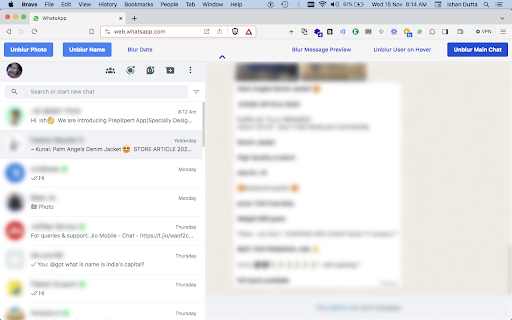

This extension works with web.whatsapp.com provided you are logged in. Blur Whatsapp™ names, photos, dates, message previews, chats. Unlike other extensions this extension lets you control each of these at granular levels. Disclaimer: WA Blur is not official Whatsapp™ application. It is an unofficial extension that is developed and maintained independently. WhatsApp™ is a trademark of WhatsApp™ Inc., registered in the U.S. and other countries. This extension has no relationship to WhatsApp™ or WhatsApp™ Inc or Meta™.

Privacy Extension For WhatsApp Web
Hides your messages until you hover over them. To increase privacy in public spaces the Privacy Extension For WhatsApp™ Web blurs your messages. Your messages and other content only reveals upon hovering over with your mouse cursor. Additionally you can quickly toggle all effects by using a keyboard shortcut or by clicking the toggle button in the extension menu. It adapts to your needs by letting you decide which elements you want to blur. Most important options: - All messages in chat: Blurs all messages in the current chat. - Last messages preview: Blurs all message previews on the left. - Media preview: Blurs all images, videos, stickers, ... in separation from the text. - Profile pictures: Blurs all profile pictures. An extended list of features can be found on our page: https://pfwa.lukaslen.com/ Quick Toggle: Use the keyboard shortcut to quickly toggle the extension on or off (Default: Alt+X). To change this navigate to: "chrome://extensions/shortcuts" --- This extension does not collect information about you or your messages. We only communicate with our server to display information about problems or updates. Visit the privacy policy to learn more. This project is licensed under the MIT license - see the LICENSE file for details. WhatsApp is a trademark of WhatsApp Inc., registered in the U.S. and other countries. This extension is an independent project developed by Lukas Lenhardt and has no relationship to WhatsApp or WhatsApp Inc.

BlurSafe for WhatsApp
Take control of your privacy by blurring sensitive information like names, group names, messages, and images on WhatsApp Web. BlurSafe for WhatsApp is a powerful privacy extension designed to enhance your WhatsApp Web experience by giving you control over what information is visible on your screen. Whether you’re in a public space or simply prefer more privacy, BlurSafe allows you to blur sensitive details such as contact names, group names, messages, images, and chat messages. With just a few clicks, you can customize which elements of your WhatsApp Web interface are blurred, ensuring that personal information remains confidential. This extension is perfect for users who value discretion while working or browsing in shared environments, or who want to safeguard their privacy at any moment. - Blur individual contact names - Blur group names - Blur messages and chat images - Unblur Last Message - Maintain control over which elements are visible - Simple and user-friendly interface - Quick setup with customizable options *If the extension doesn't take effect immediately, simply refresh your WhatsApp Web page to activate the changes.* Take charge of your privacy and use WhatsApp Web with confidence. With BlurSafe, you’re always in control of what’s displayed on your screen.

Smart Privacy Extension For WA Message
It enables the user to hide or show the whatsapp messages on the web. The Smart Privacy Extension for WA Message is a powerful tool designed to safeguard your privacy while using WA message. With this extension, you can easily hide sensitive chats, blur messages, and keep your conversations secure from prying eyes. 🔒 Privacy Notice: Your data and conversations on WhatsApp remain completely private. The extension only applies visual changes (like adding blur effect on the chat) locally in your browser. It does not collect, store, or transmit any personal information. The permission "It can: Read and change your data on web.whatsapp.com" is required only to allow the extension to interact with the webpage for these visual customizations. Disclaimer: This extension is not affiliated with, endorsed by, or associated with WhatsApp LLC. It is an independent tool designed to enhance your privacy.

Privacy Extension for WhatsApp Web: Chat Lock & Blur & Hide | WASBB.COM
Keep your WhatsApp Web private. Lock your screen with a password and blur sensitive information like chats, names, or media. Protect your privacy and take control of your WhatsApp Web experience with the Privacy Extension for WhatsApp Web. Whether you're working in a shared environment or browsing in public, this tool provides essential features to secure your sensitive information. 🔑 Features 🔒 Screen Lock: Add a password-protected lock to WhatsApp Web to secure it while you're away. ⏳ Auto Lock: Automatically lock WhatsApp Web after a set period of inactivity. 👀 Privacy Blur Options: - Blur group names and contact names. - Blur profile pictures, chat content, media messages, and input text. 🎹 Customizable Shortcuts: Use keyboard shortcuts for quick access to screen lock. 🌐 Lightweight & Fast: Integrates seamlessly with WhatsApp Web, ensuring smooth browsing. 🛠️ Who Is It For? This extension is designed for anyone who values privacy while using WhatsApp Web: 👩💻 Professionals: Protect sensitive information in shared workspaces. 🚇 Commuters: Secure your WhatsApp Web when accessing it on public Wi-Fi or shared computers. 👨👩👧👦 Families: Blur personal conversations and media when others are nearby. 📚 Students: Avoid distractions and protect chats while studying in libraries or classrooms. 🛠️ Privacy Enthusiasts: Take full control over what others can see on your WhatsApp Web. 📚 Use Cases 🤫 Shared Environments: Hide sensitive information when working in open offices or public spaces. ⏳ Stepping Away: Lock your WhatsApp Web when you're away from your computer. 👀 Public Browsing: Blur names, photos, and chats to maintain privacy in cafés or libraries. 📥 Media Privacy: Ensure media messages and input text stay private, even when sharing a screen during video calls. 🕶️ Stay Discreet: Maintain control over your WhatsApp Web usage and prevent unauthorized access. ❓ Frequently Asked Questions Q: Can I customize the auto-lock time? A: Yes, you can set the lock time according to your preference. Simply go to the settings and adjust the timer. Q: Does this extension save my password or data? A: No, all actions are processed locally within your browser, ensuring your data stays secure and private. Q: Can I choose which elements to blur? A: Absolutely! You can select specific options like names, profile pictures, chat content, media messages, or input text to blur, depending on your needs. Whether you’re working in a shared office, studying in public, or browsing at home, this extension is your privacy companion. Support: 🔹 Website: https://wasbb.com/privacy-extension-for-whatsapp-web 🔹 Contact us: support@wasbb.com Legal Disclaimer: This is an independent tool with no official association with WhatsApp LLC.
