
mpbkfbafkpkbpmgdcgkmonpfnodgfepo

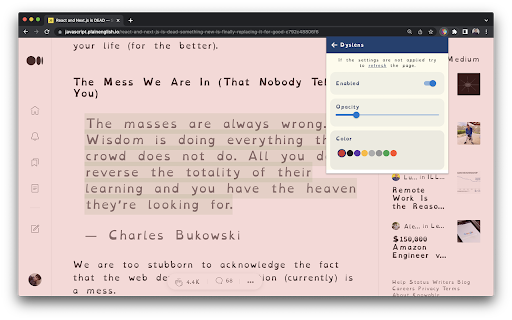


Dyslens is making the web more accessible for people who have different reading needs and suffering with dyslexia. Dyslens is a open source chrome extension, built and designed to make web more accessible for people who have different reading needs and suffering with dyslexia. Features: * Text to speech * Text font and color custom update * Line focus to improve readability and focus * Overlay Tint to make reading easier on the eyes

OpenDyslexic for Chrome
Format pages using the OpenDyslexic font and low contrast help 🔍 ABOUT •••••••••••••••••••••••••••••••••••••••••• OpenDyslexic is a free, open-source font designed to make reading easier for people with dyslexia. This extension replaces all fonts on web pages with the OpenDyslexic font, making content more readable and accessible. Sometimes letters can feel jumbled or rotated, making reading frustrating. OpenDyslexic tackles this by giving each letter a heavier bottom, creating a "gravity" effect that helps keep them steady and grounded. This unique design makes it easier to recognize letters and read smoothly. The distinct shapes of the letters also reduce confusion and swapping, so you can focus on reading without the struggle. 🛠️ MAINTAINER •••••••••••••••••••••••••••••••••••••••••• A huge shoutout to Robert James Gabriel for maintaining this extension and his dedication to accessibility. You can explore more of his work at Helperbird, where accessibility is always the priority. 📝 CHANGELOG •••••••••••••••••••••••••••••••••••••••••• Want to see what's new? Check out our full changelog and source code on GitHub. And if you love the extension, spread the word! ❤️ OpenDyslexic is free for everyonemwhether you're an individual, a company, or a school. This font is already included in many iOS and Android apps and has even been praised by the BBC for its accessibility benefits. Together, we’re making reading easier and more enjoyable for everyone. Join the movement today! 📚😊

Dislexya
A reading extension to help dyslexic readers Changes the weight of the first few letters of words to make it easier to read for users who have dyslexia.

FocusFlow: Open Dyslexic Font & Ruler
Boost reading with OpenDyslexic, Lexend & Atkinson fonts, color overlays, focus line, bionic reading & per-site controls. FocusFlow — Read with Clarity, Think with Ease. Welcome to FocusFlow! We're on the same mission to make the web accessible, but with a better, more powerful experience. Whether you have dyslexia, ADHD, or simply experience visual stress from reading online, FocusFlow transforms any webpage into a distraction-free, personalized reading environment. Helping readers with dyslexia since 2024, FocusFlow goes beyond just changing your font. It is a complete accessibility toolkit right in your browser. Now available in 7 languages: English, Spanish, French, German, Portuguese, Hindi, and Japanese. 🔤 Font Only Mode: Apply just the dyslexia-friendly font — nothing else changes. No resizing, no respacing, no surprises. Your pages look exactly the same, just easier to read. On by default for everyone. ⚙️ Advanced Typography, Tucked Away: Font size scaling, line height, letter and word spacing are now grouped under an Advanced section. They're there when you need them — out of the way when you don't. 🌐 Arc Browser Support: The sidebar panel now opens in a dedicated tab when Arc's Side Panel isn't available. Full settings, no compromises, any browser. ✨ WHAT'S NEW IN v2.6 🧾 Advanced Sidebar: A full side panel with profiles, site settings, typography tuning, keyboard shortcuts, and feedback — all in one place. Everything you need, one click away. ⚡ Quick Tools Popup: Toggle the ruler, focus line, color overlay, and bionic reading with one click from the toolbar popup. No menus, no friction. 🖥️ Per-Site Typography: Save a different font, size, and spacing for each website. FocusFlow remembers what works where — so Wikipedia can look different from your email. 📏 Font Size Limits: Set a minimum and maximum size in pixels. Pages with tiny or oversized text get rescaled into your comfort zone automatically. 💾 Save as Default: Turn your current setup into your new global default — with a one-click path back to factory settings whenever you want to start over. 💬 In-App Feedback: Report a bug or request a feature straight from the sidebar. No email client, no forms, no friction. 🛠️ CORE FEATURES 🔤 Multiple Accessibility Fonts: Choose from OpenDyslexic, Lexend, or Atkinson Hyperlegible — three fonts scientifically designed to improve reading speed and accuracy. 📖 Bionic Reading: Bolds the first half of each word so your eyes glide through text faster and more naturally. 📕 Reader Mode: Strips away ads, sidebars, and navigation clutter — leaving just the article text in a clean, distraction-free view. 🔊 Text-to-Speech: Select any text on a page and hear it read aloud. Great for auditory learners, proofreading, or when your eyes need a rest. ↔️ Typography Tuning: Take full control of your reading experience. Adjust font size, line height, letter spacing, and word spacing with intuitive sliders. 📏 Reading Ruler: A colored, customizable overlay that follows your mouse cursor, helping your eyes track long lines of text without losing your place. 🎨 Color Overlays (Screen Tints): Reduce visual stress and glare by applying a tinted overlay to any page. Choose from 5 calming colors and adjust the opacity to your comfort level. 🎯 Spotlight Mode (Focus Line): Dim the entire webpage except for the line you are reading. Perfect for staying on track and eliminating surrounding distractions. 📋 Profiles & Presets: Save your perfect reading configurations as presets and switch between them with a single click depending on your mood or the website. 🌙 Light & Dark Themes: The FocusFlow popup matches your style with one-click light and dark modes. ⌨️ POWER USER SHORTCUTS Control your reading experience instantly without ever opening the extension menu: 🔒 PRIVACY IS ABSOLUTE FocusFlow collects zero data. We never track your browsing activity, never send browsing data or personal information to any server, never store anything outside your browser, and use zero cookies or analytics. All your settings live locally on this device and are never transmitted. Read our full privacy policy at https://focusflowapp.in/index.html#privacy Get Started Today! Click the FocusFlow icon in your toolbar, choose your favorite font, and experience the web the way it was meant to be read. (Note: For the best experience, please refresh any previously opened tabs after installation so FocusFlow can take effect.)

ColorVeil
Add your own customized color filter (veil) over any website or document to help with dyslexia, visual stress, eye strain, and more. Meet ColorVeil. It's a simple screen filter for your web browser. If you've used our Windows app, you'll love this Chrome extension. It puts a color veil, or filter, on your screen. This helps make reading on the web easier on your eyes. ColorVeil is here to help with eye comfort. It's especially good for people with dyslexia or Scotopic Sensitivity Syndrome. But anyone who wants a more cozy web reading experience can use it. You choose the color and how strong it is to suit your eyes. • Color Filter — Add a color overlay over web pages or documents. Choose the color that's best for you. • Easy Use — Click the ColorVeil icon to turn the filter on or off. Simple! • Your Choice — Pick a color and make it as strong or light as you want. See changes right away. • Helps Reading — Aids people with dyslexia and Scotopic Sensitivity Syndrome. • Works Everywhere — The color veil shows on all web pages when it's turned on. • Private — We don't take or use any of your data. • Free: Use ColorVeil in all places - home, school, or work - without paying a penny. ColorVeil is easy, free, and made to make web reading better for you. We'd love to hear how it's working for you, and if you need help, we're here.
