
mpamlkcaopbfeopljmhplhobhdofngaa
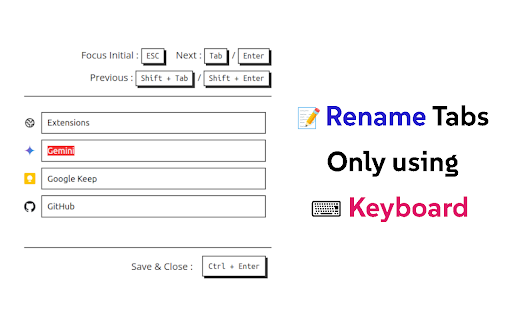


Rename tab titles at extension page that can be opened with F2 keyboard shortcut. - Press 'F2' to Open Rename Page at any tab - 'Tab' or 'Enter' / 'Shift+Tab' or 'Shift+Enter' to Move around tab titles - 'Ctrl+Enter' to Apply changes and Close - Titles are automatically applied with 'Persist & Apply Titles' option - 'Shift+R' to reload connectable tabs - 'F5' or 'Ctrl+R' to Reset changes (browser original) - 'Ctrl+W' or 'Ctrl+F4' to Close without applying (browser original) 📌 'F2' shortcut and Renaming is ⚠️not available⚠️ at some pages (e.g. ⚠️ chrome web store page ⚠️, chrome:// pages, new tab page, etc) due to security reasons of the browser. 📌 When extension is 'first installed ⬇️', you need to 'refresh 🔄' tab to use 'F2' shortcut because extension cannot connect to tabs that are created before its installed. v1.2 - Added descriptions about unavailable tabs - Reload all reconnectable tabs with 'Shift+R' shortcut - All buttons are now clickable Source code of this extension is opened : https://github.com/vhv3y8/rename-tabs-with-f2 Feature Request, Language Support, Bug Report : Github Issue or vhv3y8@gmail.com

Auto Tab Renamer
Designed to enhance your browsing experience by automatically renaming (and optionally removing tab-icons) tabs if a part of the URL matches with any of the URLs specified by the user in the options page.

Simple Tab Renamer
Quickly rename your Chrome tabs with a click Rename any Chrome tab in one click. Lightweight, private, and uses minimal permissions. FEATURES - Instantly rename any tab - Works on most websites, including Google Sheets and web apps - No data collection or storage - Minimal permissions; only what’s needed to rename tabs - Extremely lightweight with no noticeable performance impact HOW TO USE 1) Click the Simple Tab Renamer icon in your toolbar 2) Enter your desired tab name in the prompt 3) The tab title updates immediately GREAT FOR - Keeping track of multiple similar documents - Organizing research tabs - Customizing titles for screenshots - Temporarily labeling important tabs during presentations ⚠️ IMPORTANT LIMITATIONS ⚠️ - Temporary renaming only: titles reset when you refresh the page or open a new browser window (Chrome limitation) - No tab bar integration: works via the toolbar icon, not a right-click menu on tabs - Some sites may override titles: pages that frequently update their own titles (e.g., Gmail, X/Twitter) can replace your custom name - Not synced across devices: custom names appear only on the device where you set them - Visual only: does not change bookmarks, history, or page metadata - No automatic naming: each tab must be renamed manually (no batch/pattern modes) - Extension icon required: you’ll need to keep the icon available in your toolbar to use it quickly SUPPORT Questions or suggestions? Contact the developer via the Support link on the Chrome Web Store listing.

Simple Tab Renamer
A simple chrome tab renamer extension Lets you rename the title of the any tab. Very handy when you feel your tab title need more descriptive or personalized names. Also, the title sticks to the tab even if you navigate to a different page within the same tab! Note: This may not work on websites (Ex: chrome webstore, facebook etc) which do not get affected by this tab title change.

Tab Renamer
Rename your Chrome tabs for better multitasking. 😎 Rename & Find Tabs Like a Boss 🧠💻 Tired of tabs called “Home”, “Untitled”, or “New Tab”? Tab Renamer lets you rename tabs instantly and find them later with a quick search. 🎯 What It Does ✏️ Rename tabs with your own titles (via popup or right-click) 💾 Save names so they stick — even after refresh or browser restart 🔍 Search & jump to any renamed or default tab in seconds (the ultimate tab finder) 📋 See all renamed tabs in one list ♻️ Reset tab titles back to default anytime 🌞🌚 Light & Dark mode support 🆕 New in this version ✅ Right-click a tab to rename it instantly ✅ Powerful search bar to find & jump to your renamed (or even default) tabs — no more tab chaos! 🔒 Privacy First We don’t track anything, collect any data, or send anything online. All your tab names and searches stay local to your browser — exactly where they belong. Perfect for: Devs with 10+ localhost tabs Students juggling multiple dashboards Power users (aka all of us drowning in tabs) 💡 Got a feature idea? Drop it in the reviews — we’re building this for you.
