
mokhlgclcchjdgocijmjadgbhanlbfjo

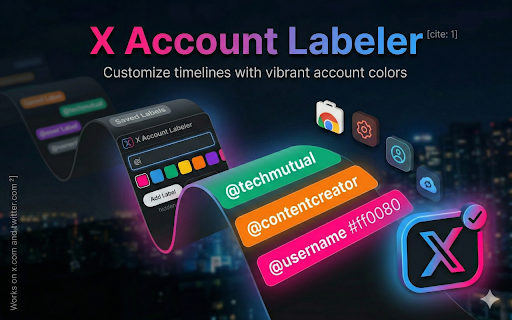

Label and identify any X (Twitter) account instantly. Create custom tags to organize profiles and personalize your feed. Take control of your X (formerly Twitter) experience with X Account Labeler. Tired of forgetting why you followed someone or struggling to identify bot accounts? X Account Labeler allows you to add personalized, visible labels to any profile on X. Whether you're a social media manager, a researcher, or a casual user, this tool helps you stay organized and informed. - Custom Account Labels: Create and apply unique tags to any profile (e.g., "Client," "News," "Potential Bot," "Funny"). - Instant Visibility: Labels appear directly on the profile and alongside posts in your timeline for quick identification. - Identify & Verify: Use labels to flag suspicious accounts or highlight trusted voices in your community. - Privacy First: Your custom labels are stored locally or synced privately—no data is shared with third parties. - Seamless Integration: Designed specifically for the New X (Twitter) interface with a lightweight, no-lag performance. - Boost Productivity: Quickly recognize key contacts without clicking into every profile. - Enhance Safety: Label known misinformation spreaders or bots to navigate X more safely. - Better Organization: A perfect companion for anyone who finds standard Twitter Lists too cumbersome. 1. Install the extension. 2. Visit any profile on X.com. 3. Click the "Add Label" button and type your custom tag. 4. See your labels everywhere that account appears! Stop guessing and start labeling today. Download X Account Labeler for Chrome. Core Functions: X account labels, Twitter profile tags, account identifier, custom labels for X, verify X accounts. Use Cases: Spot fake accounts, X bot detector, organize X followers, Twitter list alternative, profile notes. Platform Specific: Chrome extension for X, Twitter productivity tool, X social media management.

Rabbithole
Track your internet rabbitholes! We all get into rabbitholes online but we have no way to track them, and because we're afraid of losing that information, we have hundreds of tabs open! With Rabbithole, you can embark on your digital journeys, keep track of captivating websites, organize them into collections, and share them so others can get to experience them. 🔗 Website Overlay: Rabbithole adds an overlay to every website you visit, allowing you to easily store interesting websites as soon as you encounter them. You can choose to dismiss it and just use the popup if that's your style. 📂 Project Organisation: The extension transforms your new tab page into a hub for managing your online adventures. Each rabbithole is represented as a project, showcasing a collection of the websites you've saved. 🥾 Trails: You can create ordered paths through websites with notes at each stop. Walk them step by step or share them with others to guide them through your research. 📑 Tab Management: Save all your open tabs to a Rabbithole with one click, then close them to declutter your browser. Reopen them anytime you want to continue where you left off. 🔍 Search Everywhere: Press Cmd+K to instantly search across all your saved content to find exactly what you're looking for. 📤 Export: Export your data to share your research or back up your work. 🌐 Publish: Connect your Atmosphere account to publish your Burrows and Trails as curated collections. Share your discoveries with the open social web. Rabbithole is your go-to companion for tracking all the wild depths of the internet you reach. Unearth hidden gems, conduct research, or simply satisfy your curiosity, all while easily managing and categorising your web discoveries. Download the extension and let the journey begin!

7-IPTV — Live TV & Sports Streaming
Quick access to 7-IPTV: browse live channels, check service status, view the channel guide, and reach support from your toolbar. 7-IPTV is the official companion extension for the 7-IPTV streaming service. Once installed, click the toolbar icon to open a compact popup that lets you: • Visit the 7-IPTV website to manage your account or start a subscription • Browse the full channel guide to find what's on • Contact 24/7 live support if you need help • View an at-a-glance summary of available content (live channels, movies, and series) • Check the current service status The extension is lightweight, loads instantly, and requires no special browser permissions. It does not collect any personal data, run background analytics, or inject content into web pages. How to Use 1. Click the 7-IPTV icon in your browser toolbar. 2. Use the buttons to navigate to the website, channel guide, or support page. 3. That's it — no configuration needed. This extension is a shortcut tool for existing and prospective 7-IPTV subscribers. A subscription to the 7-IPTV service is required to access streaming content.

Telegram网页助手 - TG下载工具 消息管理 (非官方)
Telegram网页版增强工具:快速下载、消息整理、链接解析、文件管理。非官方第三方辅助插件 Not affiliated with Telegram. ⚠️ 重要声明:本插件为非官方第三方工具,与 Telegram 官方无任何关联 This extension is not affiliated with or endorsed by Telegram.

Support with Mellowtel
Support your favorite plugin with Mellowtel Support your favorite developer with Mellowtel while you browse, turning your everyday browsing into real support for developers. Mellowtel makes the Internet a place where everyone benefits: companies, developers and end users. Mellowtel allows users to support their favorite developer at no-cost to them. It achieves this by allowing companies to pay for the bandwidth users can share. Companies need this to access the web for public data collection or AI automations. They pay for it and a share of the revenue is given to the developer you want to support. In this way they can keep building and improving the products you love and offer you exclusive features and rewards Mellowtel only uses a small fraction of bandwidth. It doesn't collect personal data or browsing data. You can opt out or opt-in at any time from the plugin popup or the settings page. Mellowtel is an easy and free way of saying thank you to your favorite developer. By using Mellowtel you agree to our Terms And Conditions (https://www.mellowtel.com/terms-and-conditions) and privacy policy (https://www.mellowtel.com/privacy-policy) Please contact our support team if you have any questions: info@mellowtel.com
