
mokcaeplgcdllmhdmfhcbjcgmaibpdgk
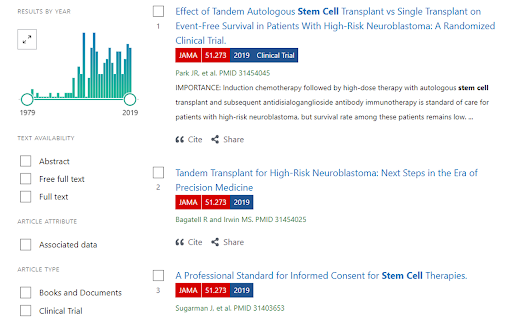
自动加载PubMed搜索结果中期刊的信息,助力科学研究,加快科研进展 Pubmed(https://pubmed.ncbi.nlm.nih.gov/)是美国国立卫生研究院管理的、向全球开放的文摘数据库。用户可以在网站上检索已发表或即将发表的文献,查看这些文献的相关信息,包括作者、期刊、发表日期、摘要和下载信息。Scholarscope 可以丰富 PubMed 的搜索结果,着重显示它们的重要信息、显示其领域中的排名、添加文献信息导出按钮、标记重要文献等。

PaperPop - Journal Impact & Ranking for Google Scholar, PubMed, etc.
Instantly show journal rankings. Generate mind maps & AI summaries for research papers. Auto-display journal rankings with 100+ ranking systems; AI-powered search summaries & mind maps for research papers 👉 Real-time Journal Rankings ✔️ Auto-display impact factor, JCR quartile on Google Scholar, PubMed, ScienceDirect and more ✔️ Built-in 100+ authoritative rankings: SCI/SSCI, Engineering Index (EI), Google Scholar Metrics, Nature Index, CiteScore, SJR, etc., covering science & engineering, medicine, social sciences, and many other vertical fields. Also includes the International Journal Warning List to help you with risk alerts. 👉 Smart Sorting & Export ✔️ Sort search results by journal rank or citation count ✔️ One-click Excel export for reference lists 👉 AI Interpretation ✔️ One-click AI summary for Google Scholar & PubMed search results, analyzing research trends ✔️ Three depth levels: Researcher / PhD Student / Master's Student ✔️ Export as Markdown or plain text ✔️ Supports custom prompts and redirects to your preferred AI platforms (such as ChatGPT, DeepSeek, Claude, Kimi, etc.) 👉 Mind Maps ✔️ Generate mind maps from article pages to quickly grasp paper structure ✔️ "Quick Overview" and "Next Steps" for search results ✔️ Online editing and image export 👉 Full-text Access ✔️ Auto-detect DOI with one-click copy ✔️ Configurable third-party URL prefix for direct full-text download 1️⃣ Click "Add" to install the extension. 2️⃣ Visit your favorite academic search sites like PubMed or Google Scholar. 3️⃣ Journal rankings and impact factors load automatically. AI interpretation and mind map buttons appear - click to generate instantly. 📌 Which websites are supported? Google Scholar, PubMed, IEEE and 20+ academic search and journal publisher sites. Note: If you access sites through third-party proxies that change the domain, features may not work. Please access official sites directly. 📌 Is it free? Yes, core features are free. Journal rankings and sorting work without registration. AI interpretation has limited free usage. For more quota, consider our Pro plan. 🛡 Privacy PaperPop keeps your data local. We don't collect, sell, or send your data to our servers. ✨ Wishing you great success and fruitful discoveries in your research! ✨

Science Research Assistant
Search for scientific information as quickly as possible while researching and writing scientific papers. Save notes for reference. Science Research Assistant is a powerful Chrome extension designed to assist scientists, students, journalists, and anyone seeking reliable scientific research. Whether you're writing a thesis or gathering facts, this tool ensures you find and utilize research efficiently and effortlessly. With a simple selection of any keyword or phrase on a webpage, you can instantly search relevant scientific journals. The extension also offers advanced meta-search options and other valuable tools to enhance your research process. You can easily save text from webpages or PDFs for future reference, and seamlessly export your saved records to PDF for better organization. The built-in algorithm analyzes text from any webpage, identifying the most frequently used keywords and key information, all while highlighting important details. You can even customize the algorithm with your own rules, enabling you to swiftly pinpoint the most crucial insights from lengthy papers or web content. If you're still in the early stages of exploring a research topic or formulating a hypothesis, the Science Research Assistant helps you navigate the overwhelming volume of available information. With its News and Trends feature, you can quickly gauge the popularity and future relevance of a topic, while receiving related suggestions to inspire fresh ideas. This extension is your essential tool for fast, accurate, and insightful research, helping you stay ahead in your field. Science Research Assistant will help you to: · Search and analyze the complex structure of web information · Search scientific journal articles · Search books · Search patents · Search records history · Save notes to record's history · Backup your notes · Compile reports and export to PDF · Use helpful meta-search patterns to dig deeper into the web · Track news and trends Usage: - Save selection text to notes – select text on a web page, click the right mouse button, and choose “Add .. to notes” from your context menu. - Keyword analysis – click the right mouse button and then choose “Keyword frequency analysis (beta)” from the context menu. - Keyword distribution – click on the highlighted keyword to see all its appearances in the text. - Keywords analysis settings overlay – choose the number of words in a keyword phrase (one to five) and the minimum required frequency within the text (from two to 10) you would like to get analysis for. Click the refresh button or remove the results button to remove the analysis. - Selection search – select any word in text on a web page, click the right mouse button, and choose “Science search for ..” from your context menu. This activates a search of various journals and web tools (see Settings). - Settings/Manual search – click on the extension icon in the top right corner of your web browser. - Filter saved records by keyword - Click "A+" button to resize the text - Click "📤 to PDF" button to export selected records and notes to PDF. - Click 🗑️to remove selected records and notes. We always welcome suggestions on what science sources and useful tools to include in future releases of the Science Research Assistant, so do not hesitate to contact us by using the provided form in the settings section. Thanks for all feedback!

Lazy Scholar
Academic research assistant - find full-text PDFs, citations, and analyze papers Lazy Scholar automatically detects scientific articles as you browse and provides instant access to full-text PDFs, citation and journal metrics, research integrity checks, and much more: FIND FULL-TEXT ACCESS Stop hitting paywalls. Lazy Scholar searches multiple sources simultaneously: • PubMed Central (PMC) - Free official versions • Europe PMC - Open access and author manuscripts • Open Access repositories • Direct PDF links CITATION METRICS AT A GLANCE • Citation counts from Google Scholar, OpenAlex, and Semantic Scholar • Influential citations - papers that heavily cite this work • Citation percentile - see how this paper ranks in its field • Web attention - mentions on Reddit, Twitter/X, Wikipedia, news, and blogs • Related papers recommendations RESEARCH INTEGRITY • Retraction alerts - know immediately if a paper was retracted • Expression of Concern notices • Published corrections and errata • Preregistration detection • PubPeer comments - post-publication peer review • Hypothesis annotations SIDEBAR ANALYSIS PANEL • References tab - view all citations, verify they exist, check for retractions • Outline extraction - automatic section parsing (Abstract, Methods, Results, etc.) • Data & code links - find supplementary materials and repositories • Statistical extraction - p-values, confidence intervals, test statistics CONVENIENCE FEATURES • Right-click to search Google Scholar or PubMed • Omnibox search - type "ls" then your query • One-click PDF download PERFECT FOR • Graduate students and postdocs • Faculty and researchers • Librarians and information specialists • Science journalists • Anyone reading academic literature

Supawork AI Scholar Helper | Academic Translation
Supawork AI Academic Translation translates, summarizes, and explains academic PDF papers instantly for global research. Supawork AI Scholar Helper is a powerful browser extension designed to revolutionize how researchers, students, and academics interact with scholarly literature. This comprehensive tool eliminates language barriers and accelerates comprehension of complex academic papers through advanced AI-powered translation, summarization, and explanation features. 📄 Instant PDF Translation Access academic papers in any language with real-time translation capabilities. Supawork seamlessly translates research documents while preserving technical terminology, mathematical equations, and scientific notation. Whether you're reading materials in Chinese, Spanish, German, or dozens of other languages, get accurate English translations instantly without leaving your browser. ⚡ Smart Summarization Save valuable research time with AI-generated summaries that capture essential findings, methodologies, and conclusions. The extension analyzes lengthy academic papers and delivers concise overviews, helping you quickly determine relevance to your work before diving into full documents. 💡 Contextual Explanations Struggling with complex concepts or unfamiliar terminology? Simply highlight any section, and Supawork provides clear, accessible explanations. The AI breaks down sophisticated academic language into understandable terms, making cutting-edge research accessible to scholars at all levels. 🔗 Seamless Integration Works directly within your browser as you navigate academic databases, digital libraries, and journal websites. No need to download, upload, or switch between applications—Supawork operates right where you conduct your research. 🌍 Multi-Language Support Breaking down global research barriers, Supawork supports translation between numerous language pairs, ensuring you never miss important international studies due to language limitations. Boost Your Research Productivity Supawork AI Scholar Helper streamlines the research process, allowing you to process more literature efficiently while maintaining deep comprehension. Focus on analysis and innovation rather than struggling with translation and interpretation. Install Supawork today and unlock seamless access to global academic knowledge.
