
mnmjcjjobghnhfklnijgjcmodgfnceek
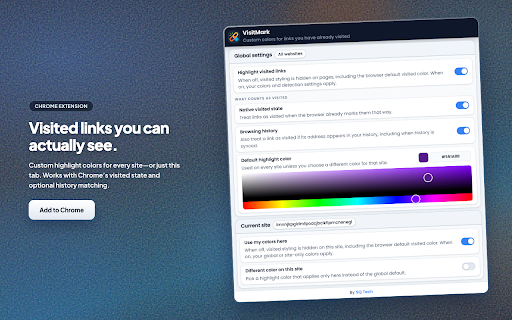
Customize visited link colors for any site: global defaults, per-domain overrides, and sync with your Chrome profile. VisitMark highlights links you have already visited using colors you control. Set a default style for all sites, then override individual sites when you need a different color or want styling turned off for that page only. If you use Chrome with sync, your choices stay available across signed-in devices. The extension can treat a link as visited when Chrome’s native visited state applies, and optionally when the URL appears in your browsing history (including synced history). Highlights update as you move between pages, including sites that change the URL without a full reload. • Custom colors for visited links on standard HTTP and HTTPS pages. • Global defaults plus per-site options: enable or disable highlighting for the current site, and optionally assign a color used only on that site. • Two detection modes, usable together or separately: browser visited state, and history-based matching for cases where visited styling alone is not enough. • A single global switch to restore the browser’s default visited appearance everywhere when you do not want VisitMark active. 1. Open the VisitMark popup from the Chrome toolbar. 2. Under All sites, enable Visited link colors and pick a default highlight color. 3. Under Detection, turn on Browser visited state and/or Browsing history according to how you want links qualified as visited. 4. On a site you use often, open the popup again. Under This site, choose whether highlighting applies there; use Site-specific color if you want a color that applies only to that host. 5. Use Restore defaults for global settings, or Remove site settings to clear saved options for the site you have open. Anyone who scans long pages of links—search results, documentation, forums, directories—and wants consistent, easy-to-see distinction between visited and unvisited destinations without opening history or relying on faint default styling. VisitMark applies your saved preferences locally in the browser. It uses extension APIs to read settings, observe navigation, and when you enable history-based detection, to read history as needed for that feature. It does not send your browsing data to publisher-operated servers for highlighting. See the linked privacy policy for full detail.

Recolor Links
Elevate web accessibility by changing the color of visited links. Improve web browsing experience with a better color contrast. Recolor Links enables users with color deficiency to better navigate the web by allowing them to easily change the color of visited and unvisited links. These users usually have a hard time distinguishing the default color schemes of links that appear on search engine results pages and popular websites like YouTube, Wikipedia, etc. By changing the color contract of links, they are able to quickly identify which links are clicked and which are not – which will be much friendlier.

Extension Manager
Manage your Chrome extensions comfortably by enabling and disabling them with ease. # Extension Manager A Chrome extension that lets you quickly enable and disable your installed extensions from a single popup window, using keyboard shortcuts and customizable key mappings. - **Keyboard‑driven extension toggle** - Open the popup with a global shortcut (default: `Alt+M`) and toggle extensions using letter keys. - Supports single‑letter and two‑letter keys (`a` … `z`, `aa`, `ab`, … `zz`). - **Key Mapping tab** - View all installed extensions with their icons and current keys. - Edit keys directly (1–2 letters `a–z`). - When assigning a key that is already in use, shows a confirmation dialog and safely reassigns the key. - Independent search bar to quickly find an extension by name. - **View Options tab** - Choose how many cards to show per row (2/3/4 columns). - Configure maximum popup height; the popup grows up to that height and then scrolls vertically. - All view options are persisted between sessions. - **Search and filtering** - Toggle Keys tab: search installed extensions by name. - Key Mapping tab: separate search for the mapping list. - `Ctrl+F` / `Cmd+F` focuses the appropriate search box depending on the active tab. - **Persistent settings** - Key mappings, view options, active tab, and theme (light/dark) are stored and restored automatically. - Reset button to clear all key mappings and re‑generate them in alphabetical order. - Search extensions by name using the search field. - Each card shows: - Assigned key - Icon and name - Enable/Disable button - Press the assigned key to toggle the extension: - 1‑letter keys toggle immediately. - 2‑letter keys: - First key press starts a short key sequence window. - Press the second letter within the timeout to trigger the 2‑letter key. - If no second key is pressed and there is a single‑letter mapping with no longer sequence, that 1‑letter key is triggered. - Use the search field to filter the mapping list by extension name. - Edit keys inline: - Focus the input, type a new key (`a–z`, length 1–2), press Enter or blur. - Conflicts show a confirmation dialog before reassigning. - Use **Reset all keys** to clear all mappings and regenerate keys alphabetically. - **Columns per row**: choose 2, 3, or 4. - **Max popup height**: choose 480px or 600px. - Changes are applied immediately and saved. Assignments are stable: once a mapping is saved for an extension ID, it is reused on the next load. In the **Key Mapping** tab: - Each extension shows: - Icon and name - Current key label (`Key: a`, `Key: aa`, or `Key: -`) - Editable key input (1–2 letters) - Valid keys: - Only `a–z`, length 1–2. - Invalid input (numbers, symbols, 3+ letters) is rejected with an inline error: - `Key must be 1–2 letters (a–z).` When you type a key that is already used: 1. The extension looks up other extensions using the same key. 2. A confirmation dialog appears, for example: ```txt Key 'a' is already used by other extensions. Replace the key there and assign it to this extension? ``` 3. If you confirm: - The key is removed from the conflicting extension. - The key is assigned to the current extension. - A small inline info message shows: - `Key reassigned from other extension.` 4. If you cancel: - No mappings are changed. - The input reverts to the previous key. - **Open popup**: `Alt+M` (configured via `manifest.json` → `commands`). - **Search** - `Ctrl+F` / `Cmd+F`: - On **Toggle Keys**: focuses the main search field. - On **Key Mapping**: focuses the mapping search field. - **Toggle extensions**: - Press the mapped key while the **Toggle Keys** tab is active and focus is not in a text field. - `manifest.json` – Extension metadata, permissions, keyboard command. - `popup.html` – Popup layout and tab structure. - `popup.css` – Styling and responsive grids for each tab. - `popup.js` – All popup logic: - Loading extensions via `chrome.management` - Rendering Toggle / Mapping / View tabs - Key mapping management and conflict handling - View options and theme persistence - Keyboard shortcut handling (key sequences, Ctrl+F / Cmd+F) This extension uses the following permissions: - `management` – Required to read the list of installed extensions and enable/disable them. - `commands` – Required to bind the global shortcut for opening the popup. - `storage` – Required to persist user settings (key mappings, view options, theme, last active tab). The extension does **not** access or modify web page content; it only manages browser extensions through the official Chrome APIs.

Remove Visited Link
Link context menu (right-click on the link) add a function that remove a visited link from your browsing history.

Visited
Visited: Customize Your Web Navigation Visited is a browser extension that enhances your browsing experience by allowing you to personalize the color of visited links. This simple yet powerful tool helps you distinguish between new and previously viewed content effortlessly. Key Features - Automatically sets visited link colors to energetic and emotional Crimson Red upon installation - Offers easy customization with predefined colors or a color picker How to Use 1. Install Visited from your browser's extension store 2. Click the Visited icon in your toolbar to customize colors 3. Choose a color and save to see instant results across all web pages Visited is the perfect tool for anyone looking to streamline their web exploration. Try it today and transform how you navigate the internet!
