
mnlgnpagklbmbjmfagbnllpdfmbdojgj
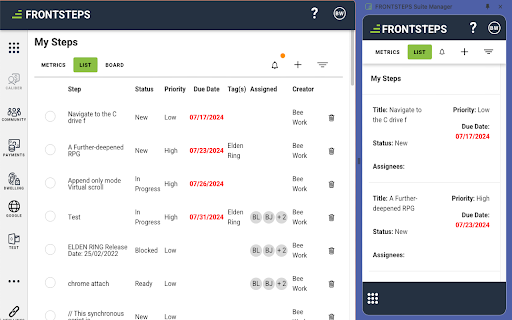
An all-in-one, user-friendly platform designed to simplify and enhance every aspect of HOA management from the palm of your hand Introducing the FRONTSTEPS Suite Manager Chrome Extension! Community management just got smarter and more mobile-friendly with our latest tool: the FRONTSTEPS Suite Manager Chrome extension. With Suite Manager, everything you need to manage communities is now just a click away, right from the palm of your hand. Seamlessly designed and easy to use, this extension empowers you to manage tasks, monitor activities, and stay organized—all from within any webpage. Why download Suite Manager? Our Suite Manager Chrome extension takes community management to the next level by blending the capabilities of back-office systems with an intuitive, mobile-friendly experience. Whether you're creating tasks, tracking updates, or analyzing reports, this tool ensures that nothing slips through the cracks. Key Features: Quick Task Creation: Add tasks from any webpage, instantly. In-Browser Management: Manage tasks without leaving your current site. User-Friendly Interface: Simple, efficient, and intuitive. AI Insights & Reporting: Make data-driven decisions with ease. Make community management seamless, efficient, and always accessible. Download the FRONTSTEPS Suite Manager Chrome extension now!

Cirometre
Cirometre yazılımının chrome üzerindeki işlemlerin yapıldığı eklentidir. Cirometre Chrome Eklentisi, Bu eklenti, Trendyol Partner hesabınıza giriş yaptığınızda refresh_token çerezini otomatik olarak alır ve kullanıcıya gösterir. Neden Yüklemelisiniz? Eğer Cirometre platformunda pazaryerleri için API entegrasyonu yapıyor veya token yenileme işlemlerini takip ediyorsanız, bu eklentiyi kurmanız gerekir. Cirometre, manuel olarak token bilgisi aramakla vakit kaybetmenizi engeller ve işlemlerinizi daha hızlı ve güvenli hale getirir. Bu sayede, otomatik işlem gereksinimlerinizi kolayca yönetebilir ve iş akışınızı optimize edebilirsiniz.

Factsplat Tabs and Bookmarks Manager (Light)
The Factsplat Tabs and Bookmarks Manager makes it easier than ever to find and organize your links and tabs! Note: Sign up with a free account on Factsplat.com to use this extension! Factsplat structures and simplifies your digital life. This lighter version comes with all the same features, but without Factsplat.com on new tabs. To get the best experience of the Factsplat extension, check out the full extension: https://chrome.google.com/webstore/detail/factsplat-tabs-and-bookma/cfincihagpobgffcamhpeojhjbikifkh?hl=en&authuser=1 No more forgotten links, or long unreadable lists of tabs. Experience the satisfaction of closing all your tabs, knowing that Factsplat is keeping them safe. The Factsplat Tabs and Bookmarks Manager lets you swiftly save your tabs to Factsplat. Declutter your browser and move your tabs into organized dashboards. Use Factsplat to create visual dashboards with the links and information you use for all your different projects. Create dashboards for any purpose (your work, a project, a hobby etc.) and organize your related links and notes, and even share them with others. The Factsplat Tabs and Bookmarks Manager makes building your dashboards in Factsplat faster and easier than ever. With Factsplat as your new tab page, you can rest assured that all the information you need is easily available at any time. Download the Factsplat Tabs and Bookmarks Manager and register (or sign in) to Factsplat with extended superpowers! Factsplat side panel for tab management: While on Factsplat, use the added side-panel to easily drag your current tabs right into Factsplat, and finally close down those 30+ open tabs. Import bookmarks: Got a bunch of bookmarks you want to get sorted out? The Factsplat extension let's you import your stored bookmarks directly into your splats with a single click! Save your current tab: Save a link to the current tab on your Factsplat dashboards in just one click! Within your dashboards, you can then visually organize your links, drag them into collections, etc. Save text and links: Right-click interesting and important links and text you find online, and save it directly to one of your Factsplat dashboards. Feel free to contact our team at support@metaito.com and we’ll reply as soon as possible.

Bulk File Downloader — Download All Files from Page
Download files linked on a webpage. Find PDFs, ZIPs, documents, and images, then save selected files or one clean ZIP. Bulk File Downloader helps you find and download files linked on any webpage. Instead of clicking every PDF, ZIP, document, image, or direct media file manually, scan the page, preview what was found, filter by file type, and download selected files in bulk. Useful for course pages, resource pages, document portals, GitHub releases, file indexes, research pages, and websites with many downloadable files. scan the current page for downloadable files detect PDFs, ZIPs, documents, images, audio, video, and custom file types preview file names and source links before downloading filter by extension or file type download selected files in bulk save files as one ZIP skip duplicates retry failed downloads use clean filenames and folders import URL lists in Pro scan all open tabs in Pro Free users can scan pages and download limited batches. Pro unlocks larger jobs, ZIP export, smart naming, URL import, retries, and advanced organization.

ELi5 - Anything Explained Like a 5 year old
Get any text or image explained to you like a 5 year old ELi5 makes understanding the internet easy! Select any text or upload a screenshot, and ELi5 will break it down into simple, easy-to-understand language—just like you're 5 years old. No jargon, no confusion—just clear, simple explanations for anything you need.
