
mnkhlmikfgcfgbpbmjfplmalgkmoaoig
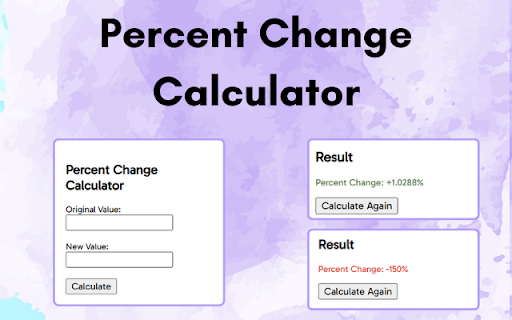
Percent Change Calculator - Your Ultimate Calculation Friend Unlock the power of quick and accurate percentage calculations with the Percent Change Calculator Chrome extension. Whether you're a student, professional, or just curious about the numbers, our extension simplifies the process of determining percentage changes effortlessly. 📊 Percent Change Made Easy: Calculate percentage changes between two values in seconds. Perfect for financial analysis, tracking stock market trends, assessing data fluctuations, or presenting positive or negative changes in your key metrics. Great for your productivity tools portfolio, 🔢 User-Friendly Interface: No need to click out of what you're working on and into a new tab of a website that will throw a bunch of ads in your face just to output a single number. Our intuitive interface guides you through the process, making it accessible to users of all skill levels. Simply input your original value and the new value, and let the extension do the math -- all from the convenience of the tab you're already in! 🎨 Visual Feedback: Easily identify positive and negative changes with color-coded results. Green indicates positive growth, while red represents a decrease. We also increase positive (+) and negative (-) signs for those with color blindness. 💡 Versatile Use Cases: Ideal for students, educators, business professionals, and anyone dealing with numbers regularly. Quickly assess price changes, performance metrics, and more. Your ideal productivity tool -- easy to use and convenient. 🔄 Recalculate On-Demand: Make adjustments on the fly. If your values change, no problem! Recalculate with ease. ⭐ Stay Updated: We're committed to improving our Percent Change Calculator continuously. Keep an eye out for updates and new features that will further simplify your calculations. If you have any feature suggestions, please send them to caztronbusiness@gmail.com ! 💰 Support Our Development: While we offer Percent Change Calculator free of charge, we appreciate your support through donations. Help us continue to enhance and expand the capabilities of this handy tool to include more of your most helpful calculators! Support us here: https://tinyurl.com/supportpcc

Change Case
The set of advanced methods to change case of text, delivered as convenient extension for browser Google Chrome. Compatible with various elements of the website: input, textarea, editable content (popular text editors like TinyMCE). Included methods like correct grammatically title case, sentence case, upper case or lower case with addition of methods for programmers: camel case, pascal case and many more. Privacy Policy: Change Case extension does not handling any user sensitive or personal data. All content transformations are performed via algorithms on user's device without third parties. ______________________________________________ 2.6.0 - rewrite the entire source code 2.4.2 - fix options page shaking on auto scroll bars 2.2.1 - improve title case: hyphens and unicode characters 2.1.4 - sentence case handles multiple sentences and common abbreviations 2.1.0 - buttons for managing shortcuts - proper English title case - fix initialization problems - minor optimization changes 2.0.0 - options page - blacklist words/phrases - keyboard shortcuts - major core changes

Percentage Calculator
Percentage Calculator is a simple yet powerful tool that helps you perform common percentage calculations right from your browser. Whether you're a student, professional, or anyone who needs to work with percentages, this extension provides quick and accurate results without the need to open a separate calculator app or website. Key Features: Calculate Percentage of a Number: Easily find out what percentage one number is of another. For example, what is 15% of 200? Find Percentage Between Two Numbers: Quickly determine what percentage one number is of another. For instance, 50 is what percentage of 200? Calculate Percentage Increase/Decrease: Effortlessly compute the percentage change between two values. For example, what is the percentage increase from 100 to 150? How It Works: Simply click on the extension icon to open a clean, user-friendly interface. Enter your numbers into the clearly labeled fields, click "Calculate," and get your result instantly. The extension performs calculations in real-time, providing immediate answers without page reloads. Why Choose This Extension: Fast and convenient: Perform calculations without leaving your current webpage Clean interface: Easy-to-use design with no distracting ads or unnecessary features Accurate results: Reliable calculations for all your percentage needs Offline functionality: Works without an internet connection once installed Perfect for: Install the Percentage Calculator extension today and simplify your percentage calculations!

Progress Percentage
Displays the percentage of a page scrolled on the top right corner The Progress Percentage extension allows you to view the percentage of the page or document scrolled. Often while reading lengthy documents or webpages, people want to determine the percentage of document left to read. Now, they can do this by viewing the upper right corner very easily.

Percentage Calculator
Users can perform the following percentage calculations:
